84
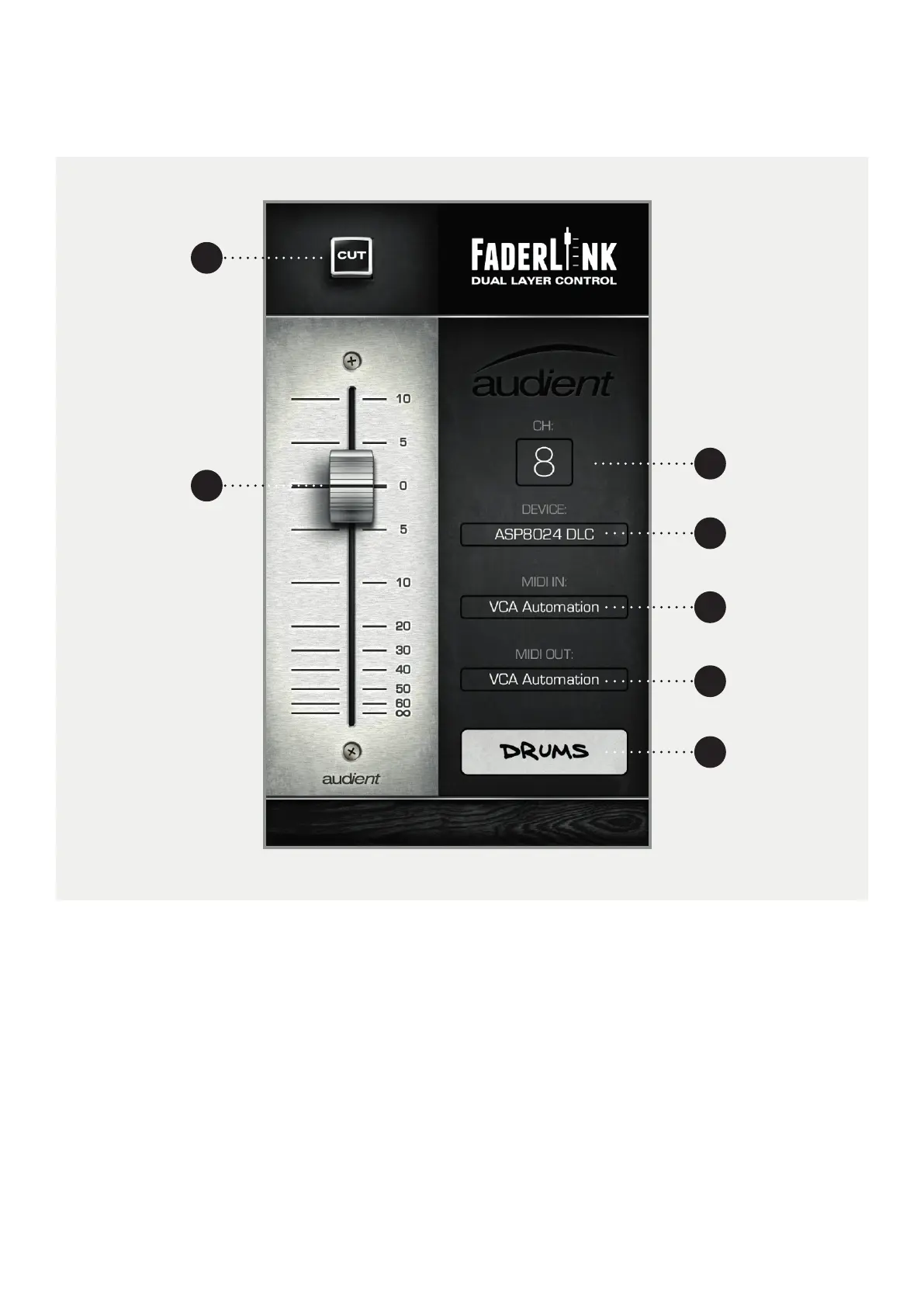
Faderlink Interface
1 CHANNEL CUT BUTTON. Cuts the audio for this
channel. This mimics the Cut Button on the selected
channel on the DLC module.
2 CHANNEL FADER. Controls the volume of the
VCA fader, operating between -inf and +10dB.
This fader mimics the VCA fader on the selected
channel on the DLC module.
3 CHANNEL SELECTION MENU. Select the DLC channel
that you want to save the channel automation for.
this will appear on the corresponding channel on
the DLC OLED displays.
4 DEVICE MENU. Select the appropriate device from
the menu.
5 MIDI IN MENU*. Select the MIDI Input for
Automation.
6 MIDI OUT MENU*. Select the MIDI Output for
Automation.
7 SCRIBBLE STRIP Allows you to name the channel,
this will appear on the corresponding channel on
the DLC OLED displays.
*Set these to ASP8024-DLC Automation.
3
4
5
6
7
2
1



 To Next Page