41
Menu/Task Bar Icons
MacOS
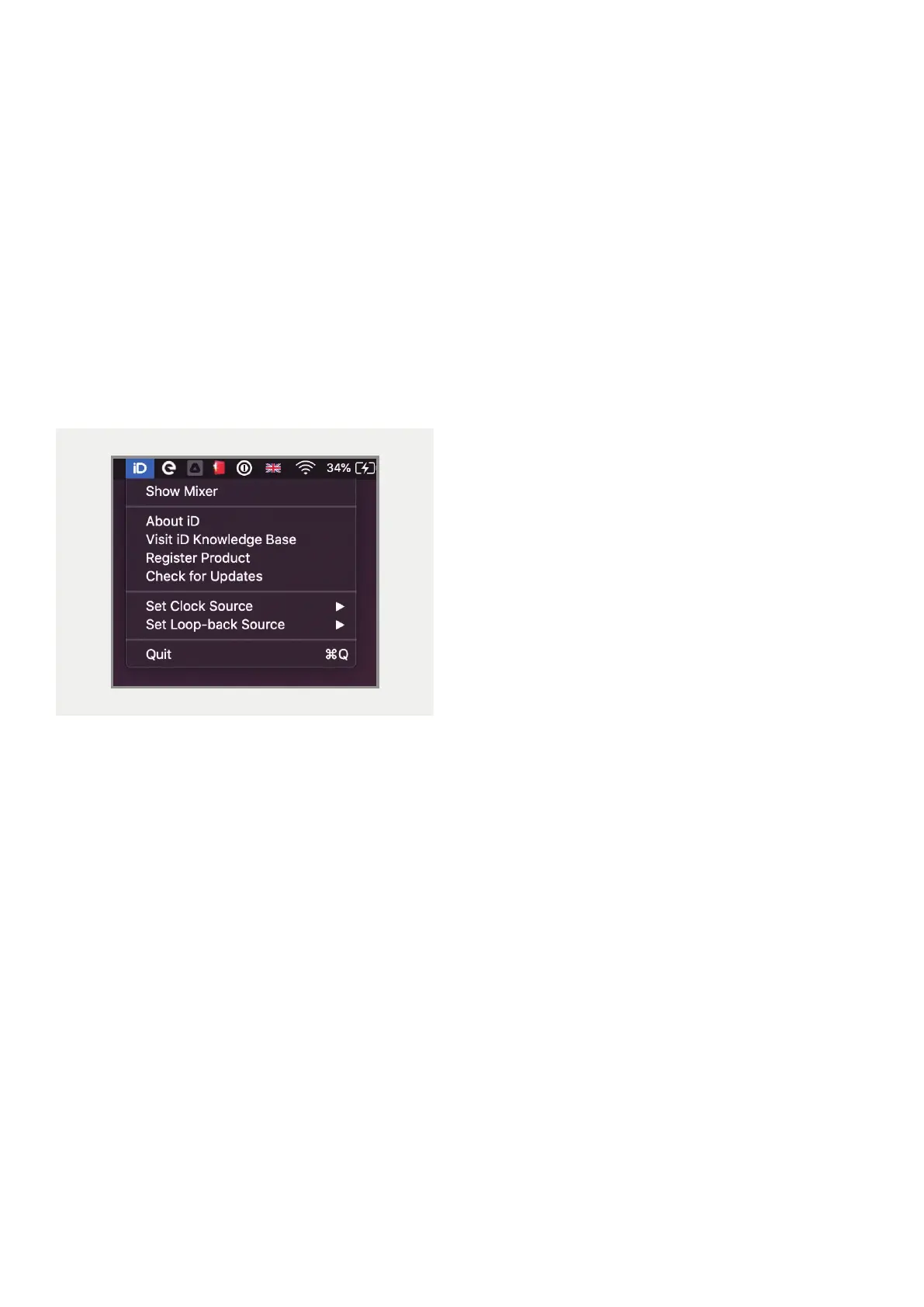
On MacOS, the iD icon appears in the menu
bar in the top right hand corner of the screen.
This gives you quick access to various functions
of the iD24. Please note that some functions
are only visible when the iD24 is connected to
the Computer
Show Mixer
Opens the iD Software Mixer. If the mixer is
already open, this option will be greyed out.
The Mixer cannot be opened unless the iD24
is connected to the Computer.
About iD
Displays information regarding the current
version of the iD mixer application.
Visit iD Knowledge Base
Opens a browser window for the Audient
Helpdesk with helpful articles and FAQ’s.
Register Product
Will open the registration screen allowing you
to register your product to Audient ARC if you
have not already done so as part of the initial
setup.
Set Clock Source
Allows you to quickly adjust the clock source
between the internal and optical clocks.
Set Looopback Source
Here you can select which Output Channel
or Mix will feed the Loopback inputs.
Check for Updates
The iD application will check with the Audient
update server for any available firmware
updates for iD24.
Quit
Fully closes the iD application.



 To Next Page