16
Locator and Navigation Buttons
Operations of the Navigation buttons at the bottom of the screen are described
in the table below:
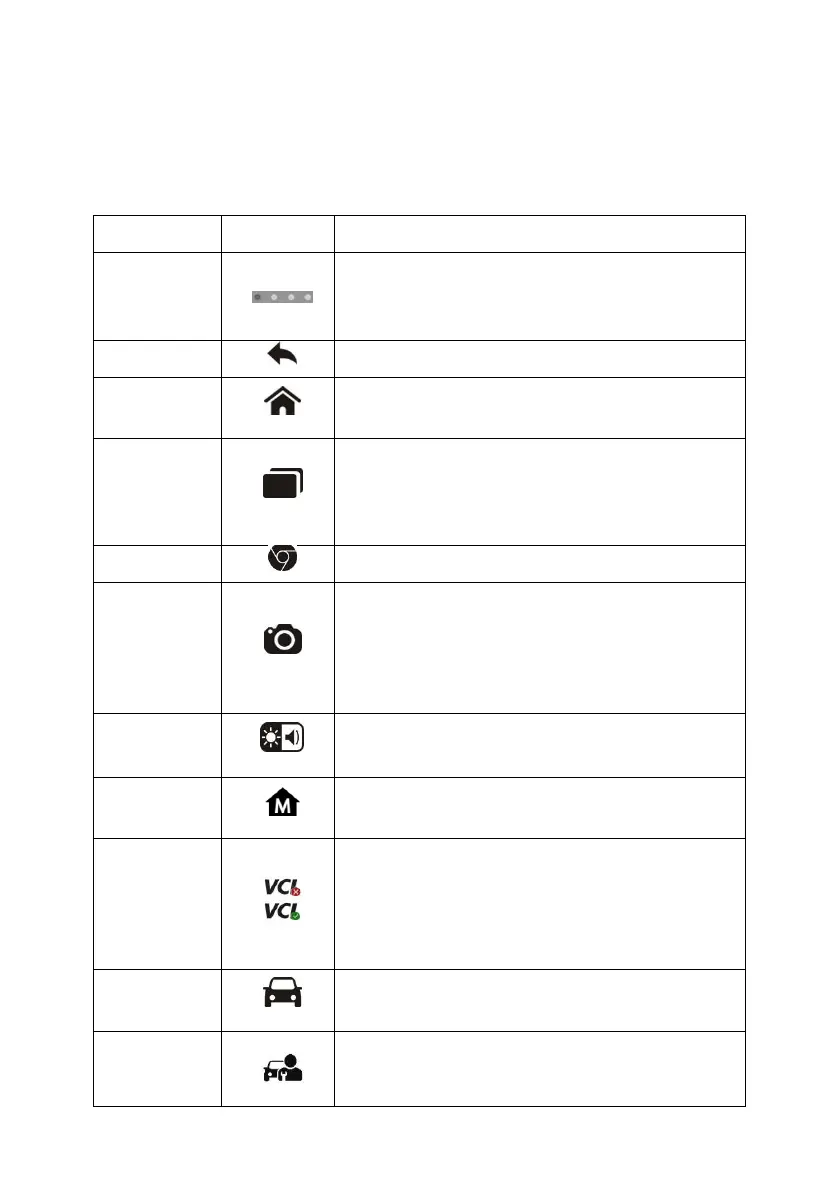
Table 3-2 Locator and Navigation Buttons
Indicates the location of the screen.
Swipe the screen left or right to view the
previous or next screen.
Returns to the previous screen.
Returns to Android System’s Home
screen.
Displays a list of applications that are
currently working. Tap an app icon to
launch. To remove an app, swipe it to the
right.
Launches the Chrome Internet browser.
Opens the camera with short press; takes
and saves screenshot image with long
press. The saved files are auto-stored in
the Data Manager application for later
reviews. See Data Manager on page 69.
Adjusts the brightness of the screen and
the volume of the audio output.
Returns to MaxiSys Job Menu.
Opens the VCI Manager application. The
check at the bottom right corner indicates
the tablet is communicating with the VCI,
an X will display if the tablet is not
connected to VCI.
Returns to the Diagnostics screen.
Returns to the Service screen.














 To Next Page