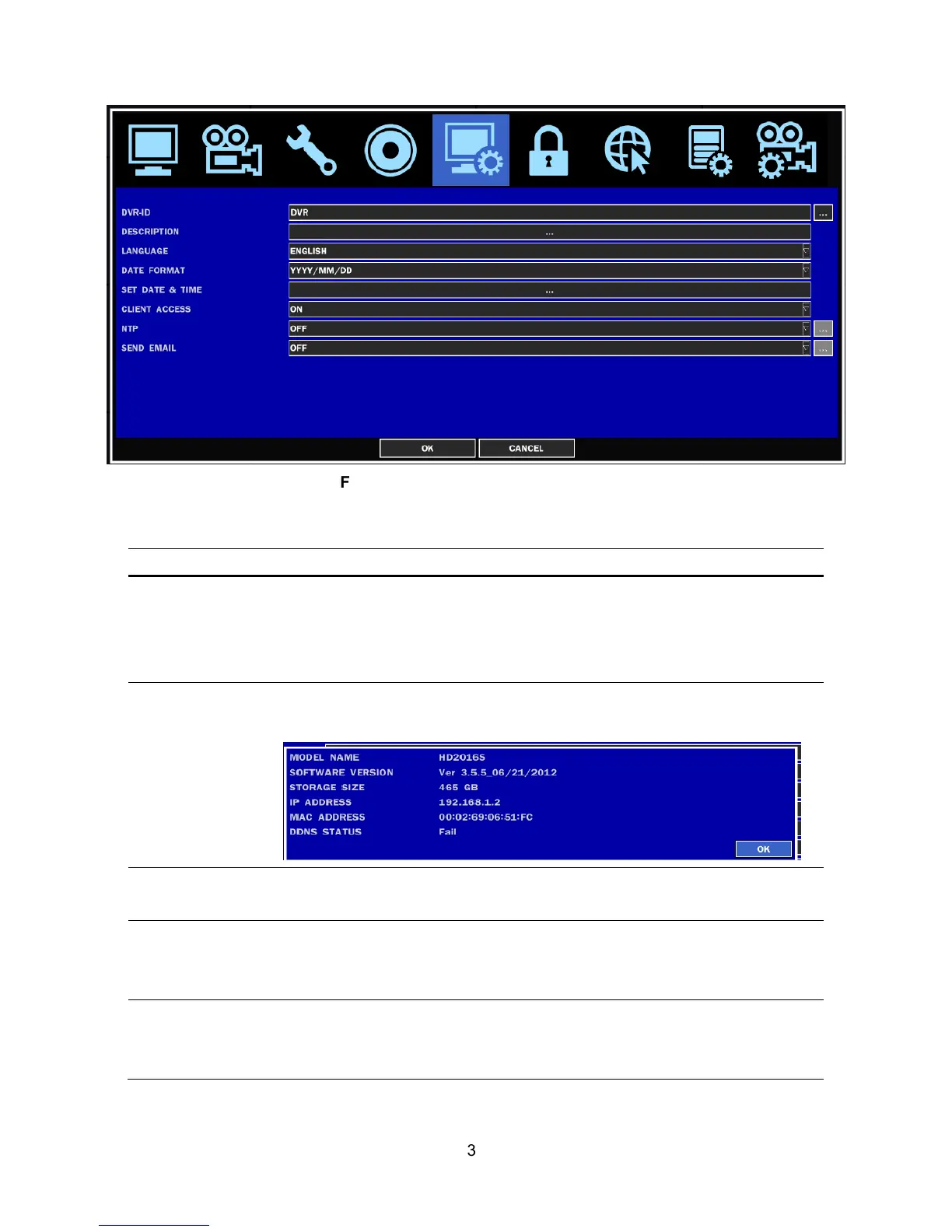
Figure 2.6.1. SYSTEM Setup Screen
Table 2.6.1. Menu items in SYSTEM Setup screen
Item Description
DVR ID
Press the SEL button and select DVR ID using the control button (
◀ ▲
▶ ▼
), and press SEL button. Press OK to apply the selected DVR ID.
SPACE / Caps Lock(Select either Capital or Lower letter)
BS(Back space: Erase previous character) / Clear(Erase all characters)
DESCRIPTION
Press SEL button to view system information.
(Software version, Storage size, IP address and MAC address.)
LANGUAGE
Select the display language using the control button (
◀ ▲ ▶ ▼
). Once
a language is selected, the display language changes.
DATE FORMAT
Select the date display format using the control button (
◀ ▲ ▶ ▼
)
Options are: YYYY/MM/DD, MM/DD/YYYY, DD/MM/YYYY, YYYY-MM-DD,
MM-DD-YYYY, DD-MM-YYYY
SET DATE&TIME
Select the display date and time using the mouse or the control button (
◀
▲ ▶ ▼
) on the remote control and press OK button to set the present
date and time.



 To Next Page