Error search and troubleshooting
AVENTICS | ECS Actuator | R417002911–BDL–001–AA 47
English
12 Error search and
troubleshooting
In case of an alarm signal on the Marex ECS control head, it may
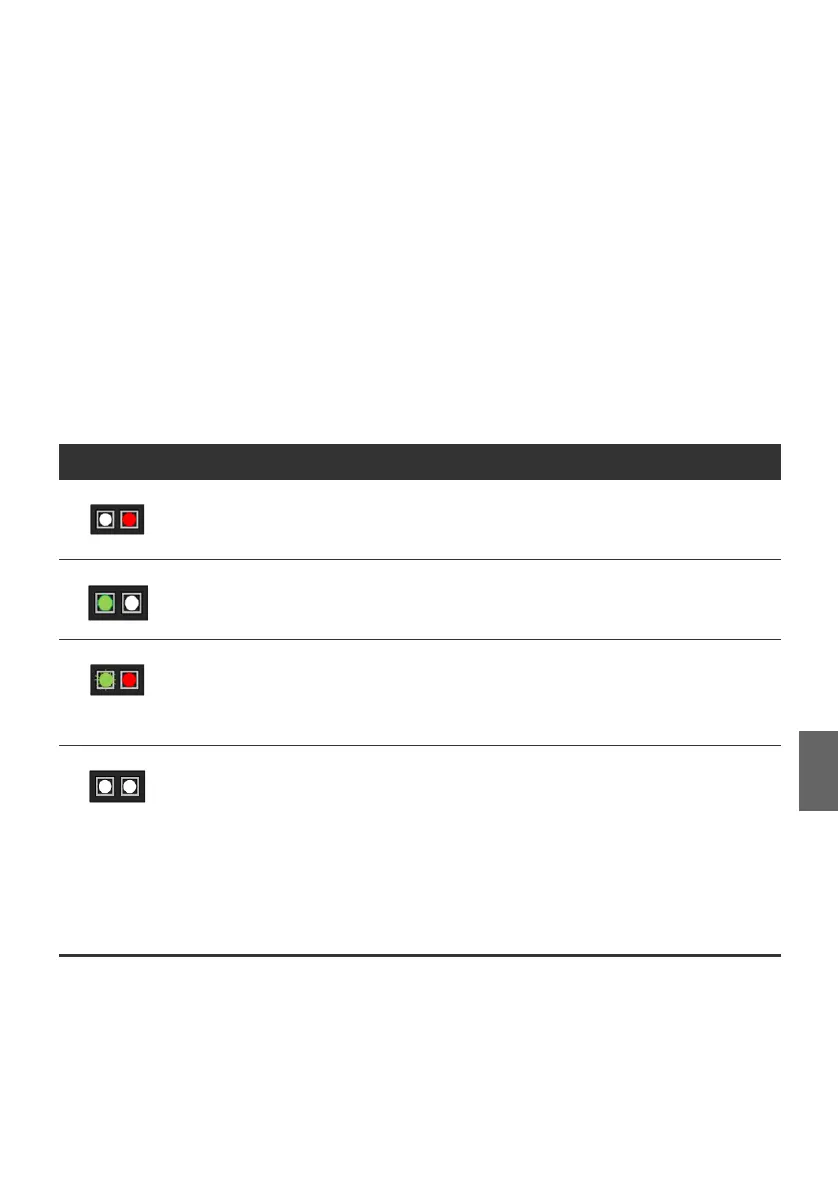
be necessary to check the condition of the actuator(s). Two LEDs
(see fig. 12) are provided under the transparent cover of the
actuator to indicate its functional condition (see 5.4). Compare
the LED signals to the indications in the table below:
12.1 Reestablishing the power supply
If the actuator is not supplied with power though all cables are
connected, this may have different causes:
O Make sure all connectors are firmly attached.
Table 11: LED-signals on the actuator
LED-signal Meaning What to do
This actuator is defective. Replace the actuator, proceed as described in
chapters 7 and 8 and repeat the Marex ECS auto-
config (8.1).
This actuator works fine, but
another actuator may be
affected.
Check the function of all other actuators, if available.
Refer to the instructions in this table.
The actuator has stopped
working due to overload.
Check manually if the actuator’s adjusting lever can
move freely by pulling the push/pull cable.
Eliminate the cause of the stiff movement.
Dis- and reconnect the POWER cable and try again.
Power supply failure or the
power is beyond the admissible
range or the communication
between the actuator and the
control unit is disturbed.
Check the PROPULSION cable for proper connection
and visible damage. Replace the cable if defective.
Measure the voltage at battery and system
components. Pay special attention to correct polarity
and fuses.
Make sure the wiring harness is properly connected to
the control unit with the retaining catches clicked into
place.


 To Next Page