Powering Up and Configuring the System 50
Assigning Stage I/O Units
When you initially configure a system, or after performing a System Restore, you must assign Stage 64, Stage 32, and/or Stage 16
I/O units to available
Stage slots in the Options > Devices tab. Each Stage slot corresponds to a Stage hardware tab 1–6 in the
VENUE Patchbay.
A banner alert is displayed whenever the system detects one or more I/O units
that are unassigned.
If your configuration includes one or more Local 16s you must also assign them
in
Options > Devices. Unlike Stage I/O, however, Local 16 is assigned to S6L
AVB network Ring 2. Assign Stage I/O first, as explained in the following
steps, before assigning Local 16.
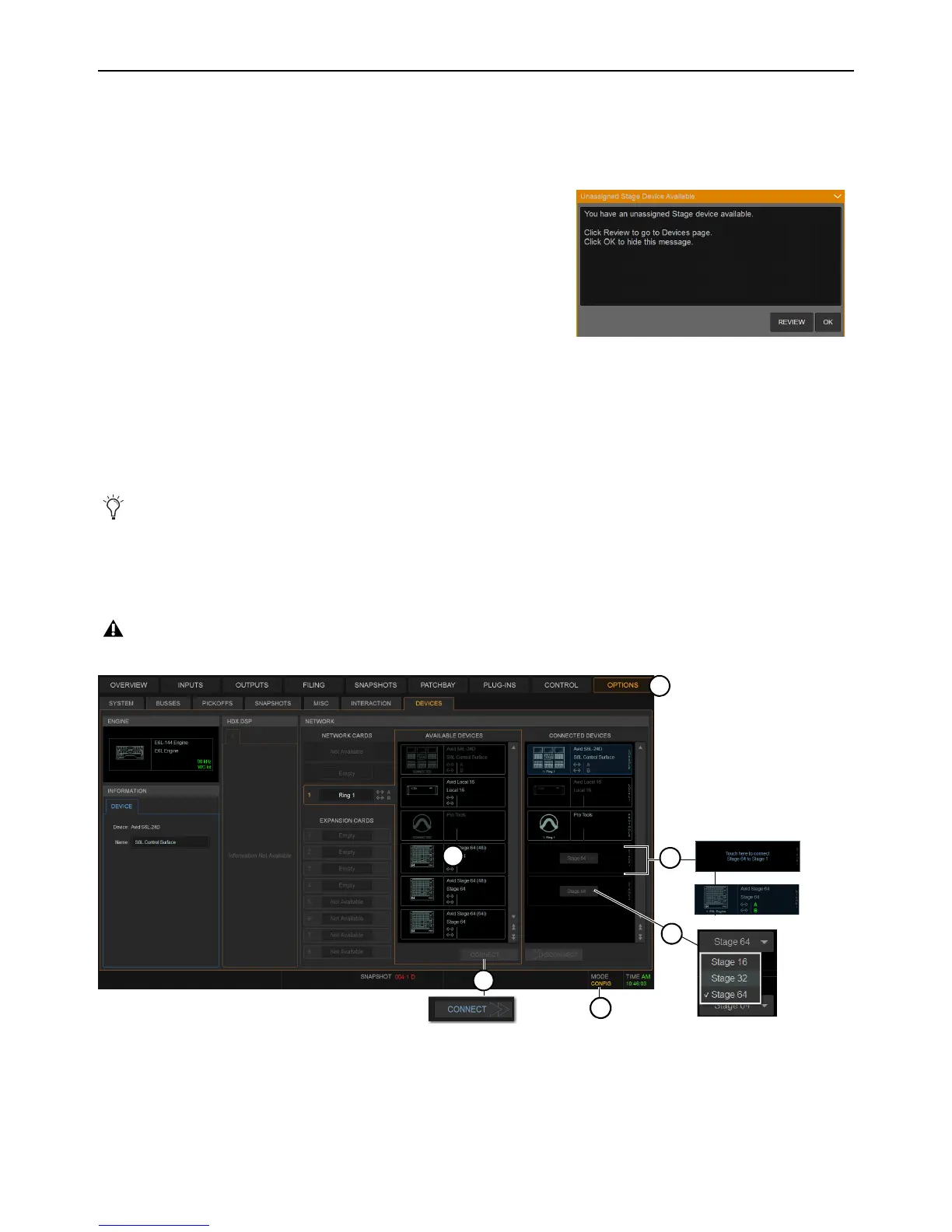
To assign Stage I/O units (refer to Figure 1):
1 Make sure the system is in Config Mode (see Enabling Config Mode).
2 Navigate the external screen to Options > Devices.
3 If your configuration includes Stage 32 or Stage 16, configure Stage slots in the CONNECTED column by clicking to select the
slot and then choosing the appropriate device from the selector.
4 In the AVAILABLE column, select the first Stage I/O device so it is highlighted (to identify units when multiple devices are pres-
ent, see
Identifying Stage I/O Units).
5 Click CONNECT.
6 Click to select a flashing Stage slot and assign the selected I/O unit to that slot.
7 Repeat for any additional Stage I/O units.
When using more than one type of Stage IO unit, group units by type and connect them in series in the
CONNECTED DEVICES
column, such as all Stage 64(s), then all Stage 32s, then all Stage 16s. The order of Stage I/O devices in the Connected Devices col-
umn does not need to match the order of physical network connections.
If any connected Stage I/O units do not appear in the Unassigned section, check network and power connections.
On initial power-on after performing a System Restore, firmware updates of the Stage units begin just after assigning them.
Figure 1. Assigning Stage I/O units in Options > Devices
Unassigned Stage I/O alert



 To Next Page