Powering Up and Configuring the System 53
Assigning Local 16
Local 16 lets you expand your local I/O capabilities, or add primary local I/O if mixing on the S6L-16C control surface. Each
Local 16 provides 8 analog inputs, 8 analog outputs, 8 AES digital inputs, and 8 AES digital outputs in a compact, 3U rack.
Local 16 requires 2x AVB-192 Network cards be installed in the E6L engine. Unlike Stage I/O, Local 16 units are configured in
the Option > Devices page by connecting them to the
Ring 2 S6L network ring.
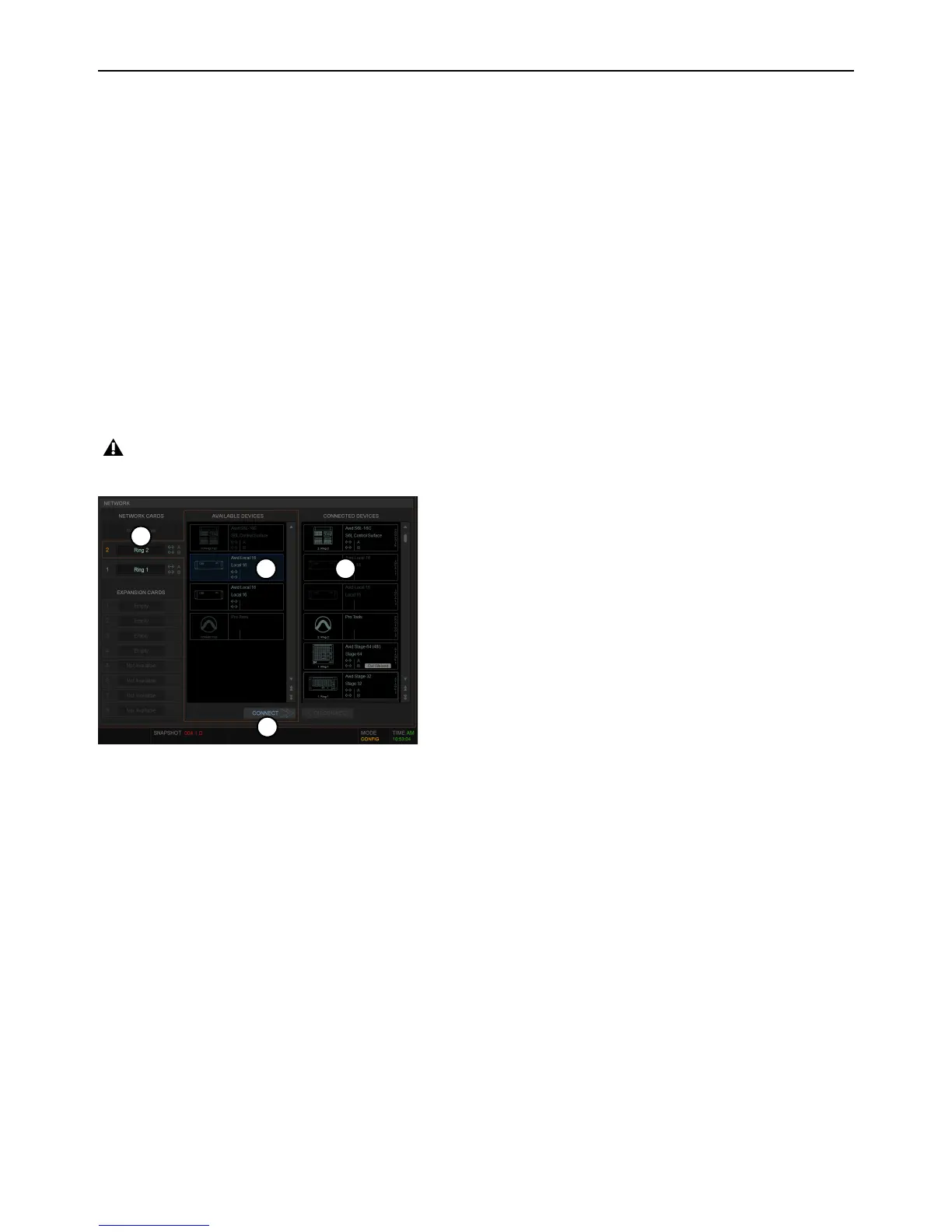
To assign Local 16:
1 Make sure the system is in Config Mode (see Enabling Config Mode).
2 Navigate the external screen to Options > Devices.
3 In the NETWORK CARDS section, select Ring 2.
4 In the AVAILABLE column, select the first Local 16 device so it is highlighted.
5 Click CONNECT.
6 Click to select a flashing Local 16 slot in the CONNECTED DEVICES column.
7 Repeat for any additional Local 16 units.
8 Proceed to Setting the System Clock.
On initial power-on after performing a System Restore, firmware updates of the Local 16 units begin just after assigning them.
Figure 2. Assigning Local 16 in Options > Devices



 To Next Page