IFD500 Series Pilot Guide
Map Subsystem 4-65
CHART TAB
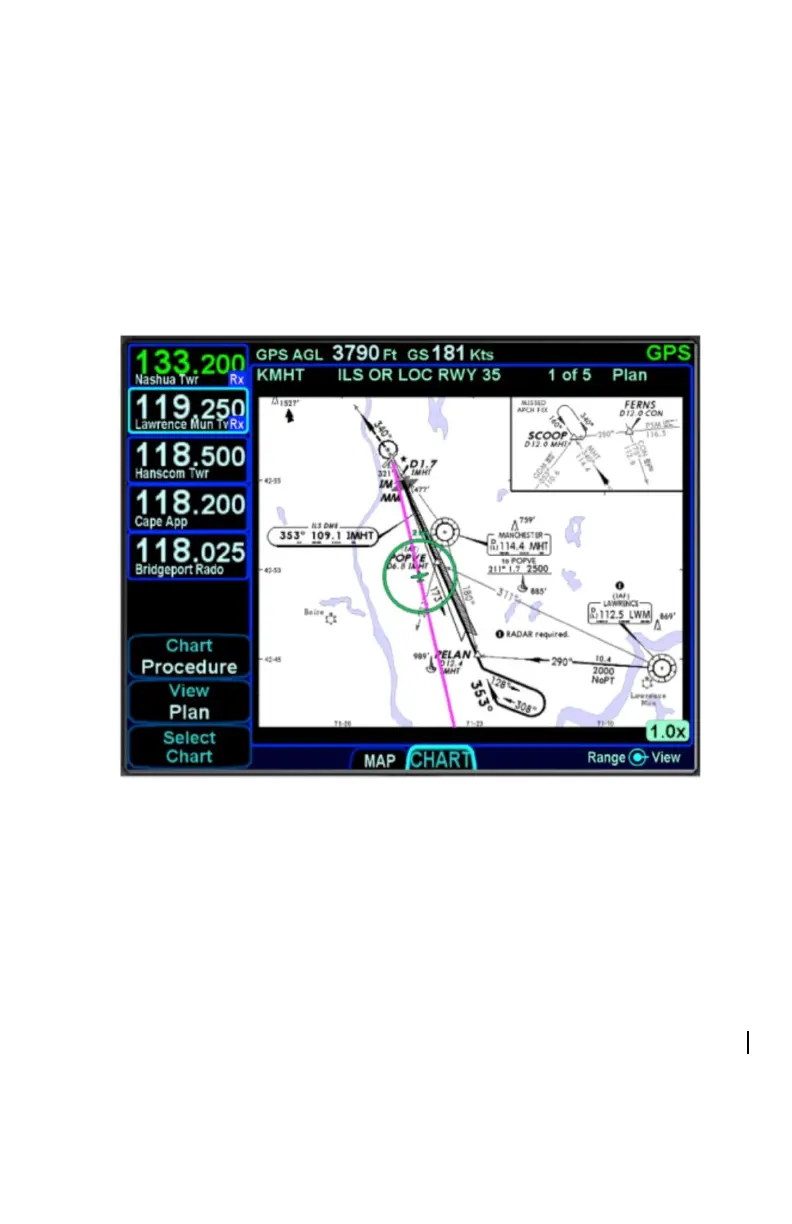
The CHART tab on the MAP page is capable of displaying geo-
referenced Jeppesen departure/arrival/approach charts and airfield
diagrams. Geo-referenced charts refers to the ability to overlay an
ownship symbol representing aircraft present position in the correct
orientation and position on the chart diagrams as well as overlaying
the active FMS flight plan on the chart.
Geo-referenced Charts with Flight Plan and Ownship Overlay
Global coverage is provided but the exact set of charts supported on
any individual IFD is dependent on the level of subscription held by
the aircraft owner/operator.
DIRECTORY LIST
Press the “Select Chart” LSK to start searching for a specific airfield
and chart. If an airfield is in the active flight plan, then a “Paste
<airfield name> LSK will be presented along with a “Select Airport”
LSK option. Pressing the “Select Airport” LSK will put a cursor in the
airport edit field that can then be altered using the bottom right knob
or by touch on a virtual keyboard.



 To Next Page