26
AvMap G7 Farmnavigator – User Manual
2.4.5 Auto-Steering (for G7 Plus only)
Auto-Steering menu allows you to access G7 Farmnavigator settings when it is connected to Auto-
Steering system.
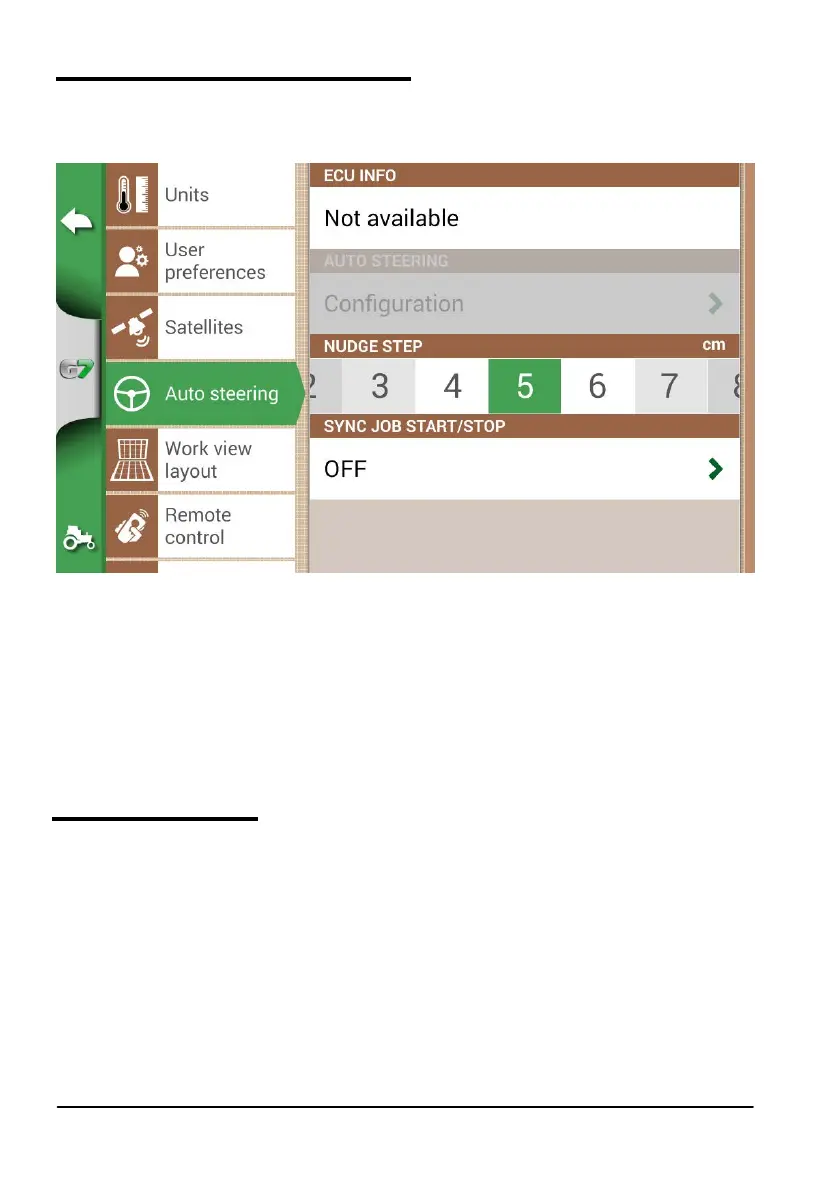
1. Select “SETTINGS” > “Auto-Steering”;
Figure 2.4.e Auto-Steering conguration page
In this page it is possible to nd:
- ECU INFO: information about ECU-S1 steering controller connected to G7 Farmnavigator;
- AUTO-STEERING: it is possible to open Auto-Steering advanced menu settings
ATTENTION: this feature is limited to expert users. An incorrect conguration leads to a malfunction of the
Auto-Steering system;
- NUDGE STEP: it is possible to congure a default displacement value for the function “Move”;
- SYNC JOB START/STOP: set this function “ON” and select Auto-Steering button to start colouring
the worked area.
2.4.6 Work view layout
Work view layout menu allows you to edit the map view.
1. Select > “SETTINGS” > “Work view Layout”;
- MAP VIEW: select 2D to have a view from above or 3D for a perspective view;
- DAILY BACKGROUND: allows you to change the background colour of the map;
- SCALE GRID: it allows you to create a grid on the background. It is possible to congure grid size
manually.
NOTE: grid orientation always refers to geographical North.



 To Next Page