41
AvMap G7 Farmnavigator – User Manual
- In case of automatic sections control, it avoids that the product will be sprayed on the headland;
- It allows you to activate Auto-Steering system along the headland path (eld contour).
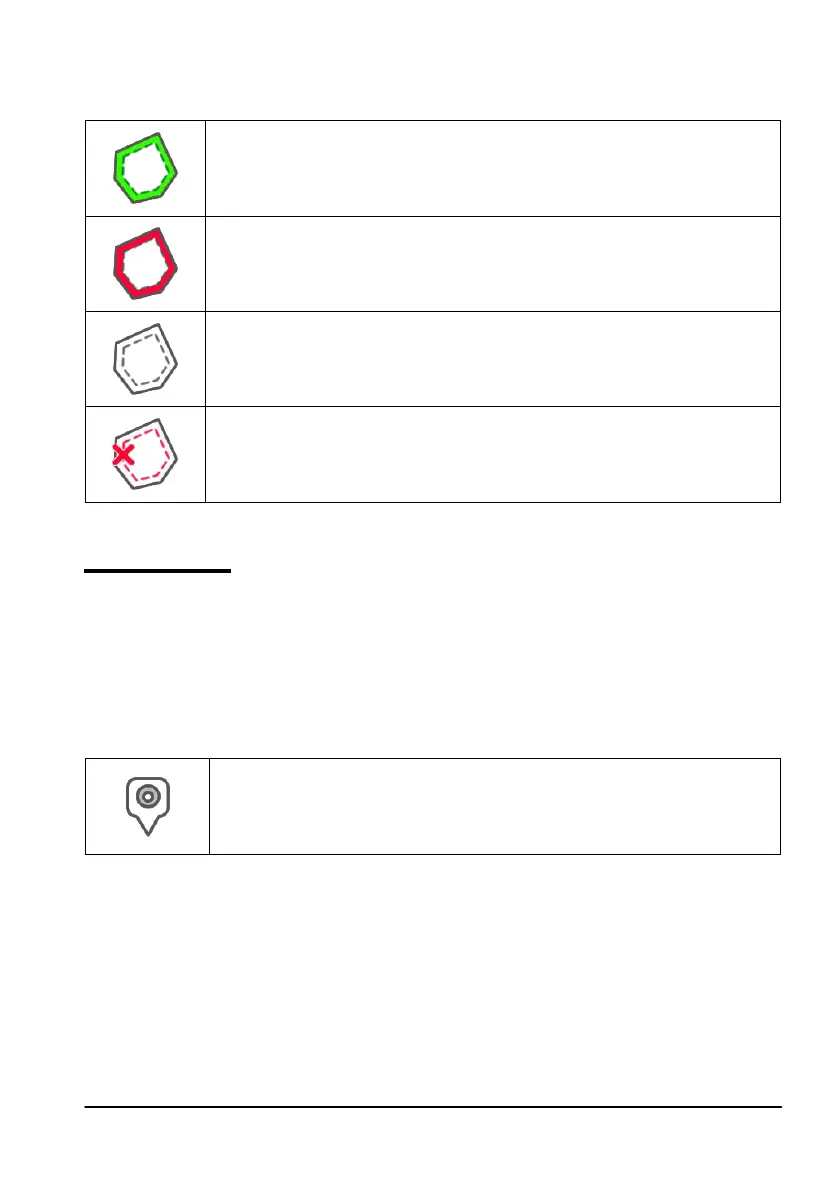
Tap “HEADLAND” to enable all these functionalities. Four dierent icons will be displayed:
Headland active
It allows you to open sections automatically on the headland. It shows the path
tracking for Auto-Steering;
Headland disabled
It prevents the opening of the sections automatically inside the headland
Headland inactive
Headland is drawn on the screen, the opening of the sections is active and the
path tracking for Auto-Steering is not active;
Delete Headland
Allows you to delete headland and to restore initial eld conditions.
Table 3.2.f Headland specic functions
3.2.5 Obstacles
G7 Farmnavigator allows users to save and view the position of a specic point on the map (e.g.
an obstacle).
- G7 Plus permits you to activate this option only with remote controller.
- G7 Ezy is provided with a specic button on the main menu.
To save the position on a specic point:
- Tap on “MARK”;
Obstacle / Mark
If pressed, it saves the position and it draws a marker on the map
Table 3.2.i Obstacle, point of interest
- On the map, it is possible to see a marker near the selected point.



 To Next Page