62
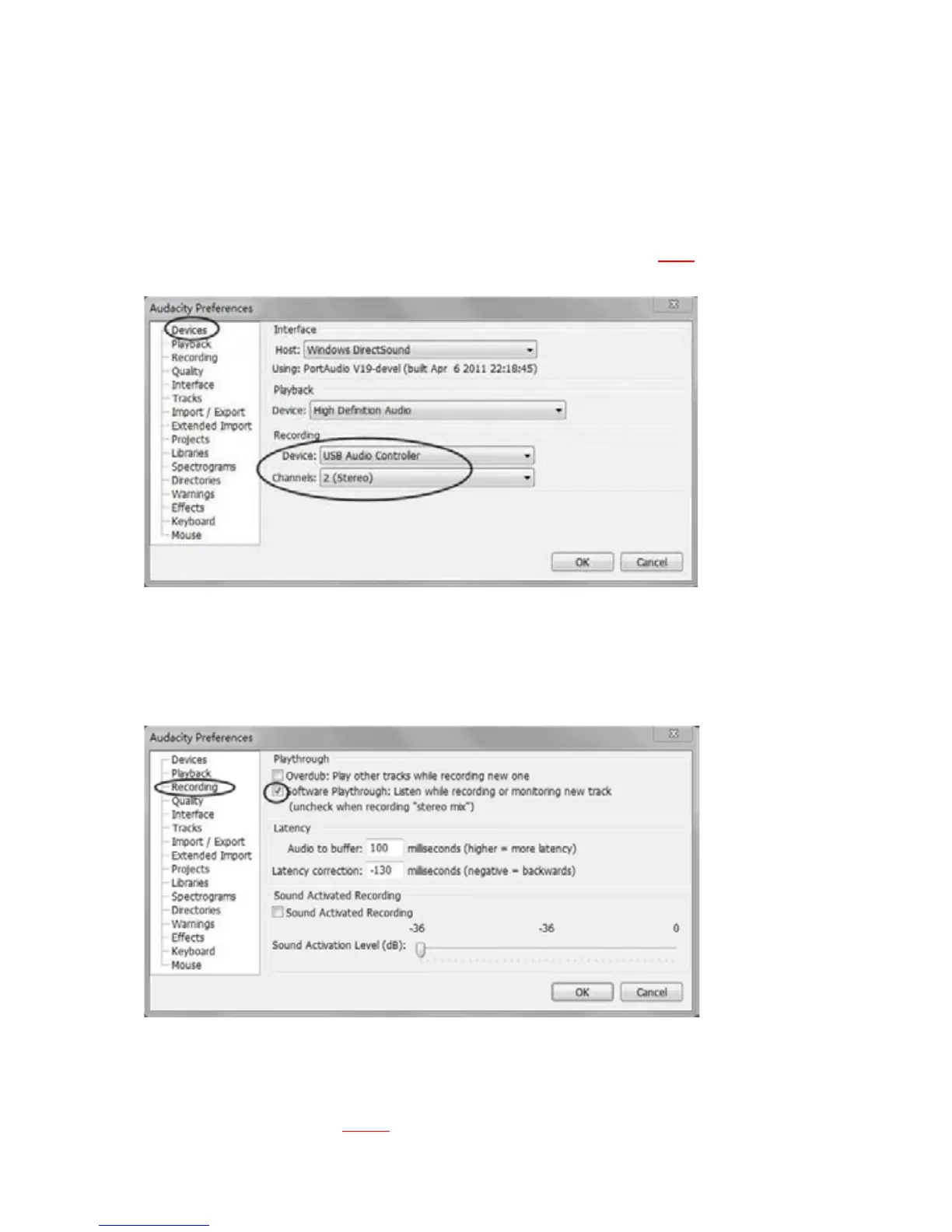
c) Click‘Devices’ontheleftside,thenthedetailcontentsoftheDeviceswill
show on the right hand side of Interface. Click the arrow on “Device”
belowPlaybackandchoose“RealtekHDAudioOutput”,or“HighDefinition
StudioDevice”.
Click the arrow on ‘Device’ below ‘Recording’
and choose ‘‘USB Aud
io
Controller’.
Clickthearrowon‘Channels’toselect‘2(Stereo)’.Do
NOT
clickOKuntil
youfinishallthesettings.
d) Click ‘Recording’ on the left side, you will see the detail contents on the
rightside.
Clickthecheckboxbeside‘SoftwarePlaythrough:Listenwhilerecordingor
monitoringnewtrack’.
e) Beforeexportingan MP3file, youneedtofind ‘lame’ first.If the program
doesnotshowtheMP3Library,makesuretheAudacitydriverdiscisinside
your computer. If the ‘lame_enc.dll’ software is not working on your
computer(i.e., Vistaand 7),youmustdownloadthe ‘lame’
softwarefr
om
website.(SeePages6365
.)



 To Next Page