63
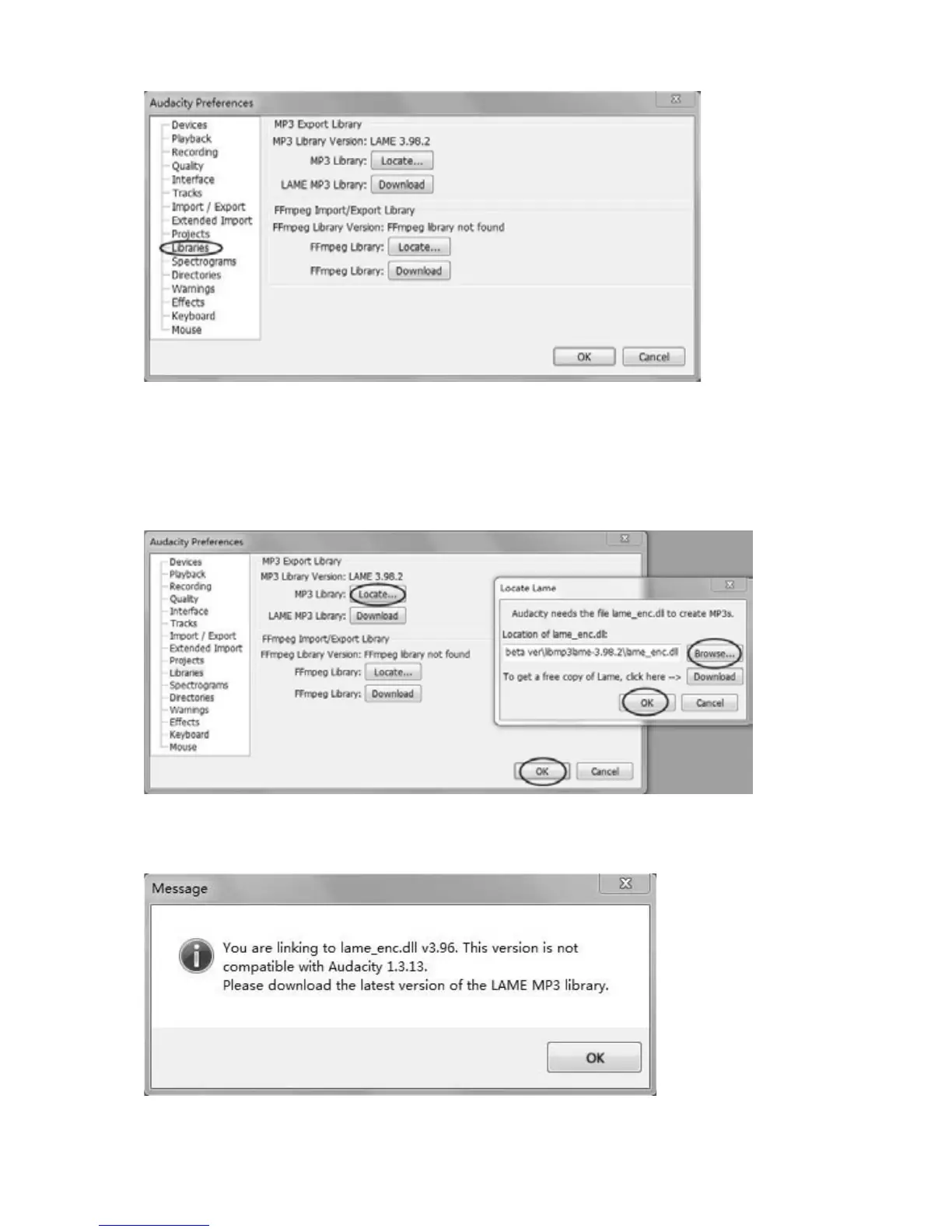
Click ‘Libraries’ on the left side, then in ‘MP3 Export Library’ interface, click
‘Locate…’ button to find ‘lame_enc.dll’. Click ‘Browse’ button to open
‘lame_enc.dll’. Click on Computer/My Computer and locate Audacity D, CD
Rom Audacity or DVDR Audacity D. Double click on it. Then double click on
‘AudacityforWin’
thenleft clickon ‘lame_enc.d
ll’tohighlightit.Clip ‘Open’
thenclick‘OK’.
Orifyoucannotfinditorthelamefileyoufoundisnotcompitibleawindow
appearstopromptyoutodownloadthelatestversion.ClickOKtoclosethe
popupwindow.
Click‘Locate..’thenintheLocateLamewindowclick‘Download’buttonanda
websitewillbeopenedautomatically.



 To Next Page