67
1. Set the aux source (PHONO, AUX, iPOD or CD) to play, then press Record
buttononAudacitytorecord.
NOTE:Duringrecordingmakesuretheinputlevelindicatordoesnotexceed
“0”.Ifyoufindtherecordingdistorted(forexample,theinputlevelindicator
exceeds “0” during recording, or
the wa
veform is clipped, or the playback
quality of the recording is distorted)you can adjustthe sound level of the
original music by setting the recording level to
5 (see the section of
ADJUSTMENTFORWINDOWS7ANDSOMEVISTASYSTEMSONLY).
2. Press“pause”inbetweeneachsong.
Onlypr
essthe“stop”buttonwhenall
desiredsongshavebeenrecorded.
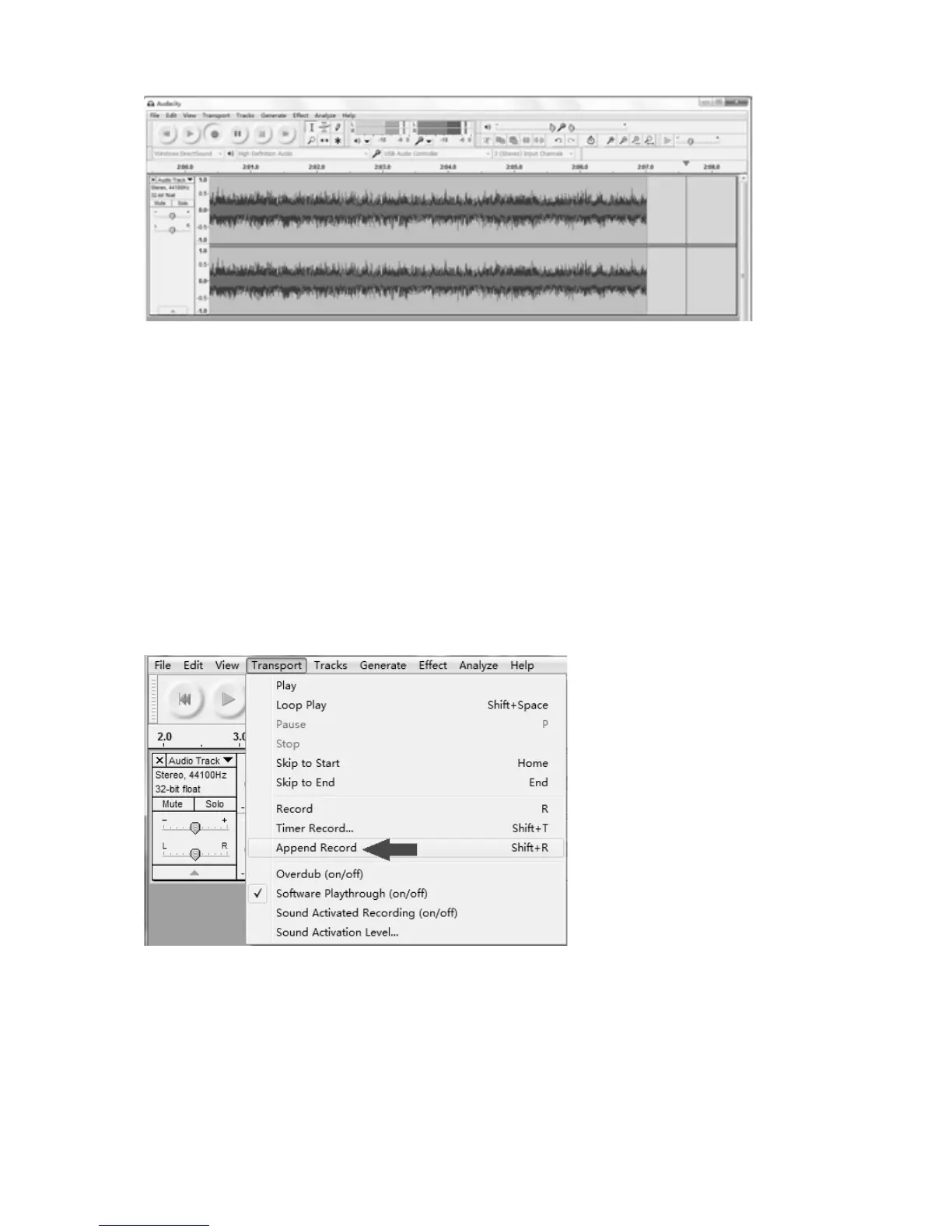
TIPS:Ifyoupressthe“stop”buttonbyaccident,youcanclick“Transport”
and click “Append Record”. Then you can continue to record in the same
track.
Forexample,the“stop”buttonhasbeenpressedbyaccidentattheendofthe
1
st
song.DonotclickanythinginAudacityandgetanothersongprepared,then
click “Transport” tab and select “Append Record” (refer the picture above).
Soonthe2
nd
songwillcontinuetorecordonthesametrackattheendofthe1
st
song.



 To Next Page