0024-9551 Revision 1
24
PCA
®
400 User Manual
Combustion Test
NGAS
Acme Powerplant
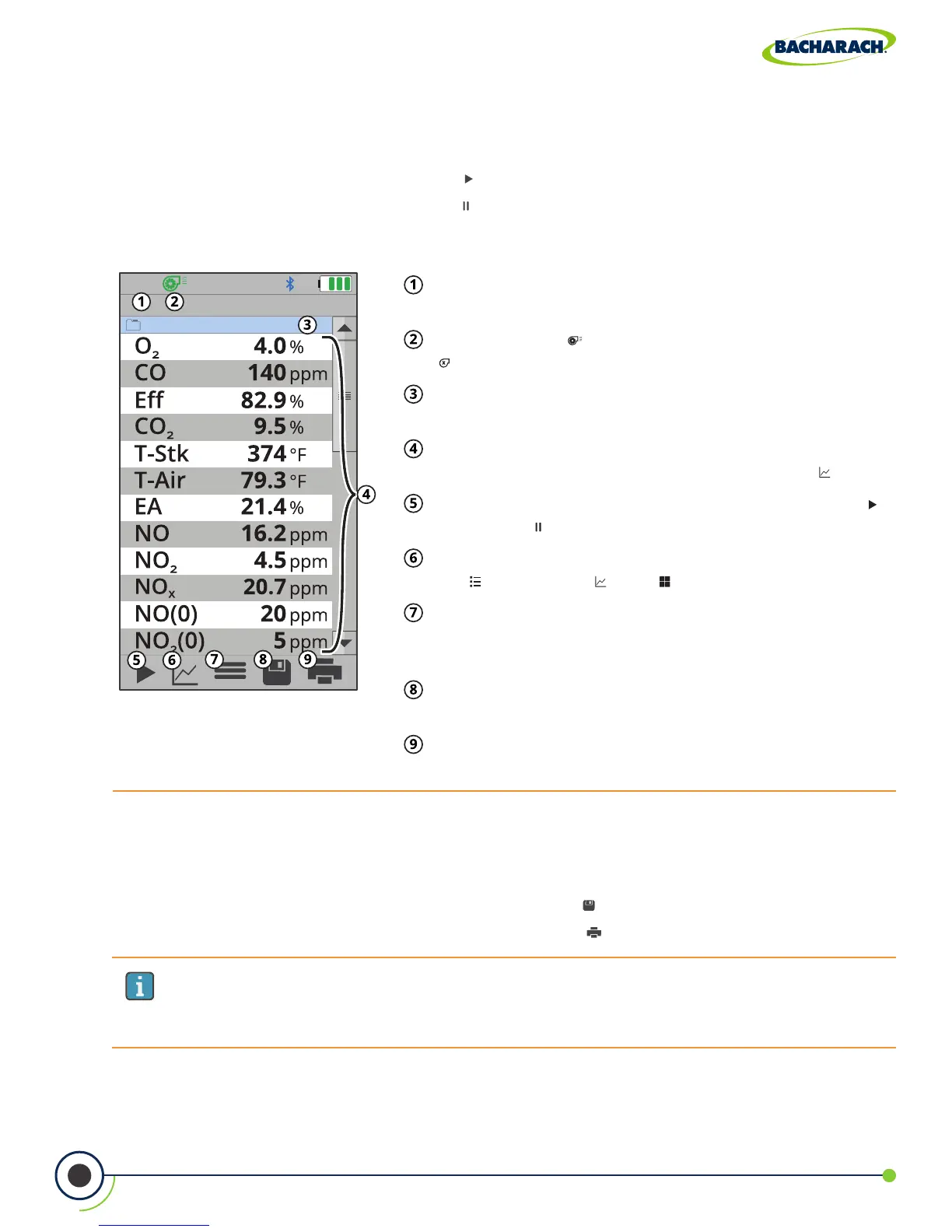
Fig. 3-7: Combustion Test Screen
Fuel Type - displays fuel calculation being used to
produce combustion data.
Pump Status - ( ) indicates that the pump is on,
( ) indicates that the pump is off.
Folder / Memory Location - location where
combustion data will be saved.
Combustion Data - results from combustion
analysis; display can be toggled by pressing ( ).
Run / Hold - toggle sample pump operation; press ( )
to run and ( ) to pause.
Toggle View - change data display between table /
list ( ), line graph ( ), tile ( ) formats.
Options - displays additional settings / conguration
(Fresh Air Purge, Logging, Pump Speed, Run / Hold Format,
Line Graph Settings, O
2
Reference, Zoom, NO
x
Calculation).
Save - save combustion data to the selected folder /
memory location.
Print - print combustion data to IrDA / Bluetooth
®
printer(s).
IMPORTANT: Printing via Bluetooth
®
is diabled when the analyzer is connected to
the PCA
®
400 App. If you wish to print, disconnect from the mobile app or enable
IrDA communications.
5. Run Sample Pump
After starting the pump, allow readings to stabilize for a minimum of 3-minutes or as long
as required by manufacturer specications / compliance testing procedures.
f To start the pump: press Run / Hold ( )
f To stop the pump: press Run / Hold ( )
6. Save / Print Readings
The PCA
®
400 is capable of saving active data to the analyzer’s onboard storage and / or
printing to the optional IrDA / Bluetooth
®
printer.
f To save combustion readings / report: press Save ( )
f To print combustion readings / report: press Print ( )



 To Next Page