40 ImagePRO-II • User’s Guide
4. Menu Orientation
Configuring Inputs
Figure 4-8. Mask Presets Submenu
• Select Set to 16:9 to mask the image to a 16:9 aspect ratio.
• Select Set to 5:4 to mask the image to a 5:4 aspect ratio.
• Select Set to 4:3 to mask the image to a 4:3 aspect ratio.
• Select Set to 3:2 to mask the image to a 3:2 aspect ratio.
• Select Set to 1:1 to mask the image to a 1:1 (square) aspect ratio.
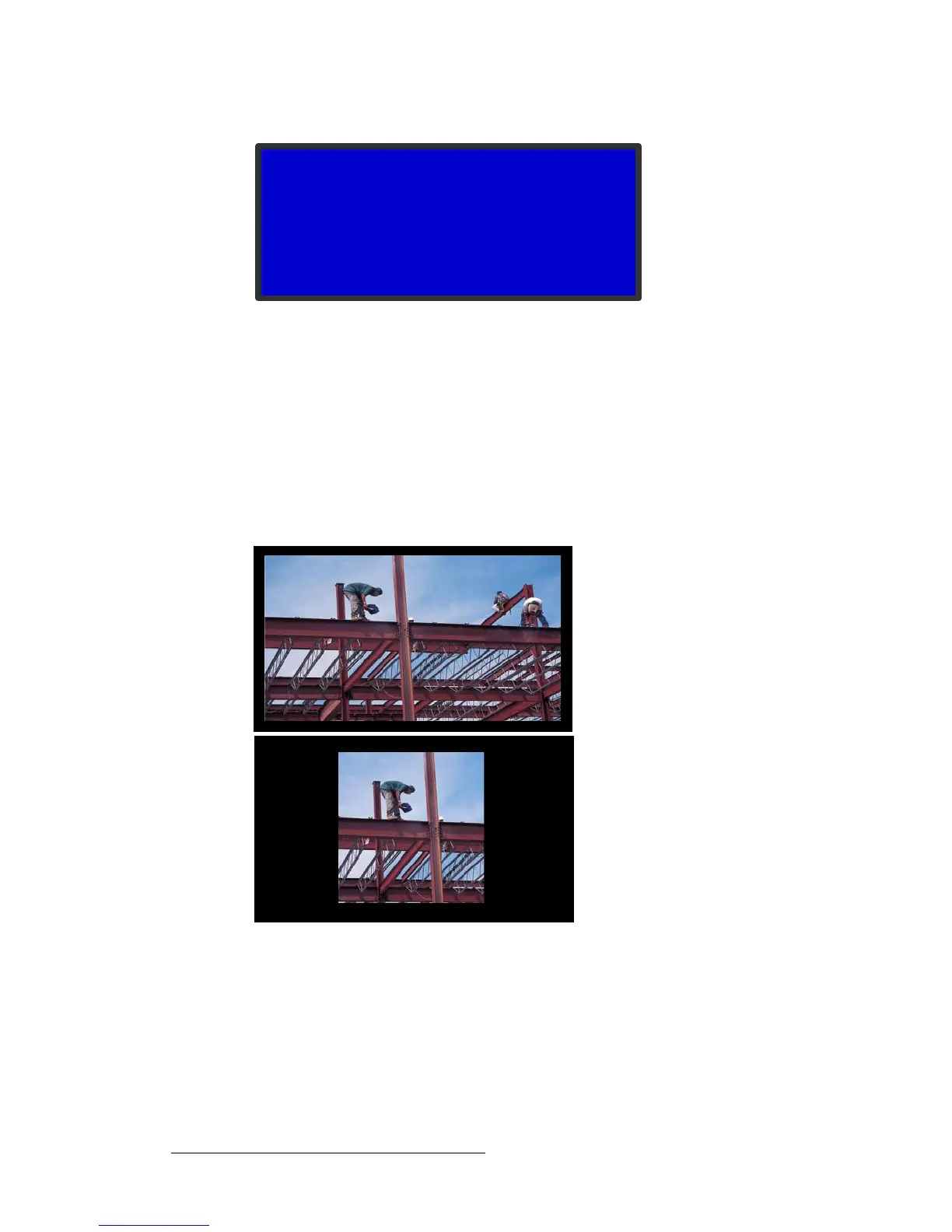
As with any mask, presets are additive and are applied to the edges of the image. If you
mask a 16:9 image to a 5:4 aspect ratio, the result looks like the lower image in the
following illustration.
Figure 4-9. 16:9 Image (top) with 5:4 Masking Preset (bottom)
The image on display is the base image to which the mask is applied. If an image has
already been masked to a 5:4 aspect ratio, and you mask it again using the 1:1 preset, the
system creates the 1:1 mask using the previous 5:4 image as a base. The result looks like
the one in the following illustration.
MASK PRESETS
> Set to 16:9
Set to 5:4
Set to 4:3
Set to 3:2
Set to 1:1



 To Next Page