5. Physical installation
5. PHYSICAL INSTA LLATION
This ch apter is intended for trained personnel, expert operators only. Do n ot install the ULC -30A when you
are n ot one tr a ined for it.
Overview
• Positioning the ULC- 30A
• Installation of the Secondary cooling unit (the DMD Cooling Expansion Module)
• Electrical connection
• Add re ss setting
• Mounting the fixed covers
• Connection of signal transmission cables
• Stick the hosing connection stickers
• Connecting the hoses with projector an d chillers
5.1 Positioning the ULC-30A
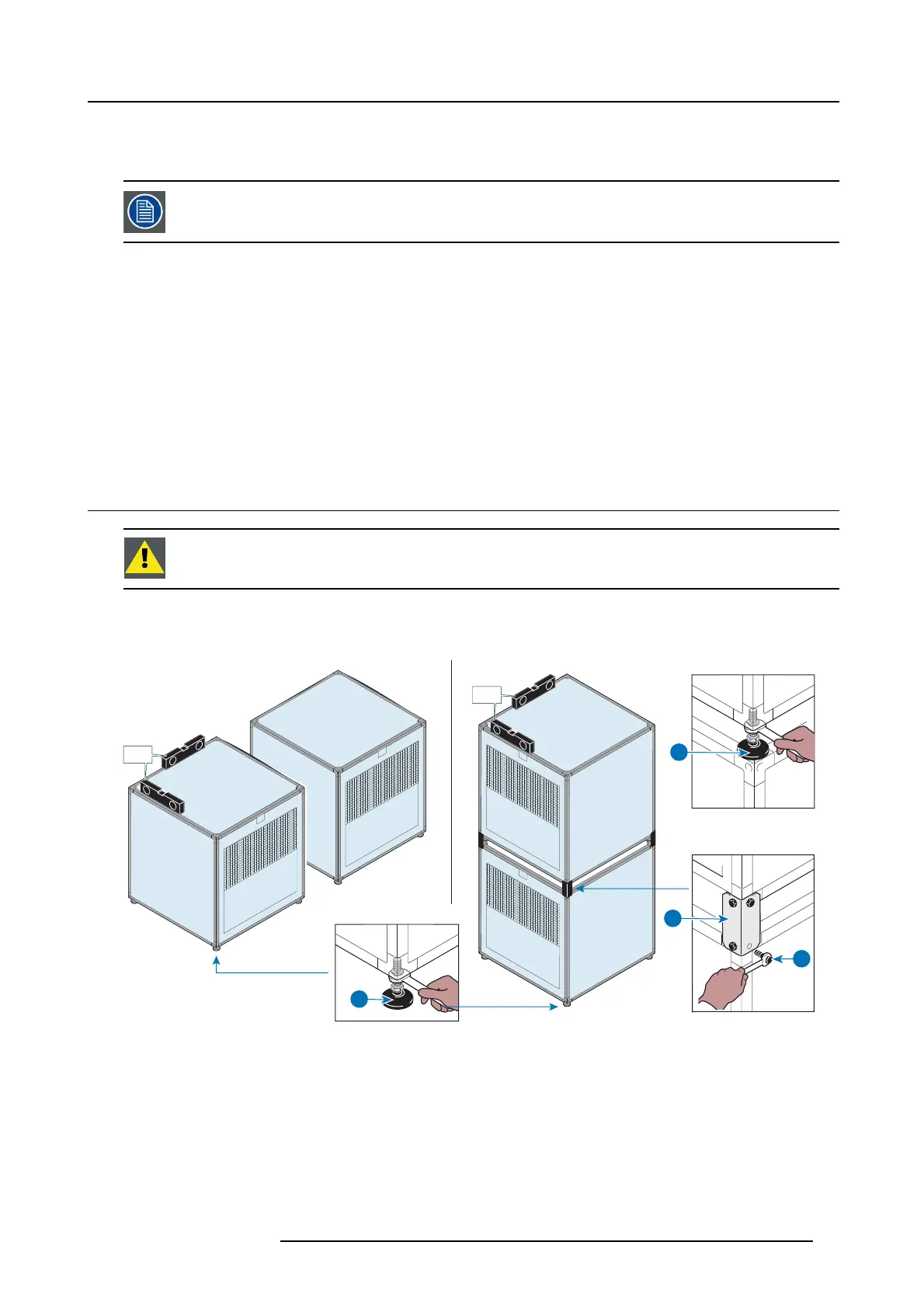
CAUTION: The supports (B) and screws (C ) are delivered in the Chiller ac cessory pack . Install these b efore
mounting the top unit onto the bottom unit.
How to position
1. Adjust the feet to level the ULC- 30A (A).
± 2°
± 2°
± 2°
A
A
A
B
C
Image 5-1
2. If placed on each other, adjust the feet o f the upper ULC-30A to leve l (A).
3. Put the supports (B) into place and tighten the screws (C) to join the units.
R5905866 ULC-30A 31/01/2018
17


 To Next Page