59-2 9424200996
Phase Overvoltage (59P) Test BE1-11m
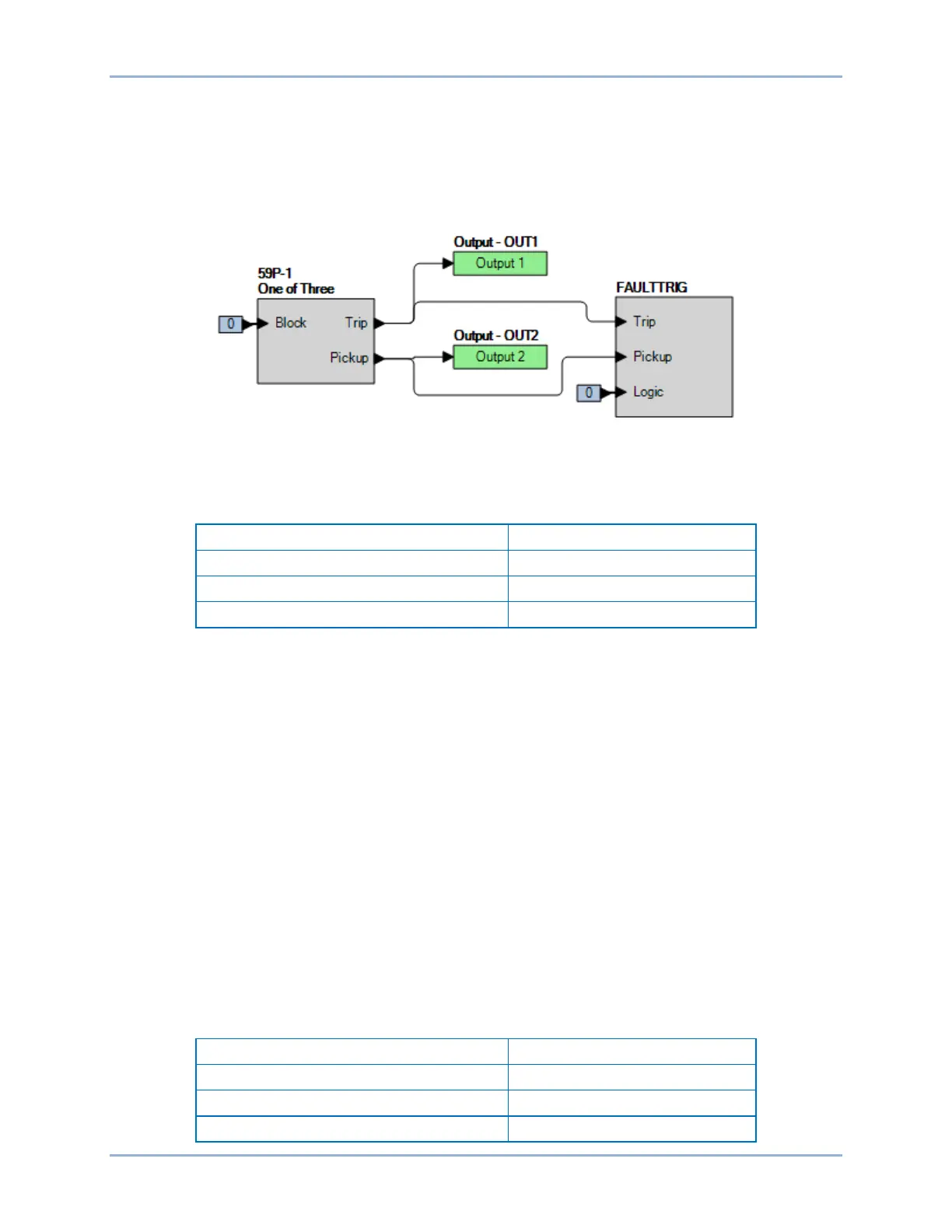
Step 2: Use BESTCOMSPlus to configure the BESTlogicPlus programmable logic shown in Figure
59-1.
• Blocking is disabled.
• OUT1 closes for 59P-1 Trip.
• OUT2 closes for 59P-1 Pickup.
• Fault recording is enabled.
Figure 59-1. BESTlogicPlus Settings
Step 3: Use BESTCOMSPlus to open the Protection, Voltage, Overvoltage (59P-1) screen and send
the first row of test settings in Table 59-2 to the BE1-11m.
Table 59-2. Pickup Test Settings
Step 4: Prepare to monitor the 59P-1 function operation. Operation can be verified by monitoring OUT2
(see Figure 59-1).
Step 5: Connect and apply a 240 Vac, three-phase voltage source to terminals C13 (A-phase), C14 (B-
phase), C15 (C-phase), and C16 (Neutral).
Step 6: Slowly increase the A-phase voltage until OUT2 closes and record the pickup. Verify that there
is a 59P-1-A target on the front-panel display. Slowly decrease the A-phase voltage until OUT2
opens and record the dropout. Reset the target.
Step 7: Verify the pickup and dropout accuracy at 120 Vac for a pickup setting of 125 V and 70 Vac for
a pickup setting of 75 V as listed in Table 59-2. Record the results.
Step 8: (Optional.) Repeat steps 1 through 7 for the B-phase and C-phase voltage inputs. Note: Be sure
to enable proper target for each phase being tested.
Step 9: (Optional.) Repeat steps 1 through 8 for settings group 1, 2, and 3.
Step 10: (Optional.) Repeat steps 1 through 9 for 59P-2.
Timing Verification
Step 1: Use BESTCOMSPlus to open the Protection, Voltage, Overvoltage (59P-1) screen and send
the first row of test settings in Table 59-3 to the BE1-11m for settings group 0.
Table 59-3. Timing Test Settings



 To Next Page