71
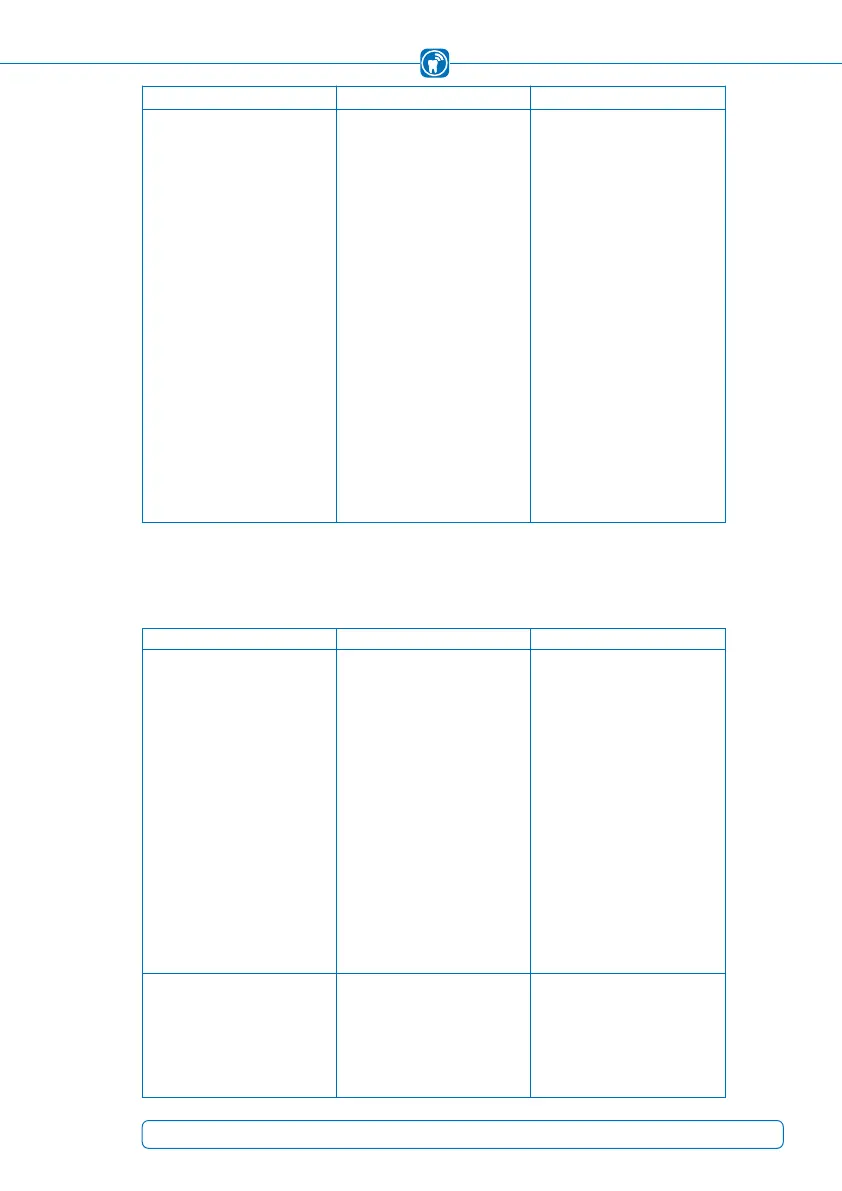
Error (symptom) Cause Action
A recording of the bite force distri-
bution can not be started.
• Patient file has not been created
or activated in the OccluSense
®
-
iPad-App
• The regularly requested function
test (with the test sensor) has
not been performed
• The function test has failed
• A required update of the Occlu-
Sense
®
-iPad-App or the hand-
held firmware was not installed
• Create patient file in the Occlu-
Sense
®
-iPad App (chapter 13.2)
• Activate patient in the Occlu
Sense
®
-iPad-App (chapter 14.2)
• Perform function test with test
sensor (chapter 12)
• Ensure correct position of the
test sensor in the handheld!
• Perform function test again
• In case of further function test
failures consult Bausch
(support@occlusense.com)
• Ensure connection to the
Apple AppStore
• Perform update (chapter 17.2,
21.3)
OccluSense
®
-Handheld
Error (symptom) Cause Action
Handheld can not be switched on. • There are no batteries in the
battery compartment
• The batteries have been
inserted incorrectly
• The batteries are insufficiently
charged
• Insert batteries into the battery
compartment (chapter 8.1)
• Remove the batteries from the
battery compartment and insert
them according to the identi-
fication marks inside the battery
compartment (section 8.1)
• Ensure the firm contact of the
the battery poles with the battery
probes
• Charge the batteries (chapter 8.1)
Batteries cannot be inserted into
the handheld.
• Battery compartment cover
can not be opened
• There are no (suitable) batteries
available
• see manual (chapter 8.1)
• Use of 3 x AAA NiMH recharge-
able batteries, 1000 mAh
(chapter 8)



 To Next Page