RX170Q User’s Manual
28 RX170Q User’s Manual
setup information such as system passwords.
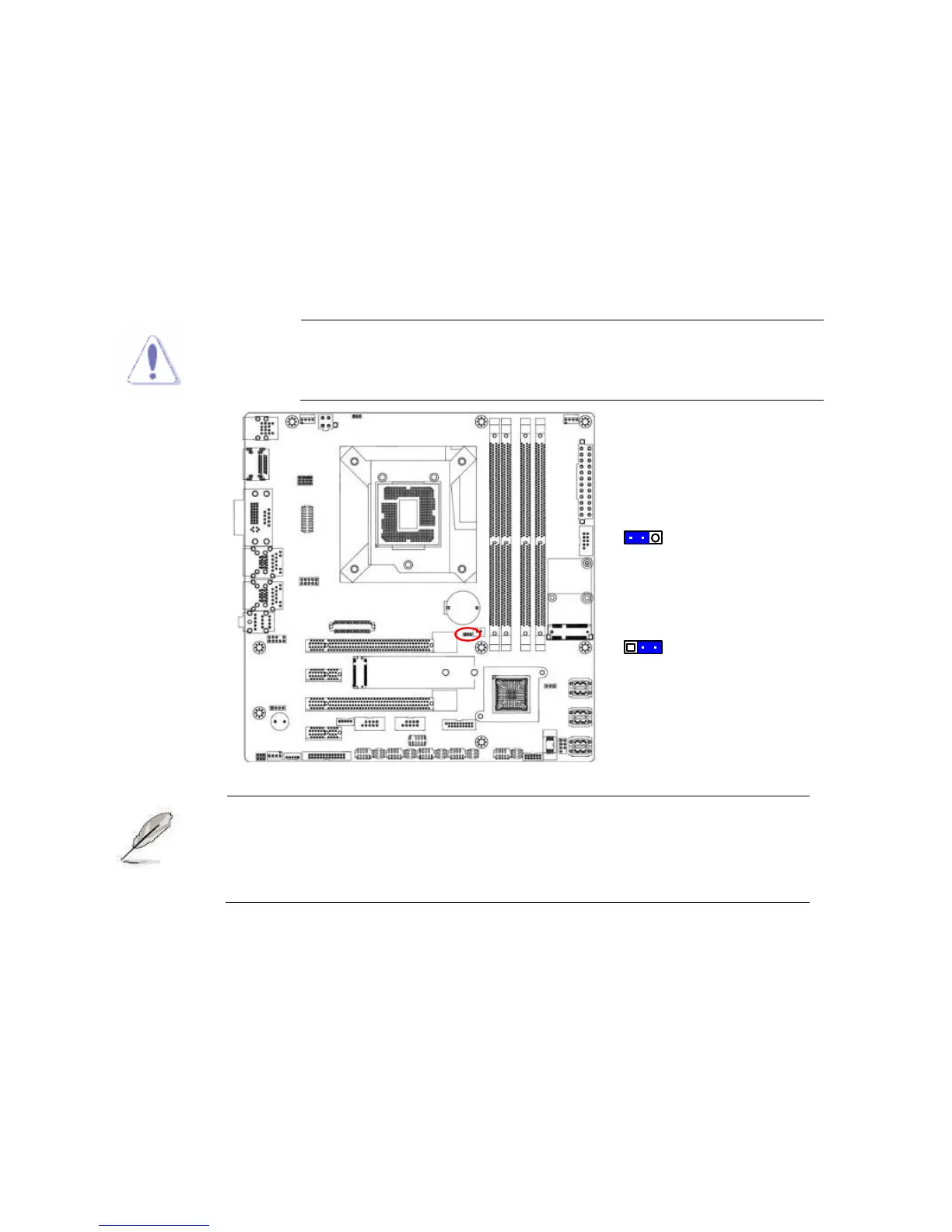
To erase the RTC RAM:
1. Turn OFF the computer and unplug the power cord.
2. Remove the onboard battery.
3. Move the jumper cap from pins 1-2 (default) to pins 2-3. Keep the cap on pins 2-3 for
about 5~10 seconds, then move the cap back to pins 1-2.
4. Re-install the battery.
5. Plug the power cord and turn ON the computer.
6. Hold down the <Del> key during the boot process and enter BIOS setup to re-enter data.
Except when clearing the RTC RAM, never remove the cap on
CLRTC jumper default position. Removing the cap will cause
system boot failure!
1
1
Normal (Default)
Clear CMOS
You do not need to clear the RTC when the system hangs due to
overclocking. For system failure due to overclocking, use the C.P.R.
(CPU Parameter Recall) feature. Shut down and reboot the system so
the BIOS can automatically reset parameter settings to default values.
1.6.2 AT/ATX Power Mode Select (JPSON1)
This jumper allows you to select ATX Mode or AT mode



 To Next Page