37
Part No. 6-847681-00 Rev. D
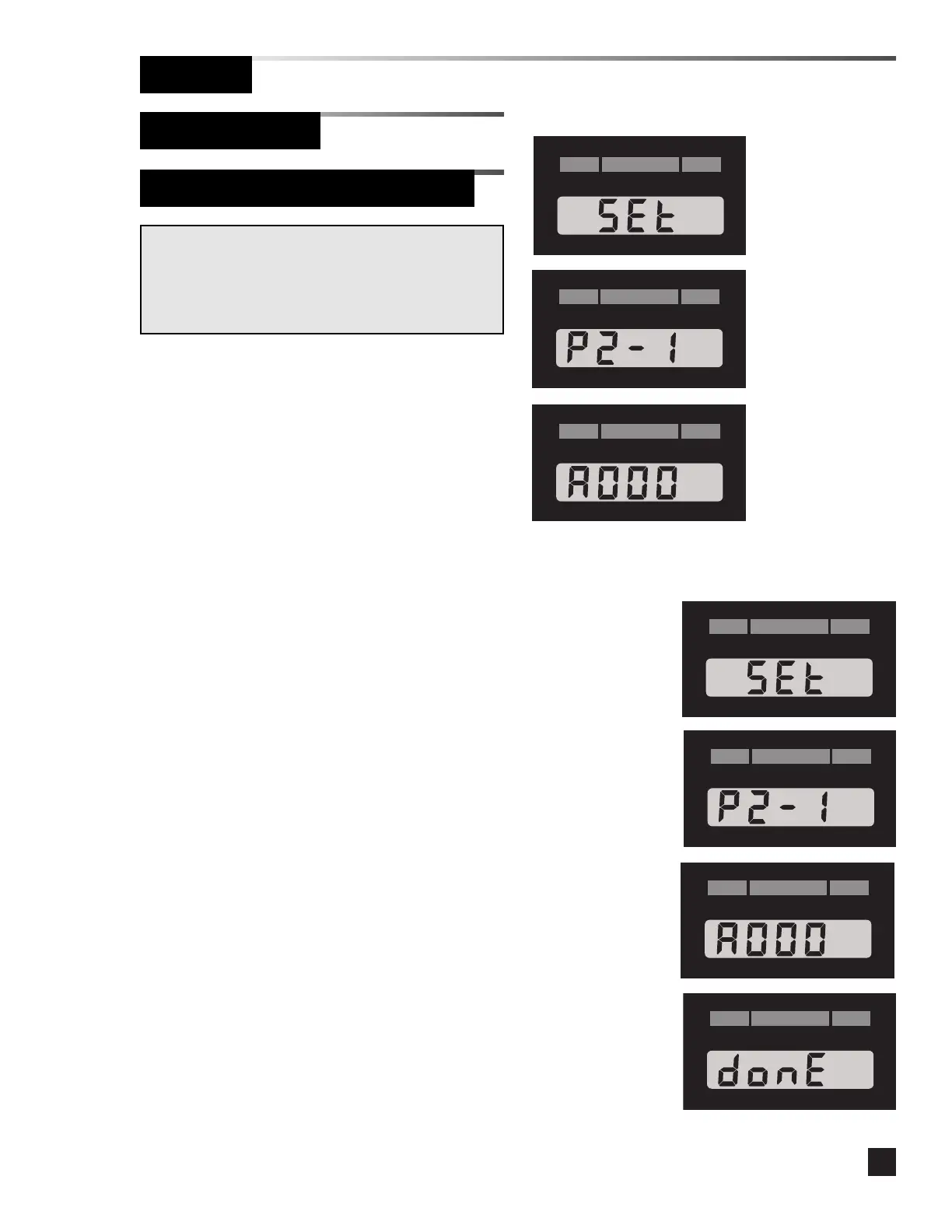
Resetting the network address to zero:
(Software 2.1 and lower)
1 Remove the cover plate.
2. Press the SETUP button then quickly
press the SILENCE button.
3. The software revision displays for
approximately 4 seconds (e.g. P2-1).
4. The network address displays for
approximately 5 seconds.
5. While the network address is displayed,
press and hold the SILENCE button until
DONE is displayed.
Operation
Set-Up Procedure
Digital Display Module (Advanced)
Viewing the firmware revision and
network address: (Software 2.1 and
lower)
1 Remove the cover plate.
2. Press the SETUP button then quickly
press the SILENCE button.
3. The software revision displays for
approximately 4 seconds (e.g. P2-1).
4. The network address displays for
approximately 5 seconds (e.g. A000), then
the module returns to monitoring mode.
Warning:
The following advanced setup options should only be
performed by qualified personnel. Improperly set
addresses can cause the alarm not to communicate with a
computer or building monitoring system.
Software
Revision
Network
Address
Software
Revision
Network
Address



 To Next Page