Commissioning
EL3773 107Version: 2.5
Recording a PLC Variable with the TwinCAT 3 – ScopeView
By a precondition of an already created TwinCAT 3 – project and a connected PLC with an oversampling
able terminal within the configuration it will be illustrated how an oversampling variable can be represented
by the Scope (as a standard part of the TwinCAT 3 environment). This will be explained by means of several
steps based on an example project “SCOPE_with_Oversampling“ as a standard PLC project.
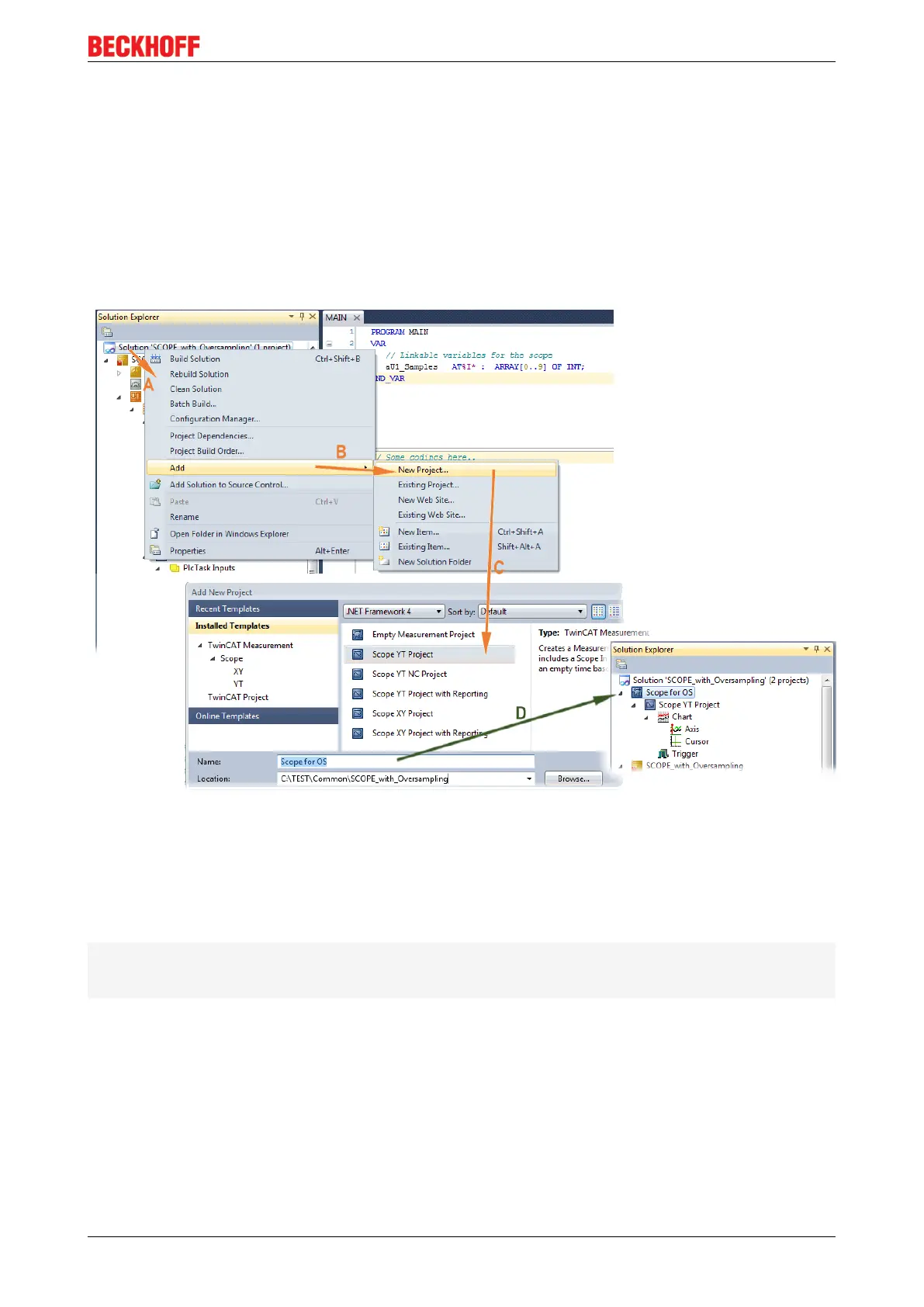
Step 1: Adding a project „Scope YT“
The example project “SCOPE_with_Oversampling“ have to be added a TwinCAT Measurement – project
“Scope YT project” (C) by right click (A) and selection (B) “Add” → “New Project..”. Then “ScopeforOS” will
be entered as name. The new project just appears within the solution explorer (D).
Fig.115: Adding a Scope project into an already existing project
Step 2a: Creation of a PLC variable within a POU
Within the TwinCAT 3 development environment an input variable as an array with respective amount than is
given by the oversampling factor have to be defined at first how it’s illustrated in an example for the POU
“MAIN” and an oversampling factor10 with structured text (ST) as follows:
PROGRAMMAIN
VAR
aU1_Samples AT%I* : ARRAY[0..9] OF INT;
END_VAR
The identification “AT%I*” stands for swapping out this array variable to link it with the process data objects
(PDOs) of a terminal later. Notice that at least the number of elements have to be the same as the
oversampling factor so that the indices can be set from 0 to 9 also. As soon as the compiling procedure was
started and ended successful (in doing so no program code may be present) the array appears into the
solution explorer of the TwinCAT 3 development environment within the section PLC under “..Instance”.
The following illustration shows extracts of the solution explorer on the right. As an example that linking of an
array variable to a set of oversampling process data is represented herewith:









 To Next Page