Commissioning
EL3773110 Version: 2.5
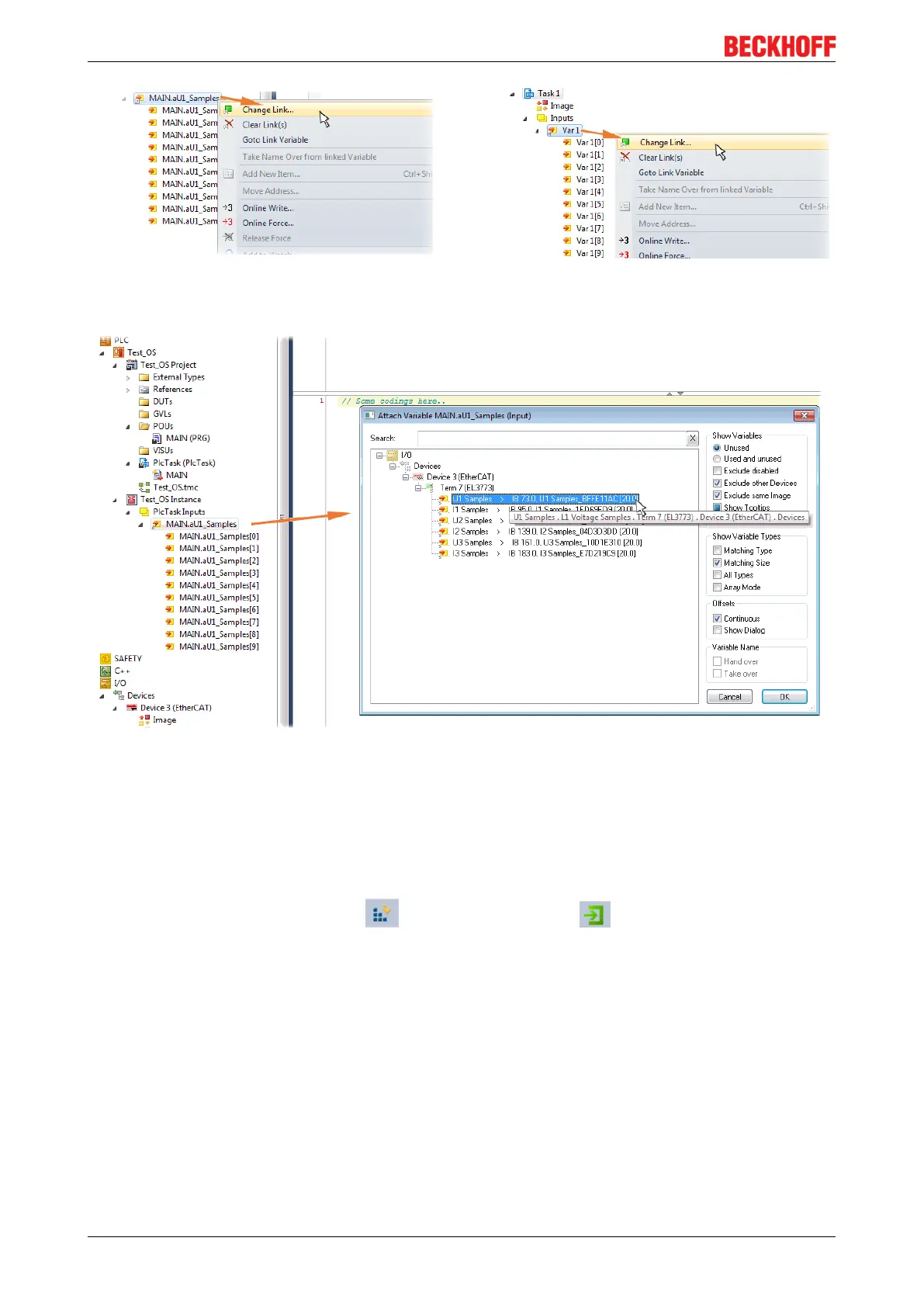
Fig.120: Set up the link of the PLC array variable (left: for the last preceding paragraph Step 2a, right: for the
last preceding paragraph Step 2b)
Fig.121: Select the EL3773 PDO "L1 Voltage Samples" to create a link to the PLC array variable
„aUI_Samples“
The selection of PDO "U1Samples" of the EL3773 for “MAIN.aUI_Samples” based by the last preceding
paragraph Step 2a as illustrated above have to be done in the same way for “Var 1” accordingly.
Step 4: Selection of the PLC array variable for the Y-axis of the scope
Now the configuration will be activated ( ) and logged in the PLC ( ), so the array variable will be
visible for the target browser of the scope for being selected.
Thereby the drop down menu will be opened by right clicking on “Axis” (A) for selection of the scope features
(B):









 To Next Page