Commissioning
EL3773 109Version: 2.5
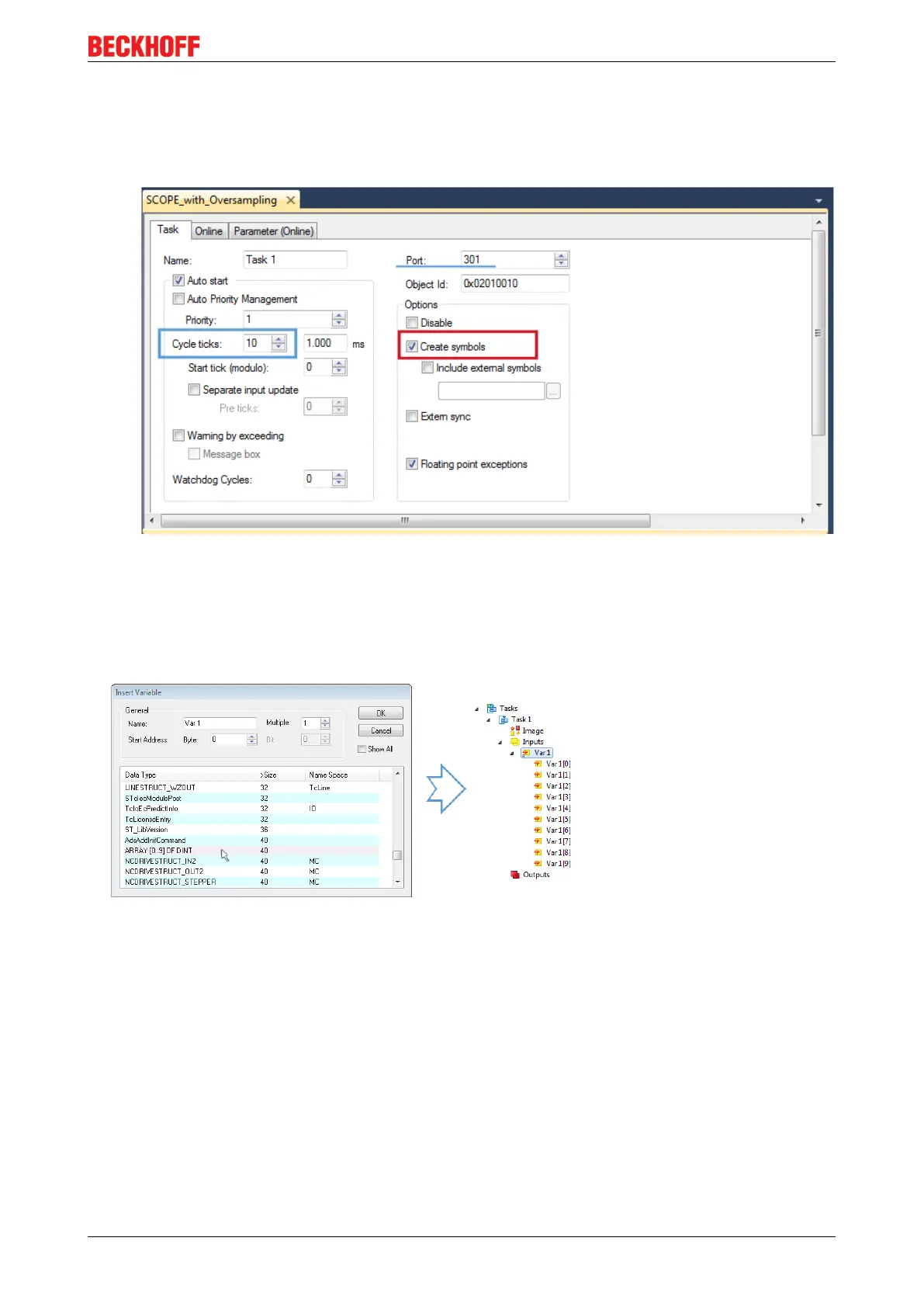
The Task have to be inserted as “TwinCAT Task With Image” and also creates an “Inputs” and “Outputs”
folder therefore. The properties of the new (or as the case may be already existing) task must have activated
the attribute “Create symbols” to make them selectable by the “Target Browser” of the Scope later on. The
task cycle time have to be changed if so. Then, with10 x Oversampling 1ms at 100µs base time, resulting
10 ticks will be set by the usage of the EL3751 for example:
Fig.118: Task property "Create symbols" must be activated
There’s a default value given for the Port number (301) that should be changed, if necessary. This number
have to make acquainted for the Scope, if applicable, later on. By a right click on “Inputs” that oversampling
based variable can now be appended with the fitting datatype of an array. „ARRAY [0..9] OF DINT“ referred
to as „Var1“ in this case:
Fig.119: Insertion of variable "Var 1" fitting to the oversampling (-factor)
Step 3: Linking an array variable with an oversampling PDO
By right click on “MAIN.aUI_Samples” (according to the last preceding paragraph Step 2a) or rather
“Var1” (according to the last preceding paragraph Step 2b) within the Solution Explorer a window opens to
select the process data:









 To Next Page