Commissioning
EL3773 95Version: 2.5
6.6.2 Configuration data
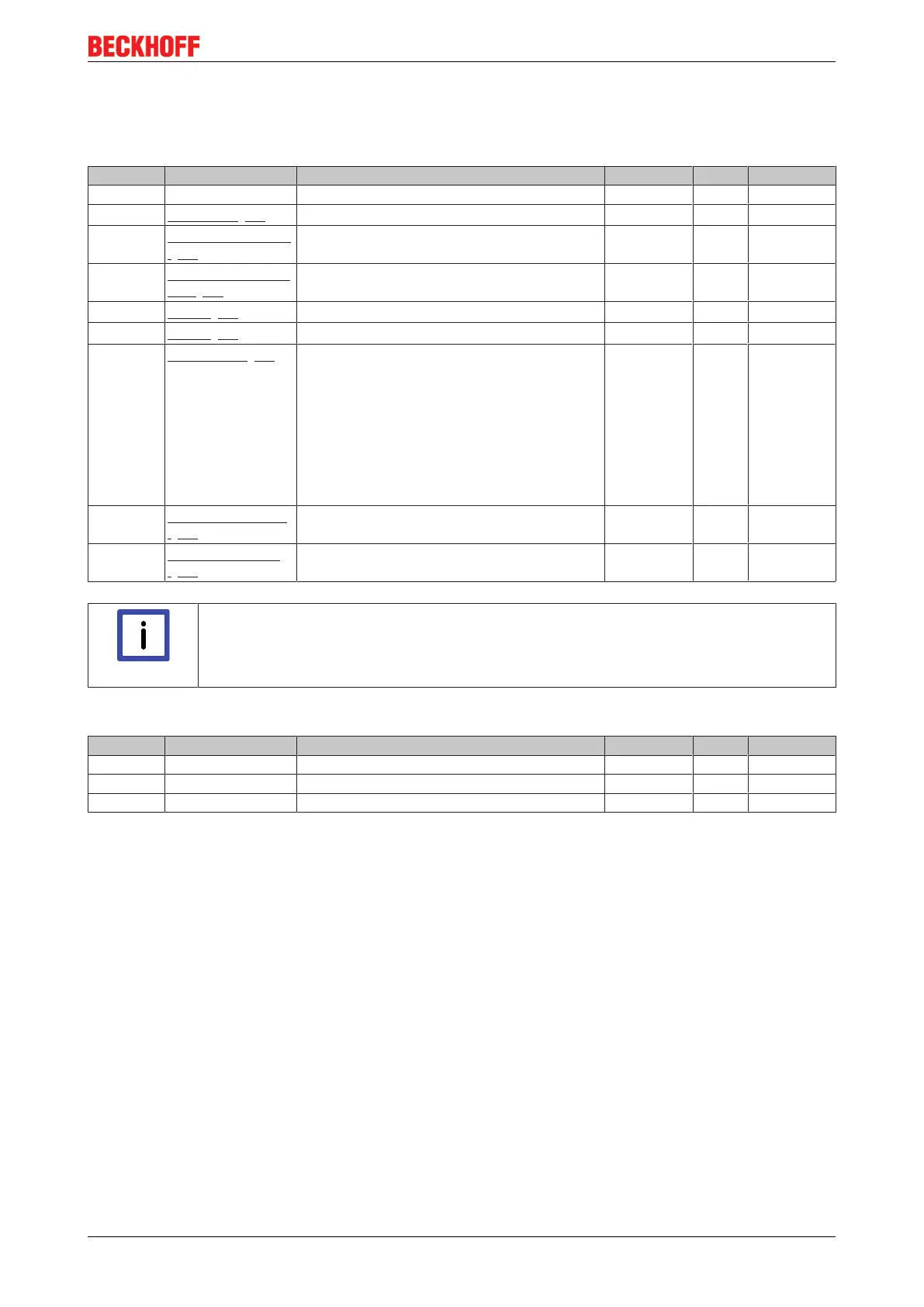
Index 80p0 AI Settings (for p = 0...5, corresponding to channel 1...6)
Index (hex) Name Meaning Data type Flags Default
80p0:0 AI Settings Maximum subindex UINT8 RO > 24 <
80p0:07
Enable limit [}87]
Limit 1 enabled BOOLEAN RW FALSE
80p0:0A
Enable user calibration
[}87]
Enabling of the user calibration BOOLEAN RW FALSE
80p0:0B
Enable vendor calibra-
tion [}87]
Enabling of the vendor calibration BOOLEAN RW TRUE
80p0:13
Limit 1 [}87]
First limit value for setting the status bits INT16 RW 0
dec
80p0:14
Limit 2 [}87]
Second limit value for setting the status bits INT16 RW 0
dec
80p0:15
Filter settings [}85]
This object determines the digital filter settings.
The possible settings are sequentially numbered.
0: 200Hz
1: 500Hz
2: 1000Hz
3: 1500Hz
4: 2500Hz
5: 5000Hz
6: 15000Hz
See note below:
UINT16 RW 2500 Hz (4)
80p0:17
User calibration offset
[}87]
User calibration offset INT16 RW 0
dec
80p0:18
User calibration gain
[}87]
User calibration gain INT16 RW 16384
dec
Note
The filter characteristics are set via index 0x8000:15
The filter frequencies are set for all channels centrally via index 0x8000:15 (channel 1). All
other corresponding indices 0x80p0:15 have no parameterization function!
Index 80pF AI Vendor data (for p = 0...5, corresponding to channel 1...6)
Index (hex) Name Meaning Data type Flags Default
80pF:0 AI Vendor data Maximum subindex UINT8 RO > 2 <
80pF:01 Calibration offset Offset (vendor calibration) INT16 RW -
80pF:02 Calibration gain Gain (vendor calibration) INT16 RW -









 To Next Page