Page 13
9487 Dielman Rock Island Ind Dr, St. Louis, MO 63132 www.becs.com
Installation and Technical Manual Rev: H10
S
S
e
e
c
c
t
t
i
i
o
o
n
n
C
C
:
:
D
D
i
i
p
p
S
S
w
w
i
i
t
t
c
c
h
h
S
S
e
e
t
t
t
t
i
i
n
n
g
g
s
s
The BECSys3 controller comes preprogrammed for
pH feed down (acid or CO
2
), Time Based Proportional
feed mode, Probe Wash, and temperature shown in
°F.
These factory settings are appropriate for most
systems. If you would like to change these settings,
you must change the internal dipswitches.
To change the dipswitches, first unplug the BECSys3
power cord and open the cover of the unit (as
explained in Section B - 2).
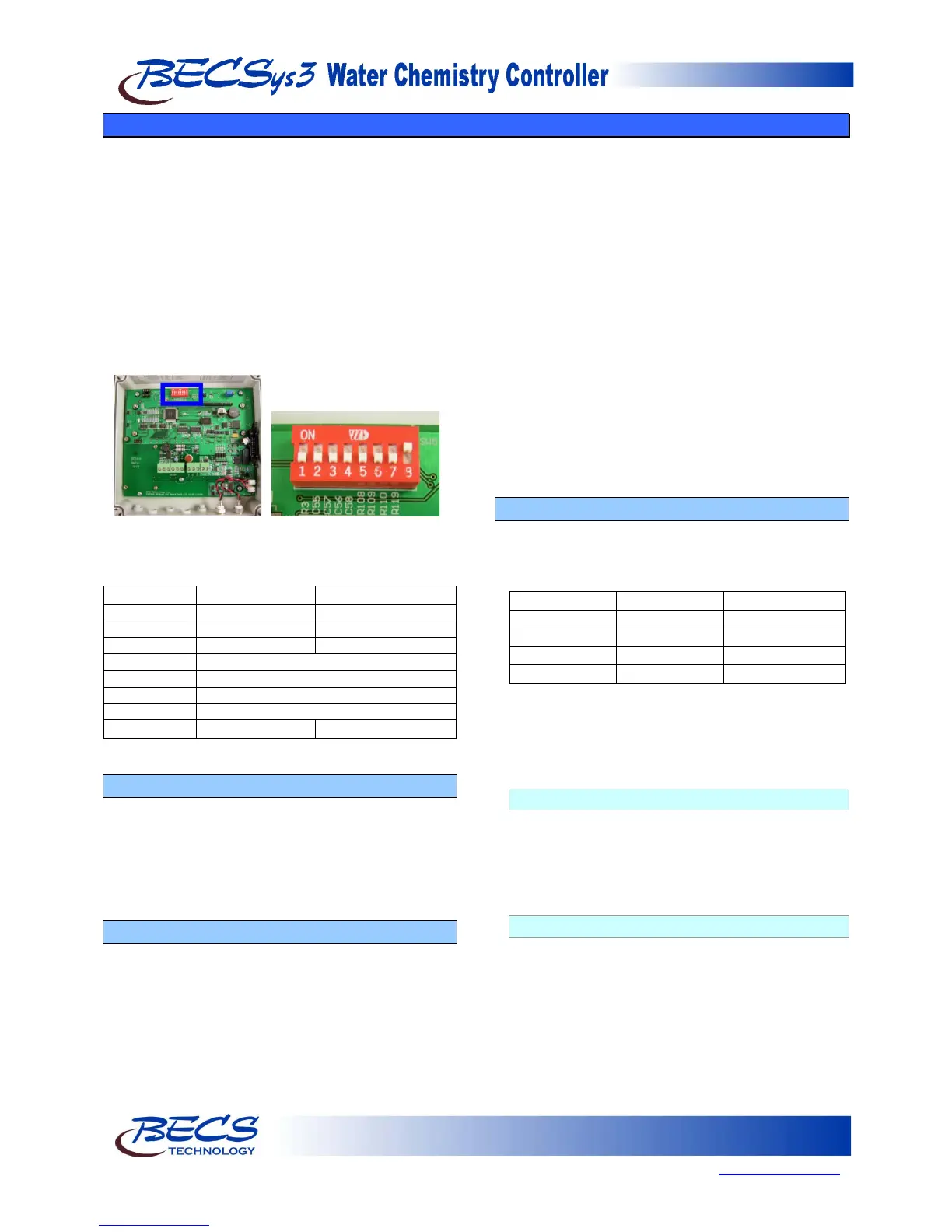
The photograph shows the dipswitch bank (SW5) in
the cover of the unit.
The following chart indicates the positions and
functions of the switches.
Temperature °C Temperature °F
* See Section C – 3
C – 1: Choosing pH Feed Direction
Relay 1 controls pH. It can be set to feed down
(acid) for use with chemicals such as carbon dioxide
or muriatic acid, or to feed up (base) for use with
chemicals such as caustic soda or soda ash. (If you
are using Dual pH then Relay#1 is set as Feed Up
and Relay#3 is set as Feed Down).
C – 2: Choosing On/Off Control or TBP
In general, if you are using a motor driven chemical
feeder then you should choose the On/Off option.
If you are using a solenoid driven or pulsed
diaphragm chemical feeder (such as Pulsatron, most
LMI models or most Prominent Models), you should
choose the TBP (Time-Based Proportional) option.
This feature helps to hold a set point and to
minimize over-shoot by making a standard feeder
mimic the action of more sophisticated modulating
feeders.
If you choose the On/Off option and are feeding up
then the controller will activate the chemical feeder
whenever the pH or ORP falls below the set point
and continue to feed until the pH or ORP rises
above the set point plus hysteresis at which point it
will stop.
If you choose the TBP option the controller will
activate the chemical feeder whenever the pH or
ORP falls below the set point and will feed for a
fraction of the Time Base depending on the amount
of deviation from set point. The balance of the Time
Base, the feeder will be paused. The smaller the
deviation, the less time the feeder is ON. The feeder
will continue this feed and pause cycle until the
BECSys3 achieves the set point plus hysteresis.
C – 3: Relay 3 Functions
Relay 3 can be used for several different functions.
To select the function of Relay 3 move switches 6
and 7 to the positions shown in the following chart:
NOTE: You will only have an Alarm Relay when
the dip switches are set accordingly. The
Alarm LED will still flash when the
controller is in Alarm.
C – 3.1: Probe Wash
Setting Dip Switches 6 and 7 to the off position
configures Relay 3 for Probe Wash. The Probe
Wash will begin 12 hours from power-up, run for
approximately 2 minutes, and then come on again
every 24 hours after that running for 2 minutes.
C – 3.2: Alarm Relay
Setting Dip Switch 6 to the off position and Dip
Switch 7 to the on position configures Relay 3 for
Alarm. The Alarm Relay will turn on any time
there is an alarm state (No Flow, pH High, etc).
Alarm points are set in the Programming Section
of this manual (Section D).



 To Next Page