Page 25
9487 Dielman Rock Island Ind Dr, St. Louis, MO 63132 www.becs.com
Installation and Technical Manual Rev: H10
S
S
e
e
c
c
t
t
i
i
o
o
n
n
F
F
:
:
T
T
r
r
o
o
u
u
b
b
l
l
e
e
s
s
h
h
o
o
o
o
t
t
i
i
n
n
g
g
F – 1: Calibration Error
If during calibration of the inputs you receive the
message “Calibration Error” check the following:
1) Try calibrating again, allowing more time
between the 1
st
and 2
nd
point calibration.
2) If you are using a BECSys HRC-1 make sure the
Hi-Z switch is in the off position.
3) Double check to make sure you have the proper
wires connected to the input.
F – 2: Probe Error
The BECSys3 has some limits in place to help detect
a bad probe. As probes are used, the electrolyte is
depleted and the readings become farther off. The
“Probe Error” message indicates the probe has been
calibrated too far away from these safety limits.
When you see a “Probe Error” it is time to change
the probe.
S
S
e
e
c
c
t
t
i
i
o
o
n
n
G
G
:
:
U
U
p
p
g
g
r
r
a
a
d
d
i
i
n
n
g
g
F
F
i
i
r
r
m
m
w
w
a
a
r
r
e
e
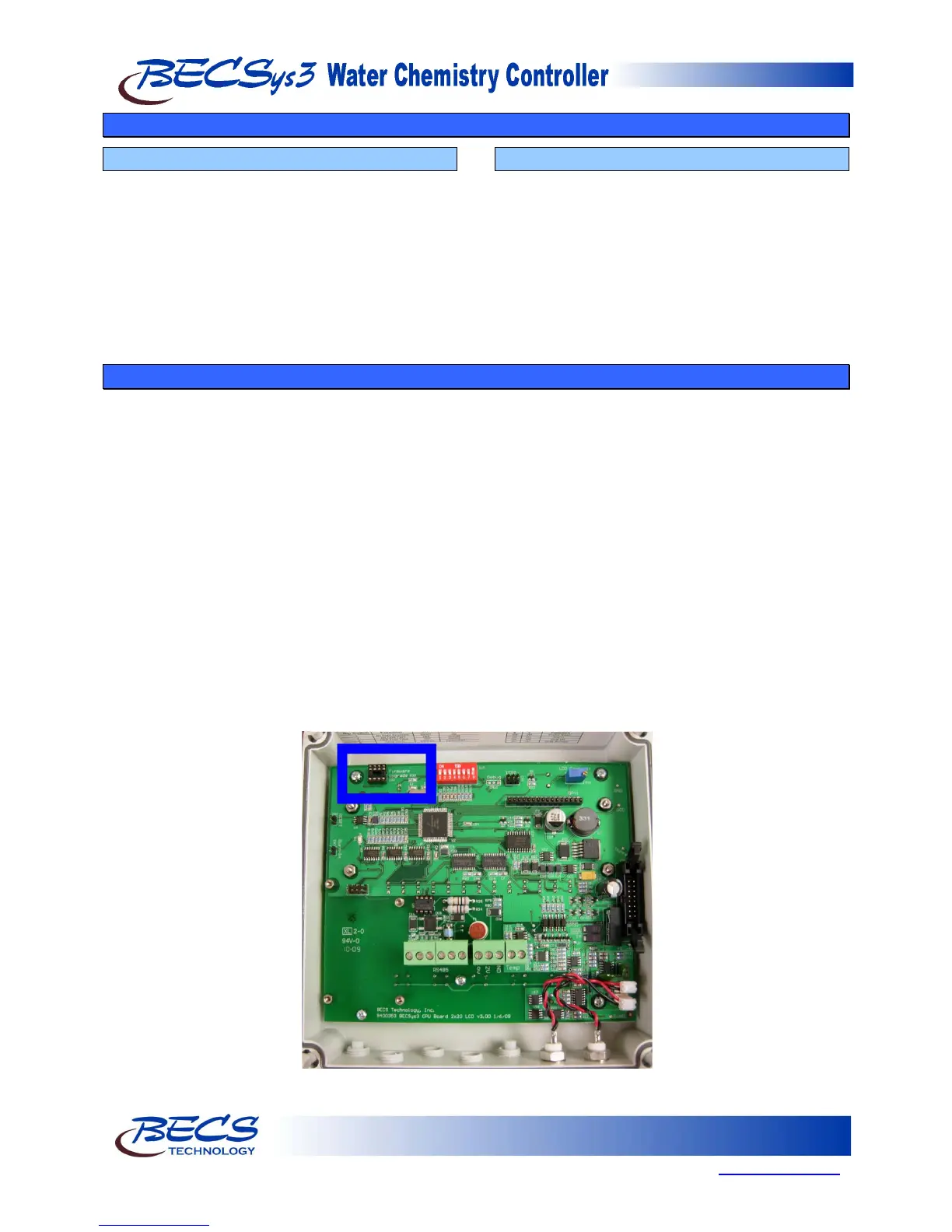
The BECSys3 Firmware can be upgraded in the field. To do so you order the upgrade Firmware, this comes on an 8 pin
dip IC and then complete the following steps:
1) Remove power from the unit.
2) Install the 8 pin dip IC into the socket labeled “Firmware Upgrade” at the top of the BECSys3 CPU board. Make
sure pin 1 is aligned properly.
3) Reapply power.
4) The unit will display the current Firmware Version followed by “Found Firmware“ and the Firmware Version on
the upgrade IC.
5) Next the BECSys3 will display “Do Not Interrupt” followed by “Upgrading Firmware” and the percentage
complete.
6) Once the Firmware upgrade is complete, the unit will display “Do Not Interrupt” followed by “Restoring Cal
Data” and the percentage complete. This restores the calibration data.
7) Finally, the BECSys3 will display “Do Not Interrupt” followed by “Upgrade Complete”. Once the upgrade has
finished, the unit will reset and start up normally.
Once the upgrade is complete, remove power from the BECSys3 and remove the Firmware Upgrade IC from the
controller. At this point, you may discard the Firmware Upgrade IC.



 To Next Page