Device communicationDevice communication
iso685-D-B_D00177_05_M_XXEN/07.2017
45
A maximum of 5 TCP/IP connections can be used simultaneously.
Only one device may access the web server at the same time. If several de-
vices try to access the web server it may result in timeouts.
The write access is deactivated by default in the device menu (= Deny). To
be able to set parameters via the web server the write access must first be
activated in the device menu (= Allow) (see “Write access” on page 42).
Use the web server preferably with the following web browsers:
Google Chrome, Mozilla Firefox or Internet Explorer.
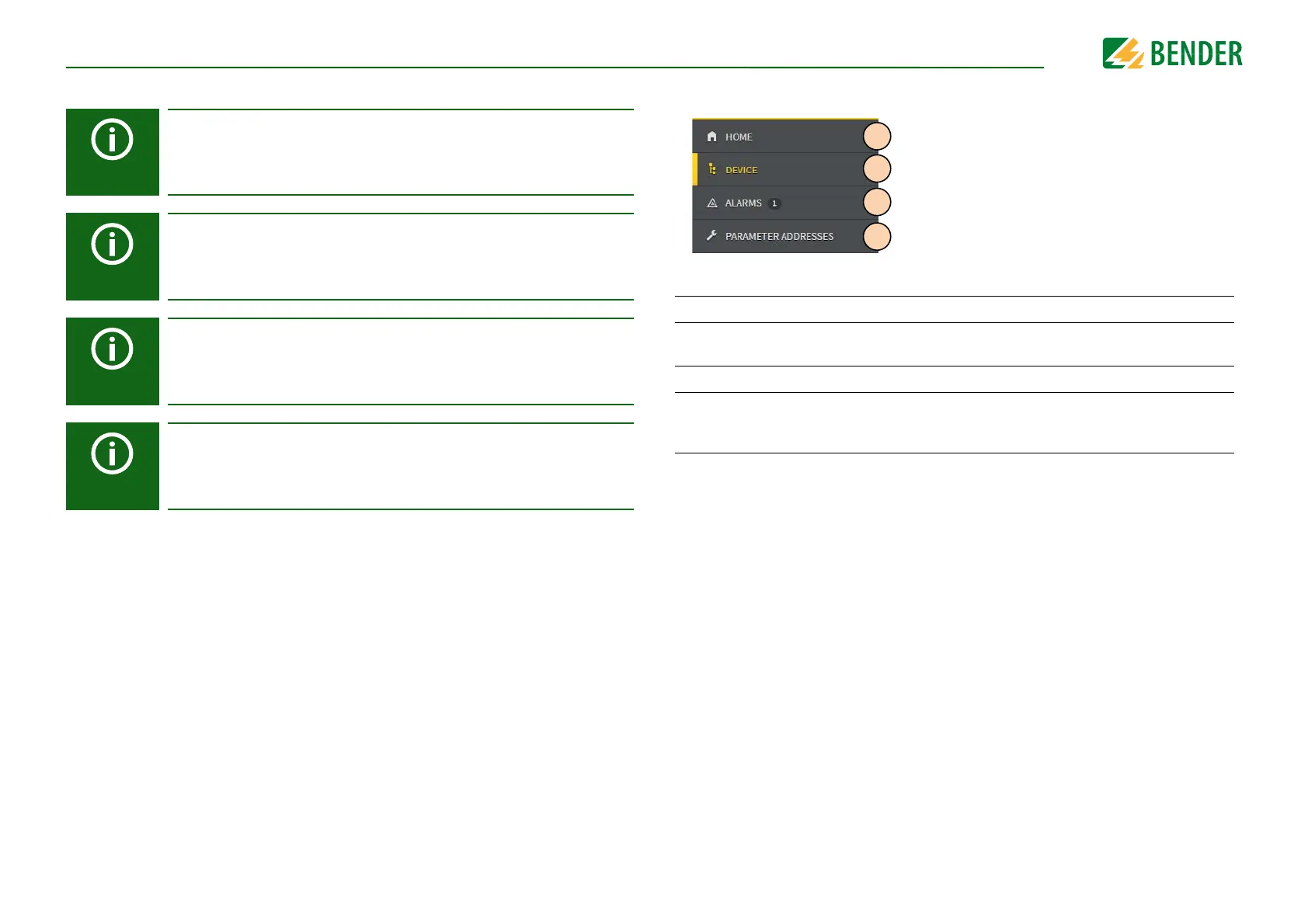
Web server device menu (first level)
Legend for web server device menu (first level)
1 START Indication of general device information.
2DEVICE
Indication of an overview of alarm values and measured values.
Indication of the settings. Settings can be changed here.
3 ALARMS Indication of alarm messages.
4
PARAMETER
ADDRESSES
Activate and deactivate the indication of the Modbus information by
selecting or deselecting the selection box for the question "Display
additional Modbus information for each parameter?".










 To Next Page