BENNING IT 115 Device description
- 13 -
3 Device description
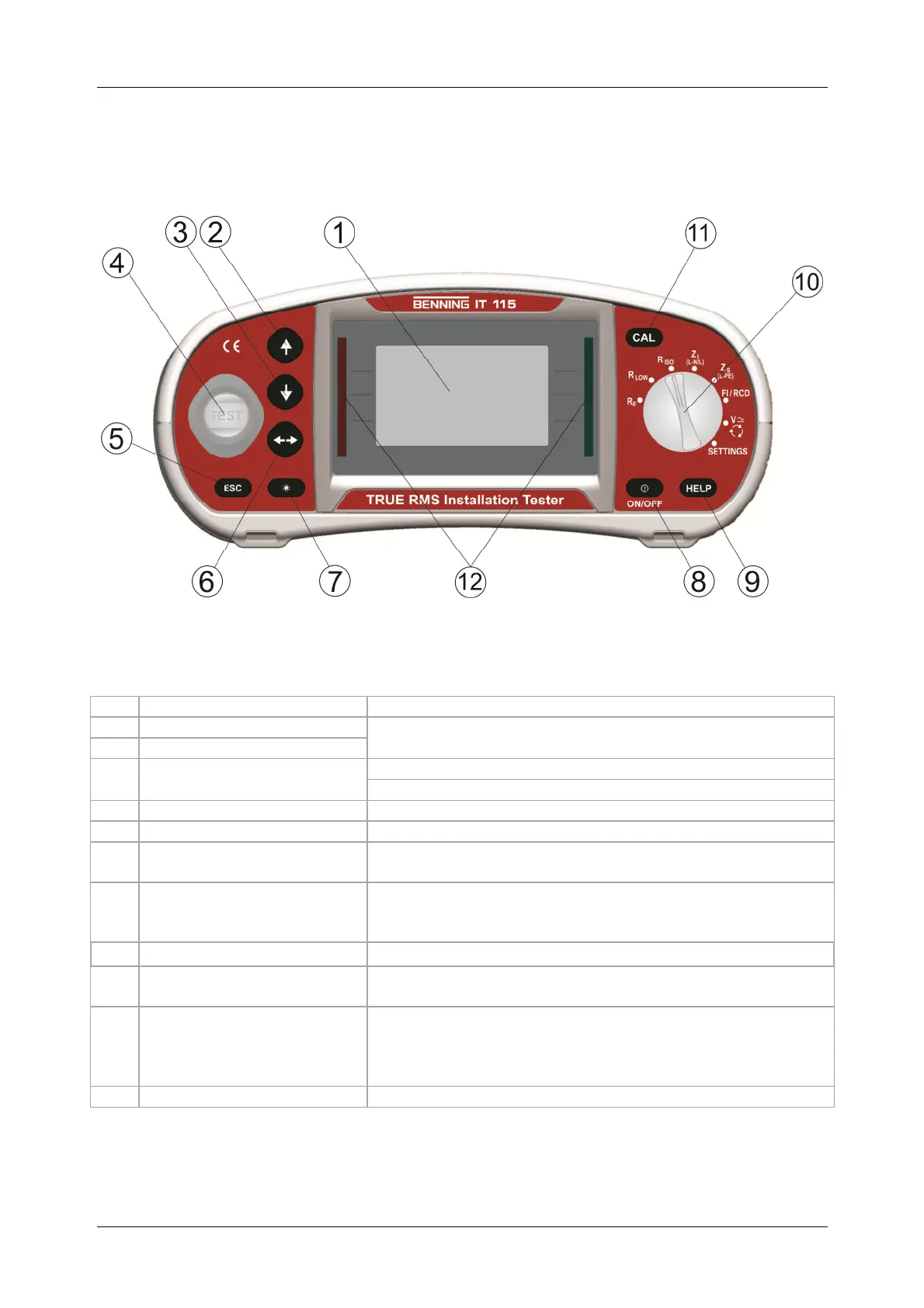
3.1 Front panel
Figure 3.1: Front panel
Caption:
1
Matrix display with 128 x 64 pixels and background lighting
2
Modifies selected parameters
3
4
TEST
Start of measurement
PE contact electrode for protective conductor connection
5
Back / cancel
6
Selects parameters in the measuring function selected
7
Contrast
Modifies background lighting and contrast
8
ON / OFF
Switches the tester on or off;
automatic switch-off ("APO") after 15 minutes without
pressing a key
9
HELP
Help function with connection diagrams
10
Function selector switch
Rotary switch for selecting the measuring functions and
"SETTINGS" mode
11
CAL
For calibrating the test cables in the R LOW and
CONTINUITY function
Starts the Z
REF
measurement in the sub-function ΔU
voltage drop
12
PASS / FAIL indication of the measuring results



 To Next Page