Parts of the display and their functions 11
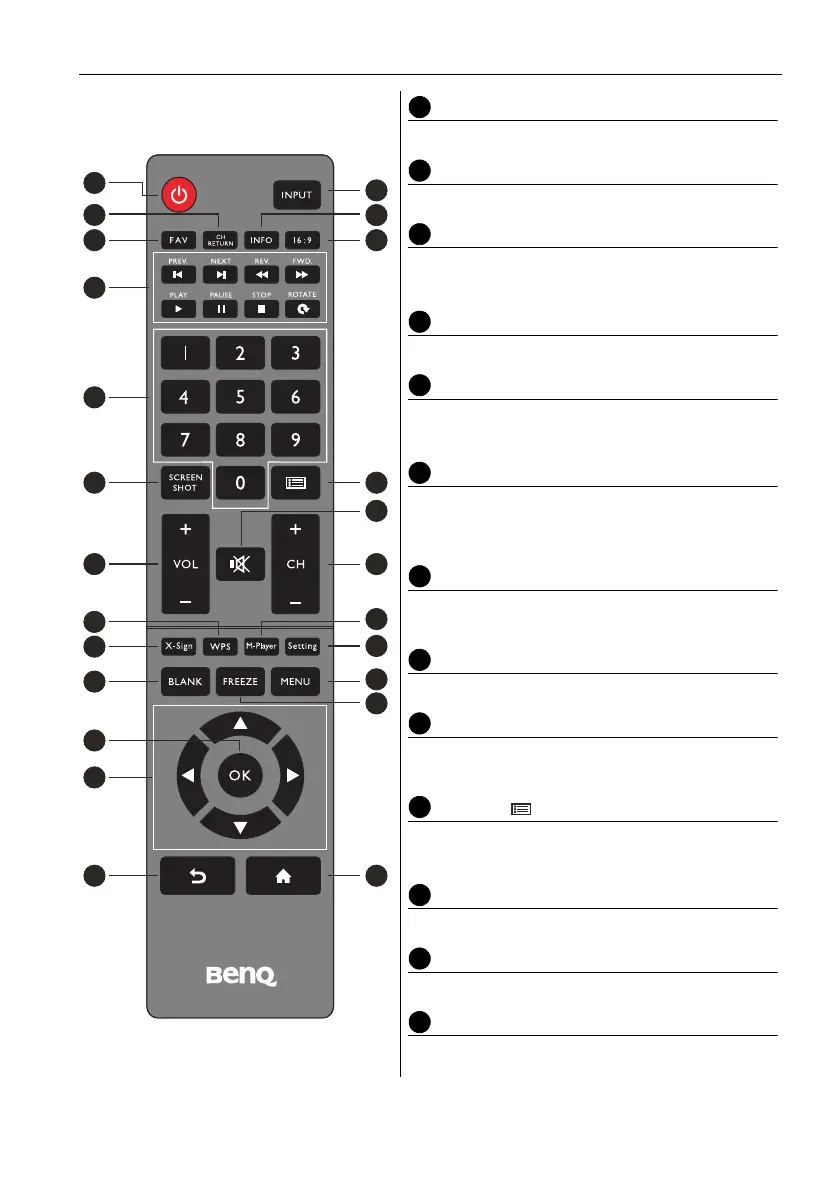
Remote control
POWER
Turn the display on or off.
INPUT
Select the input source.
CH RETURN
TV Channel return
Note: It is only working on some specific regions.
INFO
Show the information of the current input source.
FAV
Favorite TV program
Note: It is only working on some specific regions.
16:9
Change the display image to the different mode
under non-Android system Mode: Full, 4:3, Film,
Subtitle, PC mode.
MULTI-MEDIA buttons
The buttons are used to operate the media
functions under Multi-Media APP.
Numeric buttons (0-9)
Press to enter numbers.
SCREEN SHOT
Capture the printed screen and save to the USB
drive.
CHLIST ( )
Delete a character / view program list.
Note: It is only working on some specific regions.
MUTE
Turn on/off the sound.
VOL- / VOL+
Turn up/down the volume.
CH+ / CH-
Change program channels.
2
3
1
7
8
9
12
16
14
18
22
21
23
5 6
4
10
13
11
17
15
19
24
20



 To Next Page