4
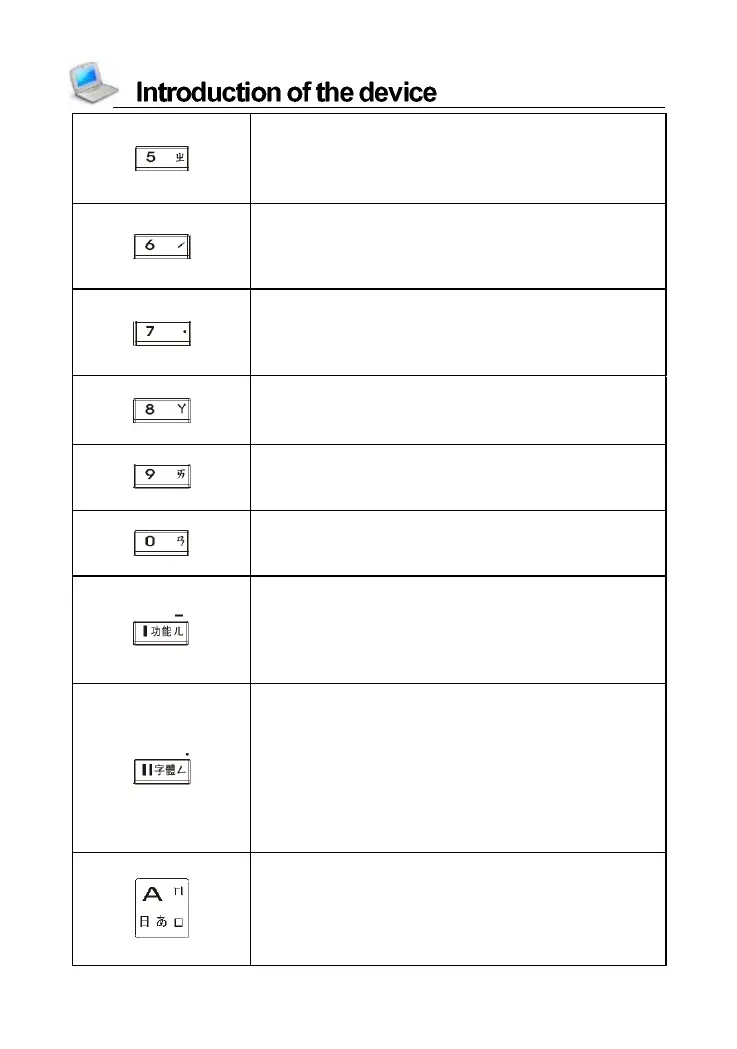
Numeric key “5”
Chinese phonetic symbol “ㄓ”
The light tone of Pinyin input method
Input symbol “%” with [SHIFT] key
Numeric key “6”
The second tone of phonetic/Pinyin input
method
Input symbol “?” with [SHIFT] key
Numeric key “7”
The light tone of phonetic/Pinyin input
method
Input symbol “,” with [SHIFT] key
Numeric key “8”
Chinese phonetic symbol “ㄚ”
Input symbol “*” with [SHIFT] key
Numeric key “9”
Chinese phonetic symbol “ㄞ”
Input symbol “ (” with [SHIFT] key
Numeric key “0”
Chinese phonetic symbol “ㄢ”
Input symbol “)” with [SHIFT] key
Select item “I” in the main menu
Chinese phonetic symbol “ㄦ”
Open “Function” menu, same as [Func] on
the screen
Hyphen “-” with [SHIFT] key
Select item “II” in the main menu
Chinese phonetic symbol “ㄥ”
Switch font size on the explanation screen of
dictionaries and detail view screen of PIM,
provides magnifying the highlighted words.
With [SHIFT] key, input symbol “.” in English
input mode; input space mark in Japanese
input mode; input decimal point in calculator
English letter “A”
Chinese phonetic symbol “ㄇ”
ChangJie/Simplified ChangJie input method
“日”
Japanese kana in “あ” line



 To Next Page