78
1.5.1 Editing Data (Take “Name Card” as Example)
* Click “New Record” “Name Card”. You may append Name Card
data on the editing screen. (as picture 3)
* To modify the content, double click the entry. (as picture 4)
* To copy, paste or delete one or more entries, select the entries first.
Notes:
Tap “Custom page”, and then Click the blank area of “Portrait” to import
BMP or JPG file as Name Card portrait.
1.5.2 Custom Field
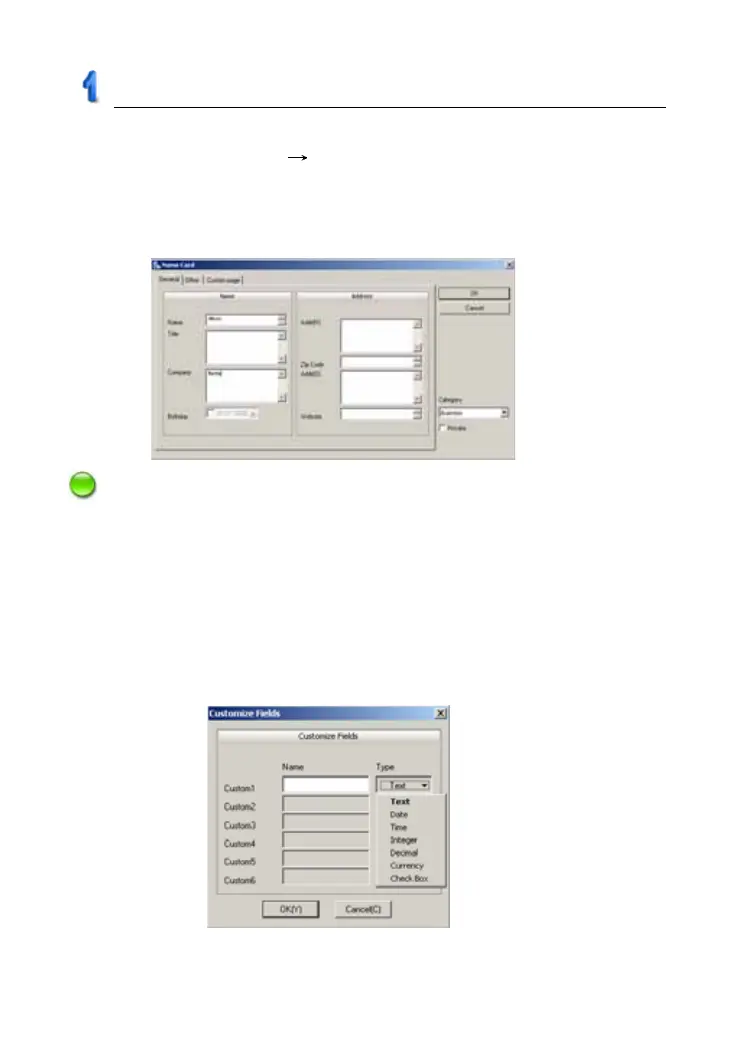
Click “Edit Custom Fields” to add custom fields besides the built-in
fields. Up to 6 field types can be selected: text, date, time, integer, decimal,
currency, or check box, shown in picture 5.
picture 4
picture 5
PC Service Home Guide



 To Next Page