MCS-D 200 – Putting into operation
9
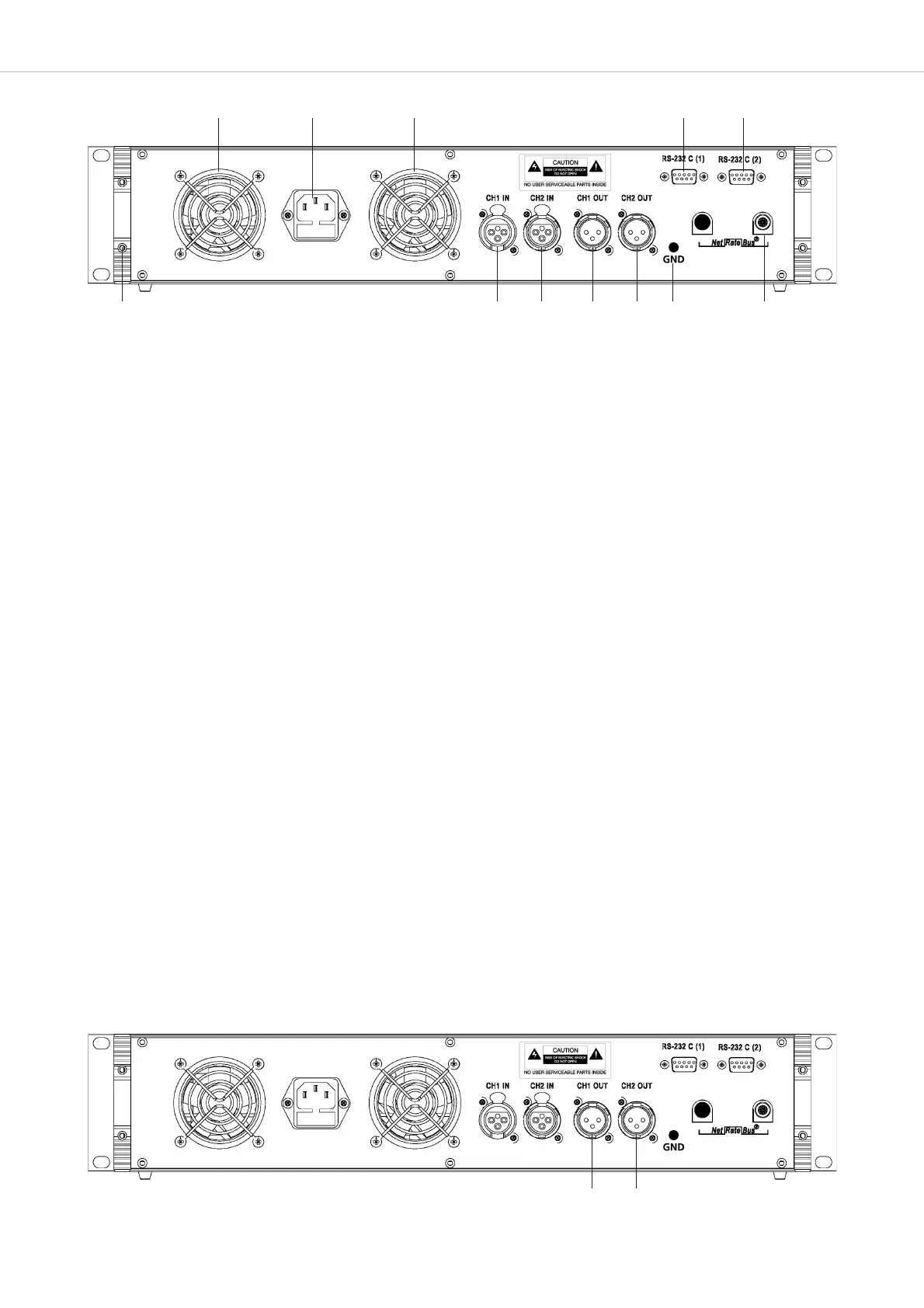
Mains connection with fuse (6.3 A safety fuse)
NetRateBus conference sockets, MCS-D 200 with 1 Push-Pull socket to connect other power supply units for example.
Fan outlet (number of fan outlets depends on the number of power supply units integrated into the control unit)
RS 232 C (1). 9-pin Sub-D connection for PC or media control system.
Note: A PC is connected via a null modem cable.
If you use other devices, please observe the pin wiring. The configuration is done via the control unit.
RS 232 C (2). The connection corresponds to RS 232 C (1).
CH1 IN: XLR LINE IN input (female), 0 dBm, balanced. The input signal is routed to the loudspeakers of the microphone
stations or to any output. Settings are done via the control unit.
CH2 IN: XLR LINE IN input (female), 0 dBm, balanced. The input signal is routed to the loudspeakers of the microphone
units or to any output. Settings are done via the control unit.
CH1 OUT: XLR LINE OUT output (male), 0 dBm, balanced. Master output of all microphones or any channel; programmable
for recording or broadcasting applications.
CH2 OUT: XLR LINE OUT output (male), 0 dBm, balanced. Master output of all microphones or any channel; programmable
for recording or broadcasting applications.
Ground
End profile
Note:
For more inputs and outputs connect a CA 45xx D/A Interface.
Rear view
3.2 Putting into Operation
3.2.1 Audio Connection
• Connect the master output or of the MCS-D 200 control unit to the input of a mixing console or mixing amplifier.
• Always route cables running to the unit where they will not be damaged by heavy or sharp objects












 To Next Page