VD (E2.1) 10/2011 page 44/83
Deactivate the week program timer (factory setting, setting in the user level, chap. 10) before
starting a program.
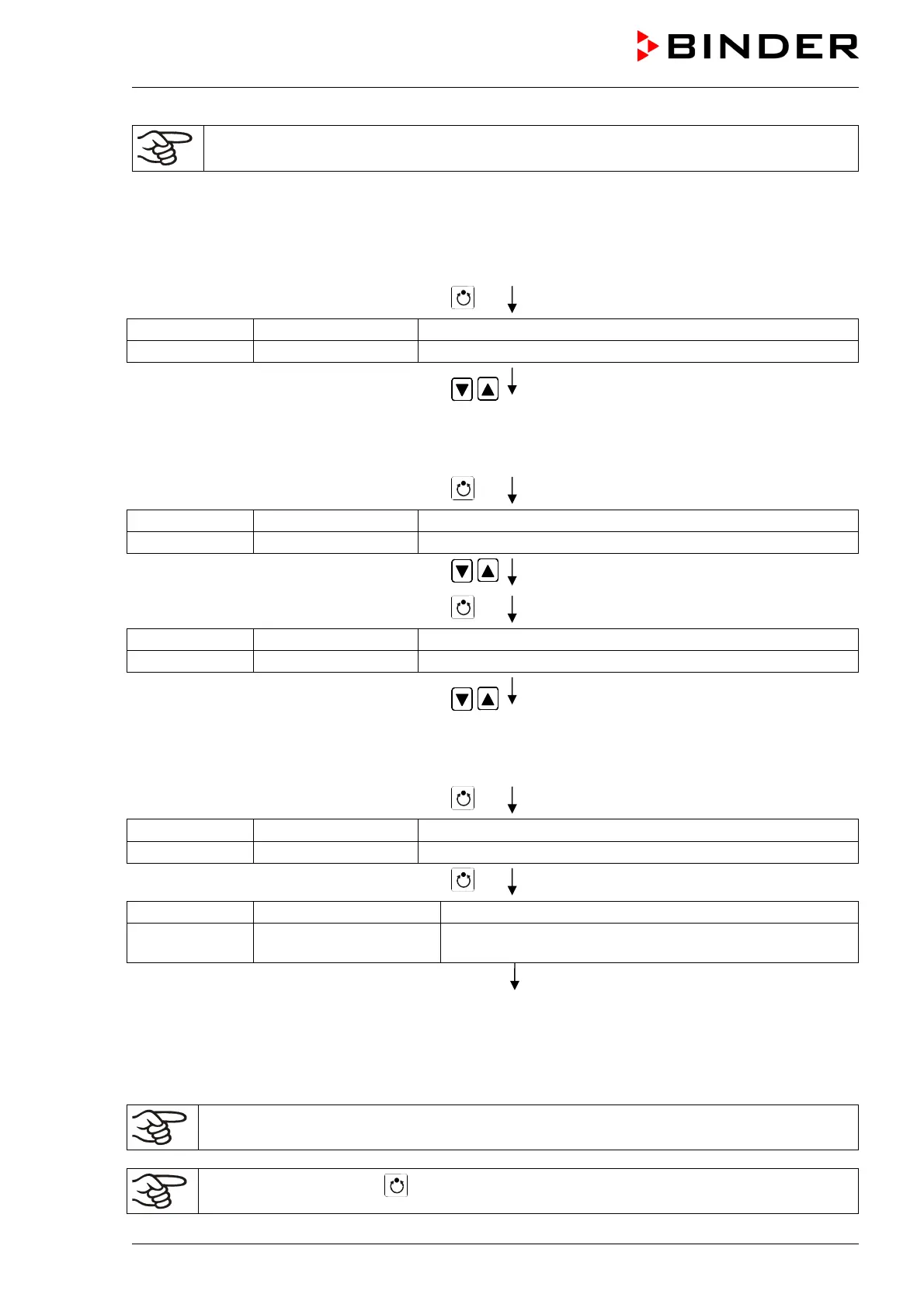
Step 1 – Program selection (only with program type “2 programs” set)
Normal Display
Press program key
Display 1 shows e.g. 1 (actual selection of the program)
Display 2 shows SEL.PRG. (select program 1 or 2)
Enter program number 1 or 2 with
arrow keys
Value is shown in display 1.
Next step – entry of program course settings
Press program key
Display 1 shows e.g. 00.00 (entered delay time hh.mm)
Display 2 shows RUN TIME (enter delay time of program start)
Set delay time in hh.mm using arrow keys Value is shown in display 1.
Press program key
Display 1 shows e.g. -1 (actual selection of the number of program cycles)
Display 2 shows REPEAT (enter number of program cycles)
Select number of cycles -1, 0, 1 etc. using
arrow keys
Value is shown in display 1.
Last step – program start
Press program key
Display 1 shows e.g. 1 (selected program)
Display 2 shows RUN PRG. (Question: start selected program?)
Press program key
Display 1 shows e.g. 25.5
C
actual temperature value
Display 2 shows P01:S01 00:29:39
(time running backwards)
(actual program P01, actual section S01, and remaining
time of program section S01)
Program is running. The green LED (7d) lights up.
In addition to the green LED (7d) indicating a running program, the LED (7a) is lit if the heating is active,
or not lit if the actual temperature equals the set-point.
During program course the arrow keys and the EXIT button are not functional.
By pressing program key for 3 seconds, you can terminate the program course.



 To Next Page