Page 76
724-746-5500 | blackbox.com
Chapter 3: Installation
Table 3-2. Video matrix components.
Number Description
1 Video sources, for example, an SDI camera
2 Interconnect cable
3 ServSwitch DKM FX or FXC
4 Monitors/Displays
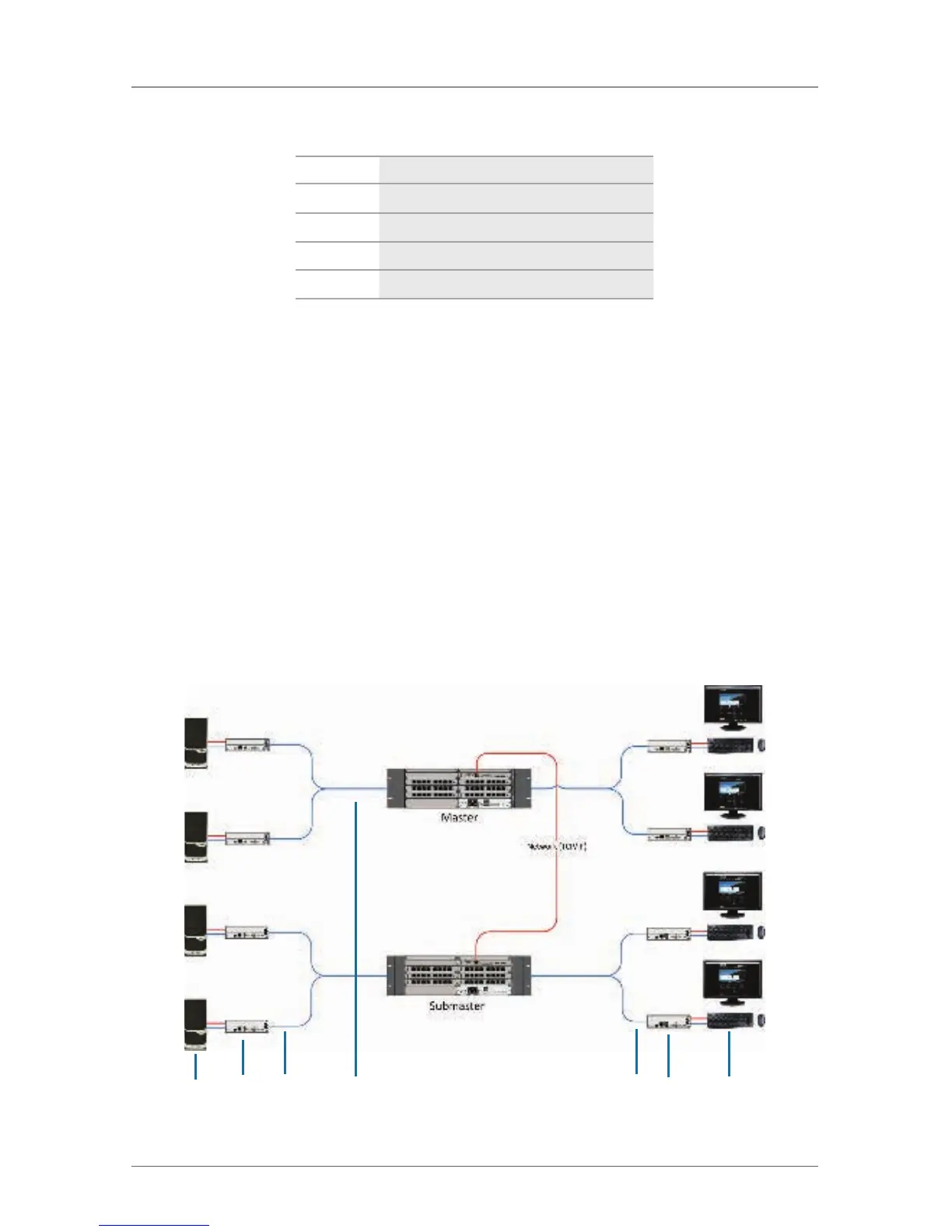
3.3.3 Parallel Operation (Stacking)
If you have special configurations, especially at installations with several monitors
per workstation, or you need additional support for USB 2.0 transmission paths,
you can increase the number of CPUs and consoles connected using a parallel
operation (stacking) of several ServSwitch DKM FX devices.
One of the DKM FX or DKM FX Compact matrices has to be defined as the
master matrix. All the others have to be configured as slave matrices and the IP
address of the master matrix has to be entered in the Master IP Address field.
They have to be connected to the master matrix via the network connector
(RJ-45) of the CPU board. The option Enable LAN Echo has to be activated at the
master matrix.
If a switching command is done in the OSD, the slave matrices will also switch
automatically.
NOTE: Switching of stacked devices might be delayed by several seconds.
1 2 3 4 5 6 3 7 8
Figure 3-3. Parallel operation (stacking) application.



 To Next Page