5 Using the Device
25
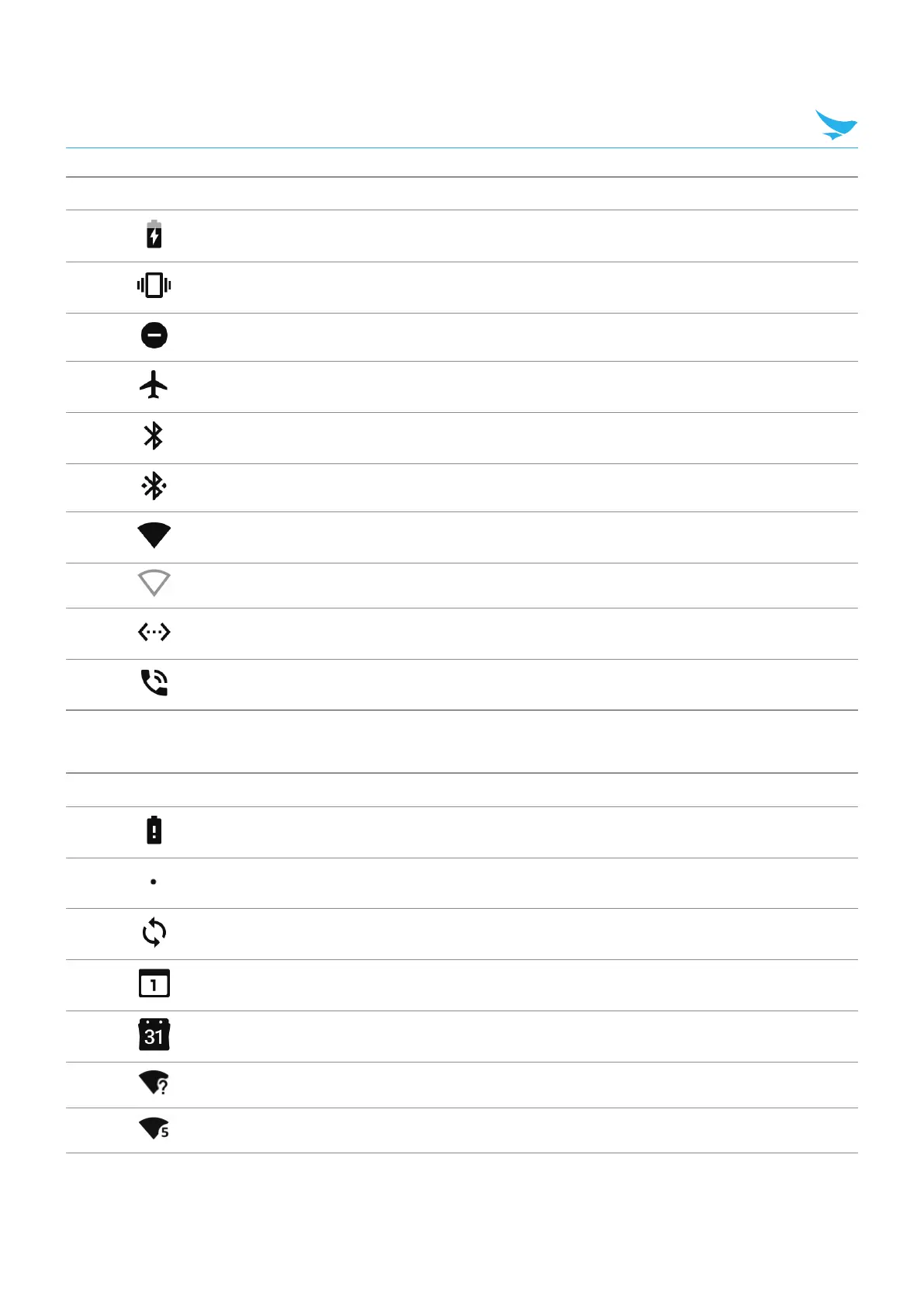
Icon Description
Main battery is charging.
All sounds, except media and alarms, are silenced and vibrate mode is active.
Do Not Disturb mode active.
Airplane Mode is active. All radios are turned off.
Bluetooth is on.
The device is connected to a Bluetooth device.
Connected to a Wi-Fi network.
Not connected to a Wi-Fi network or no Wi-Fi signal.
Connected to an Ethernet network.
Speakerphone enabled.
5.10.2 Notification Icons
Icon Description
Main battery is low.
More notifications are available for viewing.
Data is syncing.
Indicates an upcoming event. Non-GMS devices only.
Indicates an upcoming event. GMS devices only.
Open Wi-Fi network is available.
Connected to a Wi-Fi network. Indicates the Wi-Fi version number.



 To Next Page