not start. The check consists
of the following steps:
Check for presence of a pro-
tective earth
Check of the preconditions for
correct charging
Status indicators / fault mes-
sages are listed in the section
entitled "Technical data".
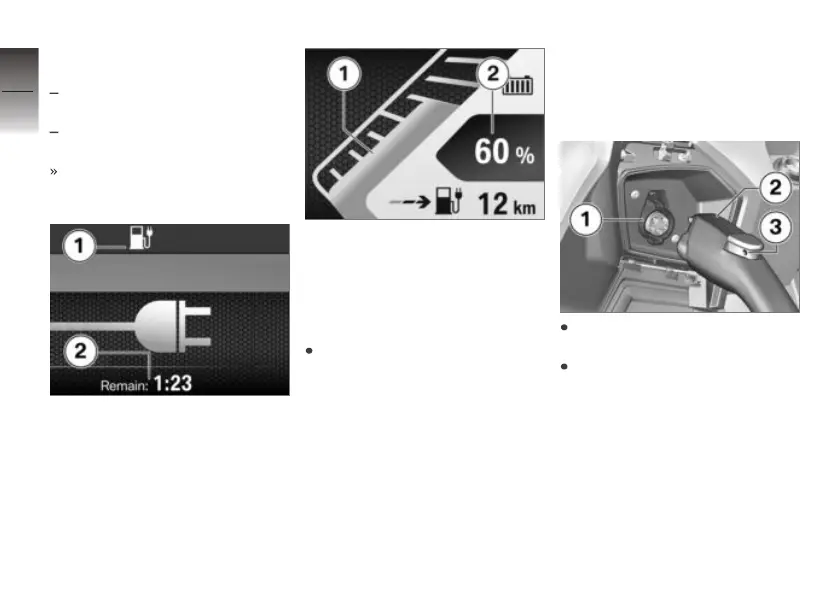
Symbol 1 for charging in pro-
gress and the residual charging
time 2 appear on the multifunc-
tion display.
Bar display 1 for charge state
appears. Charge state is also
shown as a percentage 2. After
a certain time the TFT display
switches automatically to energy-
saving mode (Stand-by-Modus).
Short-press the INFO or
TRIP button again if you want
to recheck charging status.
Ending charging process
It is very important to step
through the procedure in the
correct sequence when ending
the charging process.
Unlatch the cable plug before
disconnecting. If you are char-
ging at a charging station, end
the charging process at the char-
ging station before disconnecting
the charging cable.
If applicable, remove the secur-
ity lock from hole 3.
Press release button 3 and dis-
connect charging cable 2 from
charging socket 1 on the E-
Scooter.
6
64
z
BMW ePOWER



 To Next Page