connect the charging cable to
the vehicle. The check con-
sists of the following steps:
Check for incorrect wiring in
the wall socket
Check for presence of a pro-
tective earth
Check of the preconditions for
correct charging
Status indicators / fault mes-
sages are listed in the section
entitled "Technical data". Fault
messages can be reset as fol-
lows:
Disconnect the standard char-
ging cable from the power sup-
ply by unplugging it from the
wall socket.
Wait 3 seconds and re-insert
the plug.
Critical faults indicating that
the standard charging cable
is damaged cannot be reset.
These faults include:
Relay welded (device perman-
ently faulty)
Temperature sensor faulty
Fault-current test returned a
negative result
Check the maximum permiss-
ible continuous charging cur-
rent rating of the wall socket.
Before charging for the first
time, set the maximum char-
ging current either directly by
means of buttons 3 on the
standard charging cable, or at
the charging station.
Your setting is automatically
saved after two seconds. Cor-
responding charging-current in-
dicator 1 flashes twice in con-
firmation.
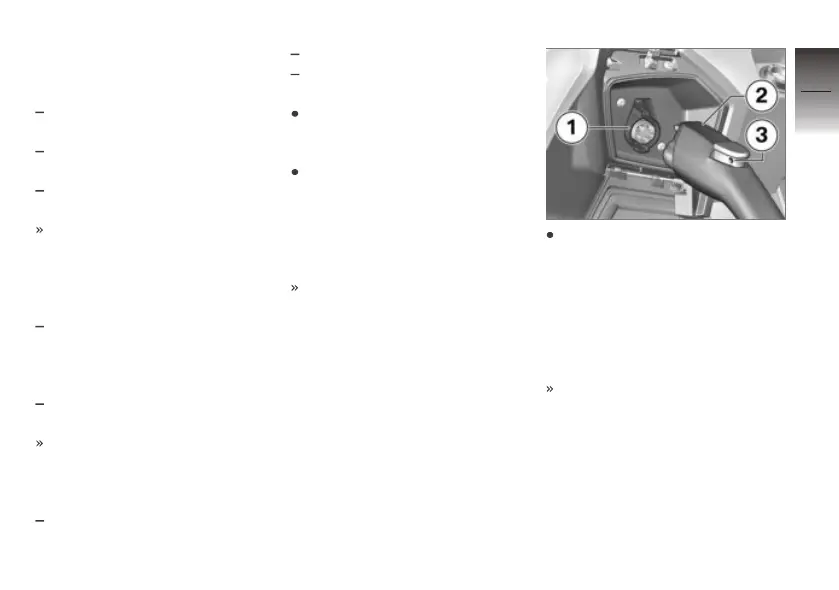
Connect charging cable 2 to
charging socket 1 of the E-
Scooter. To do so, line up the
charging-cable connector with
the socket and push it in until
it engages. A security lock can
be inserted into hole 3 to pro-
tect against tampering.
The standard charging cable
automatically runs all the ne-
cessary check steps. Symbol 4
shows green to indicate that
the checks completed suc-
cessfully, and charging com-
mences. If symbol 4 shows
red the check did not complete
successfully and charging can-
6
63
z
BMW ePOWER



 To Next Page