Part III: Advanced Commands
EXTEND CLOSING (COMMAND + 5 + 1)
D1260 Owner’s Manual
50410C © 2003 Bosch Security Systems
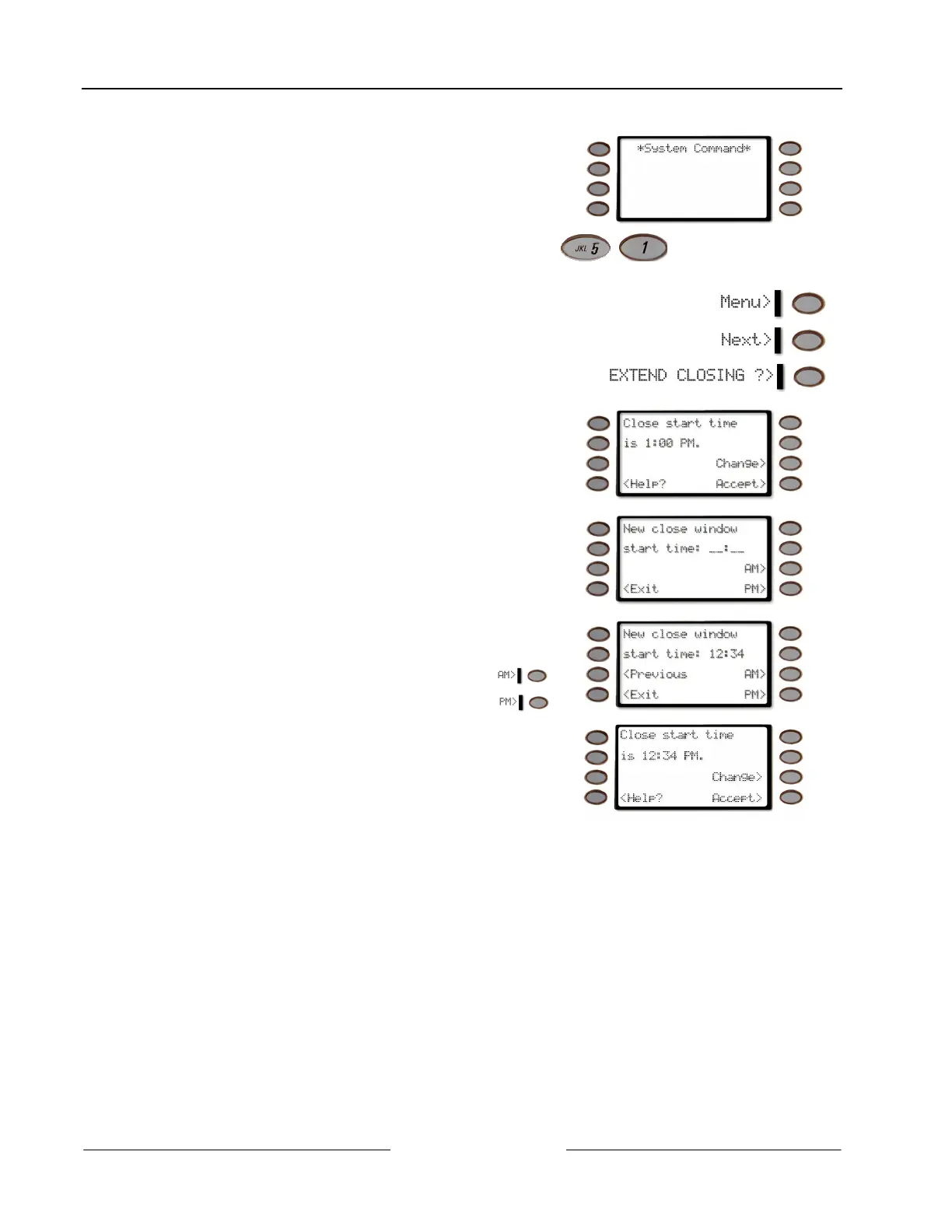
3. The display shows *System Command*.
4.
Press the 5 key and then the 1 key.
Note: If you prefer, you may use the Command Menu in place of steps 2 and 3 to initiate this function.
Press the Menu> soft key to enter the Command Menu,
then press Next> soft key repeatedly
until you reach the EXTEND CLOSING ?> prompt then press the
adjacent soft key.
5. The display changes to show the current start time.
Press the Change> soft key to change the start time.
Press the Accept> soft key to accept the start time and
return to idle text.
6. If the Change> soft key was pressed, the display
changes to New close window start time:
Enter the new time using a 12-hour (HH:MM) format.
Ex: If the desired time is 12:34, press [1] [2] [3] [4]
Press the AM> soft key to select AM.
Press the PM> soft key to select PM.
7. The display changes to show the new start time briefly
before returning to idle text.
8. Press the Accept> soft key to accept the Close Start
time.



 To Next Page