Part III: Advanced Commands
EXTEND CLOSING (COMMAND + 5 + 1)
D1260 Owner’s Manual
© 2003 Bosch Security Systems 50410C
EXTEND CLOSING (COMMAND + 5 + 1)
Your system may be programmed to expect you to arm within a scheduled closing window, which is a duration of time
that is programmed by your alarm company. Your system may also be programmed to automatically arm at the end of
the window.
COMMAND 51 lets you extend the scheduled closing window time either prior to the closing window time or during the
closing window time. Use this function when you expect to stay past the scheduled end of the closing window. Your
alarm company sets the length of time prior to the start of the closing window in which you are allowed to extend the
closing window.
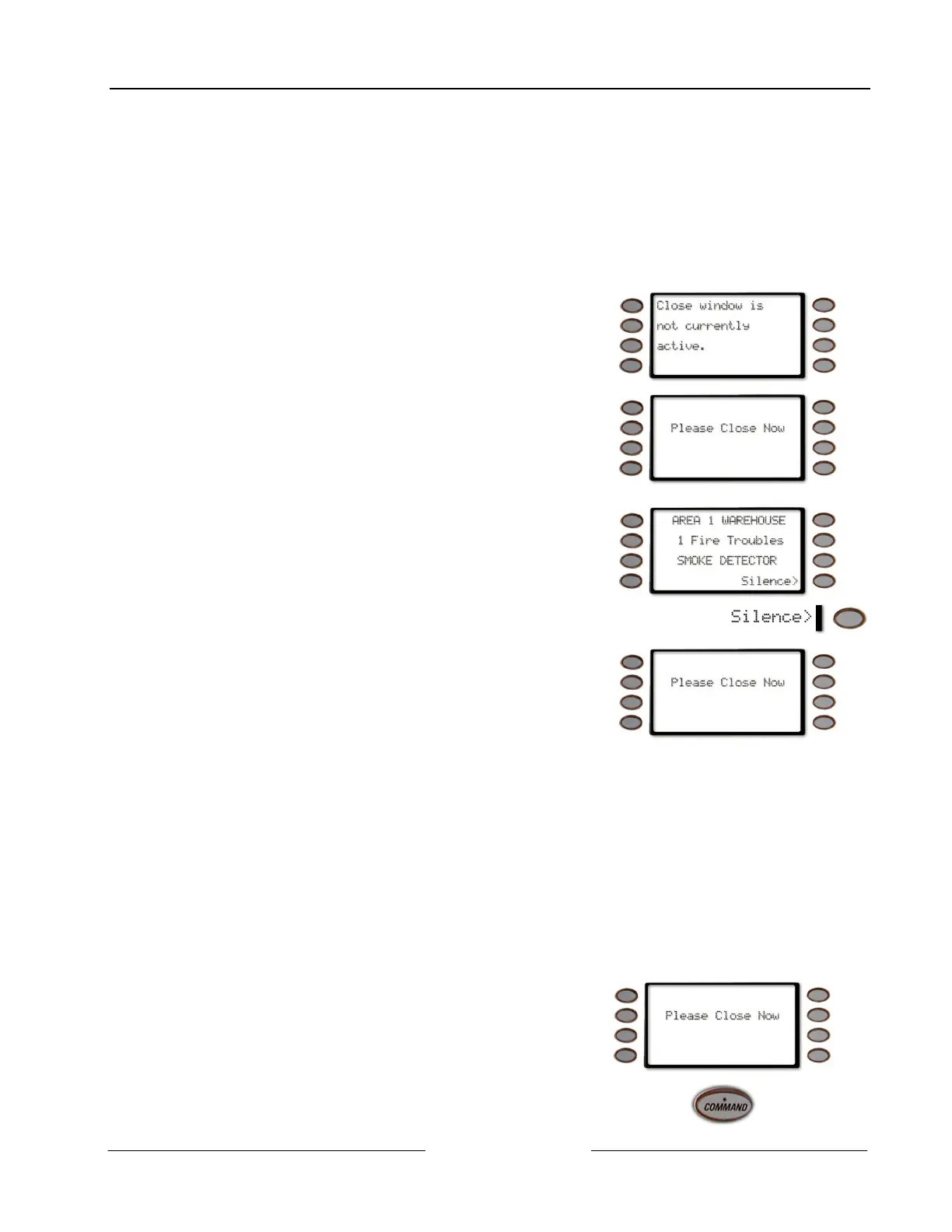
Close window is not currently active displays during the time when the
command center won’t allow the window to be extended.
At the beginning of the closing window, the command center beeps and
displays Please Close Now to remind you to arm your system. It remains
in the display until you arm, the close window ends, or you extend
closing.
Note: The closing window can only be extended once the window has
started.
Alarm or trouble messages replace this message in the event of an alarm
or trouble condition.
Pressing the Silence> soft key will silence the beep and clear the message
for 10 minutes.
If the alarm or trouble condition clears before the end of the close
window Please Close Now message returns to the command center
display.
If you have not armed or extended closing, the Please Close Now message and beep will reappear after 10 minutes. Your
alarm company sets the length of time for the closing window. To extend the window, enter the new time at which you
would like the reminder tone to begin. This time will be the new beginning of the closing window. The time length of the
closing window is programmed by your security company and remains fixed.
When you hear the warning you can:
• Press the Silence> soft key will silence the beep and clear the message for 10 minutes
• Leave before the end of the closing window
• Stay past the scheduled end of the closing window, by using COMMAND 51 to extend the closing window.
Note: Extending the closing window does not effect the amount of time available to close.
For example, if your closing window starts at 4:00 p.m. and stops at 4:30 p.m. and you extend closing to 5:00 p.m.,
the closing window will now be between 5:00 and 5:30 p.m.
1. At the beginning of the closing window, the command
center beeps and displays Please Close Now to remind
you to arm your system. It remains in the display until
you arm, the close window ends, or you extend
closing.
2.
Press the COMMAND key.



 To Next Page