Part III: Advanced Commands
ADD/CHANGE USER (COMMAND + 5 + 6)
D1260 Owner’s Manual
50410C © 2003 Bosch Security Systems
Add/Change Card
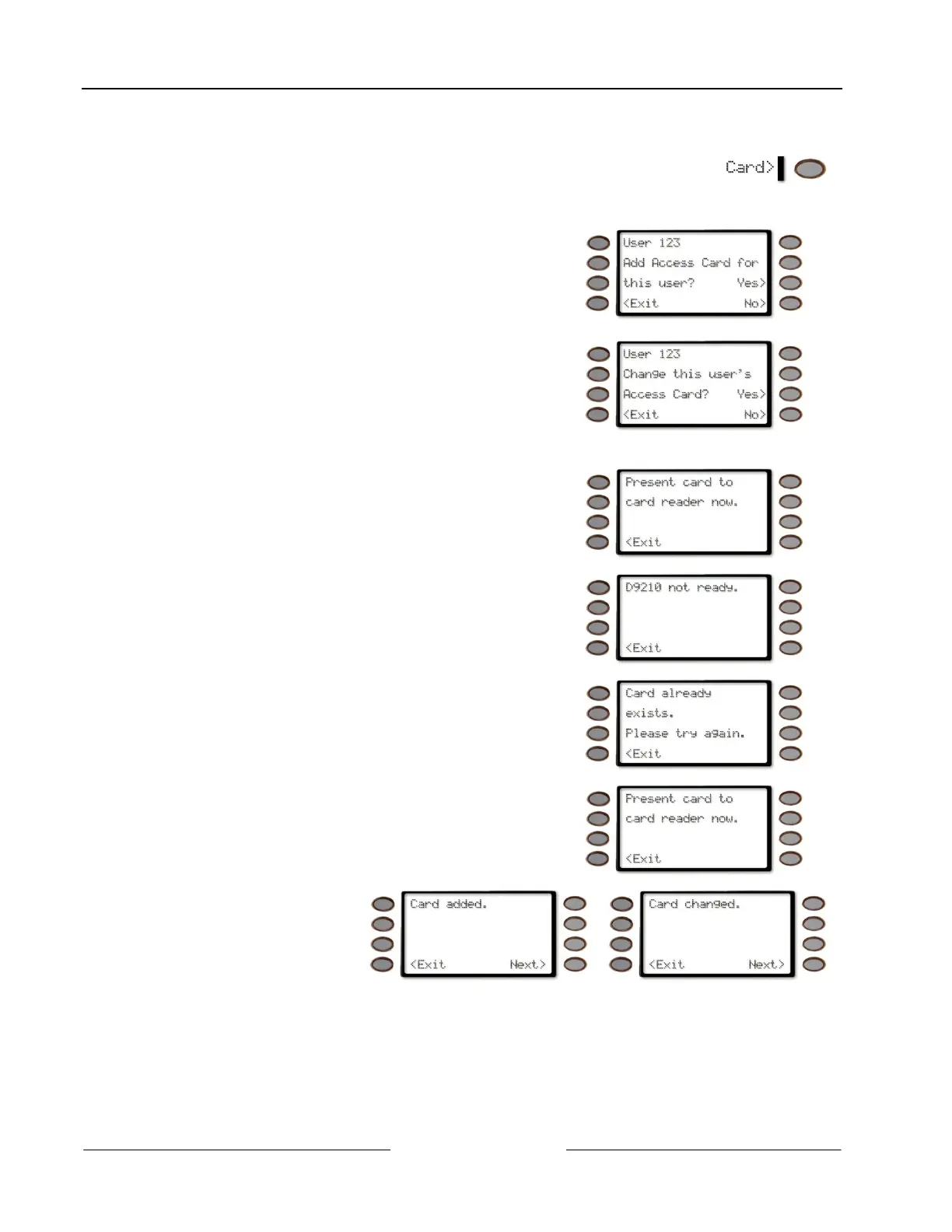
1. Pressing the Card> soft key will allow you to
add/change a user’s access card or credential.
2. The display changes to either one of the following depending on if an access card exists for the user:
User 123 Add Access Card for this user? - if no access
card exists for that user.
Pressing the Yes> soft key will jump to Step 3.
Pressing the No> soft key will jump to Add/Change
Level.
User 123 Change this user’s Access Card? -if an access
card already exists for this user and you wish to change
it. (In both cases, 123 is used as an example)
Pressing the Yes> soft key will jump to Step 3.
Pressing the No> soft key will jump to Add/Change
Level.
3. If a card reader is connected to your system, the
display changes to Present card to card reader now.
Pressing the <Exit soft key exits out of this function
and returns the display to idle text.
If the display changes to D9210 not ready, contact
your security company.
Pressing the <Exit soft key exits out of this function
and returns the display to idle text.
4. If the card you are trying to add to the system already
exists, an error tone sounds and the display changes to
Card already exists. Please try again.
Pressing the <Exit soft key exits out of this function
and returns the display to idle text.
Then the display returns to Present card to card reader
now.
Pressing the <Exit soft key exits out of this function
and returns the display to idle text.
5. If the card is accepted,
the display changes to
either Card added. or
Card changed if the
card already exists in
your system.
Pressing the <Exit soft key exits out of this function and returns the display to idle text.



 To Next Page