13
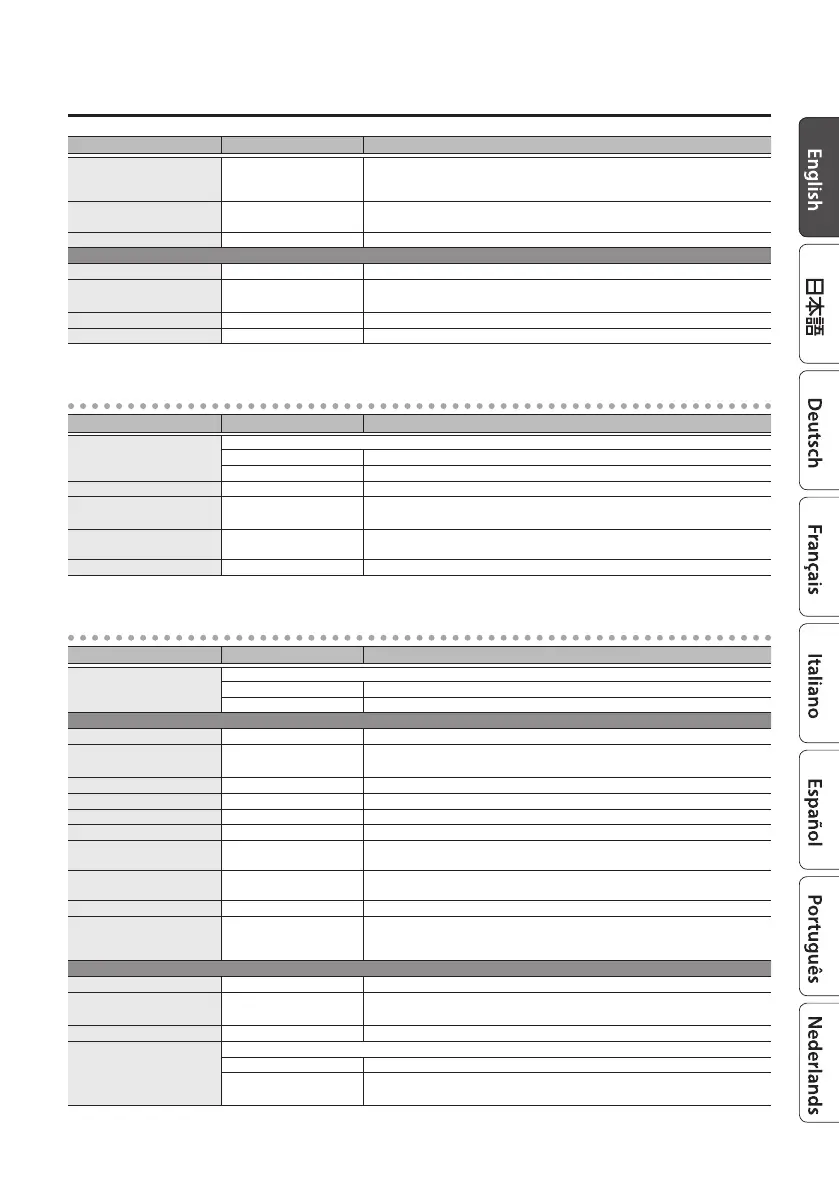
Parameter List
Parameter Value Explanation
STEP RATE
OFF,
ª
–
`
Adjusts the rate of the step function which varies the rotation in a step-wise
manner. Higher settings make the change occur in smaller steps. Turn this “OFF”
if you don’t want to use the step function.
Bi-PHASE OFF, ON
Species whether the two phase shift circuits are connected in series (ON) or
not (OFF).
OUTPUT MODE MONO, STEREO Species whether the output is mono (MONO) or stereo (STEREO).
SCRIPT
RATE 0.01–20.00 Hz Adjusts the speed of rotation.
BPM 6.0–600.0
Species the tempo.
The range of this setting depends on the RATE or NOTE value.
NOTE
`
–
Œ
Adjusts the speed of rotation, specied as a note value relative to BPM.
DEPTH 0–100 Adjusts the depth of the rotation eect.
CLASSIC-VIBE
Parameter Value Explanation
TYPE
Selects the type of output.
CHORUS Direct sound and eect sound are mixed and output.
VIBRATO Only eect sound is output.
RATE 0.01–20.00 Hz Adjusts the rate at which the eect is applied.
BPM 6.0–600.0
Species the tempo.
The range of this setting depends on the RATE or NOTE value.
NOTE
`
–
Œ
Adjusts the rate at which the eect is applied, specied as a note value relative
to BPM.
DEPTH 0–100 Adjusts the depth at which the eect is applied.
VIBRATO
Parameter Value Explanation
TYPE
Selects the type of vibrato.
PRIME A vibrato unique to the MD-500. A wide range of settings are possible.
SCANNER Simulates the scanner vibrato of a tonewheel organ.
PRIME
RATE 0.01–20.00 Hz Adjusts the rate of vibrato.
BPM 6.0–600.0
Species the tempo.
The range of this setting depends on the RATE or NOTE value.
NOTE
`
–
Œ
Adjusts the rate of vibrato, specied as a note value relative to BPM.
DEPTH 0–100 Adjusts the depth at which vibrato is applied.
COLOR 0–100 Higher settings produce a more complex modulation.
TRIGGER OFF, ON Turns the vibrato on/o.
RISE TIME 0–100
Species the time from when trigger turns on until the specied vibrato eect
is obtained.
ENVELOPE SENS 0–100
Adjusts the time over which the vibrato depth reaches the maximum according
to the input.
WAVEFORM 1–10 Selects the type of wave.
INPUT SENS 0–100
The vibrato depth changes according to the input. If this is set to “0,” vibrato is
applied at a xed depth regardless of the input. With higher values, less vibrato is
applied for louder input.
SCANNER
SCAN SPEED 0.01–20.00 Hz Adjusts the speed of vibrato.
BPM 6.0–600.0
Species the tempo.
The range of this setting depends on the SCAN SPEED or NOTE value.
NOTE
`
–
Œ
Adjusts the speed of vibrato, specied as a note value relative to BPM.
MODE
Selects the SCANNER mode.
V1–V3 Applies vibrato. Higher values produce a deeper eect.
C1–C3
Applies chorus. Higher values produce a deeper eect.
Mixes eect sound with direct sound, adding depth to the sound.



 To Next Page