12
Parameter List
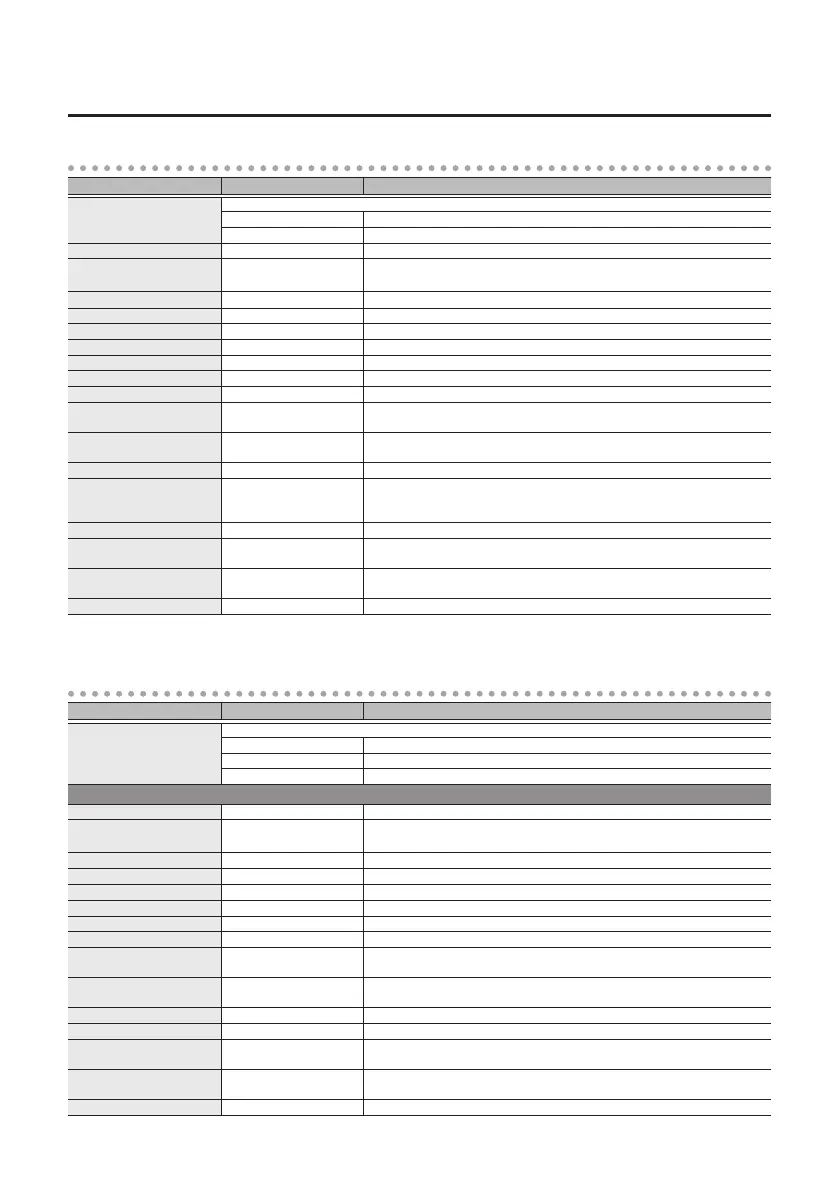
FLANGER
Parameter Value Explanation
TYPE
Selects the type of anger.
PRIME G For guitar
PRIME B For bass
RATE 0.01–20.00 Hz Adjusts the speed of modulation.
BPM 6.0–600.0
Species the tempo.
The range of this setting depends on the RATE or NOTE value.
NOTE
`
–
Œ
Adjusts the speed of modulation, specied as a note value relative to BPM.
DEPTH 0–100 Adjusts the depth of modulation.
RESONANCE 0–100 Adjusts the amount of resonance (feedback).
MANUAL 0–100 Adjusts the center frequency at which the eect is applied.
TURBO OFF, ON If this is “ON,” a more intense eect is produced.
LOW DAMP -100–0 Adjusts the amount of feedback for the low-frequency region.
HIGH DAMP -100–0 Adjusts the amount of feedback for the high-frequency region.
LOW CUT FLAT, 20–800 Hz
This sets the frequency at which the low cut lter begins to take eect. When
FLAT is selected, the low cut lter will have no eect.
HIGH CUT 630 Hz–16.0 kHz, FLAT
This sets the frequency at which the high cut lter begins to take eect. When
FLAT is selected, the high cut lter will have no eect.
SEPARATION (*1) 0–180 deg Adjusts the spread. Higher settings increase the left/right spread.
STEP RATE
OFF,
ª
–
`
Adjusts the rate of the step function which varies the rotation in a step-wise
manner. Higher settings make the change occur in smaller steps. Turn this "OFF"
if you don't want to use the step function.
WAVEFORM 1–10 Selects the type of wave.
INPUT SENS 0–100
The width of the sweep changes according to the input. Higher settings extend
the sweep.
POLARITY UP, DOWN
Species whether the sweep extends upward (UP) or downward (DOWN) when
INPUT SENS is raised.
OUTPUT MODE MONO, STEREO Species whether the output is mono (MONO) or stereo (STEREO).
*1: Unavailable if OUTPUT MODE is “MONO”
PHASER
Parameter Value Explanation
TYPE
Selects the type of phaser.
PRIME G For guitar
PRIME B For bass
SCRIPT Models the MXR Phase 90 which was manufactured during the ‘70s.
PRIME G, PRIME B
RATE 0.01–20.00 Hz Adjusts the speed of rotation.
BPM 6.0–600.0
Species the tempo.
The range of this setting depends on the RATE or NOTE value.
NOTE
`
–
Œ
Adjusts the speed of rotation, specied as a note value relative to BPM.
DEPTH 0–100 Adjusts the depth of the rotation eect.
RESONANCE 0–100 Adjusts the amount of resonance (feedback).
MANUAL 0–100 Adjusts the center frequency at which the rotation eect is applied.
LOW DAMP -100–0 Adjusts the amount of feedback for the low-frequency region.
HIGH DAMP -100–0 Adjusts the amount of feedback for the high-frequency region.
LOW CUT FLAT, 20–800 Hz
This sets the frequency at which the low cut lter begins to take eect. When
FLAT is selected, the low cut lter will have no eect.
HIGH CUT 630 Hz–16.0 kHz, FLAT
This sets the frequency at which the high cut lter begins to take eect. When
FLAT is selected, the high cut lter will have no eect.
SEPARATION 0–180 deg Adjusts the spread. Higher settings increase the left/right spread.
WAVEFORM 1–10 Selects the type of wave.
INPUT SENS 0–100
The width of the sweep changes according to the input. Higher settings extend
the sweep.
POLARITY UP, DOWN
Species whether the sweep extends upward (UP) or downward (DOWN) when
INPUT SENS is raised.
STAGE 2, 4, 8, 16, 24 Selects the structure of the phaser.



 To Next Page