15
Parameter List
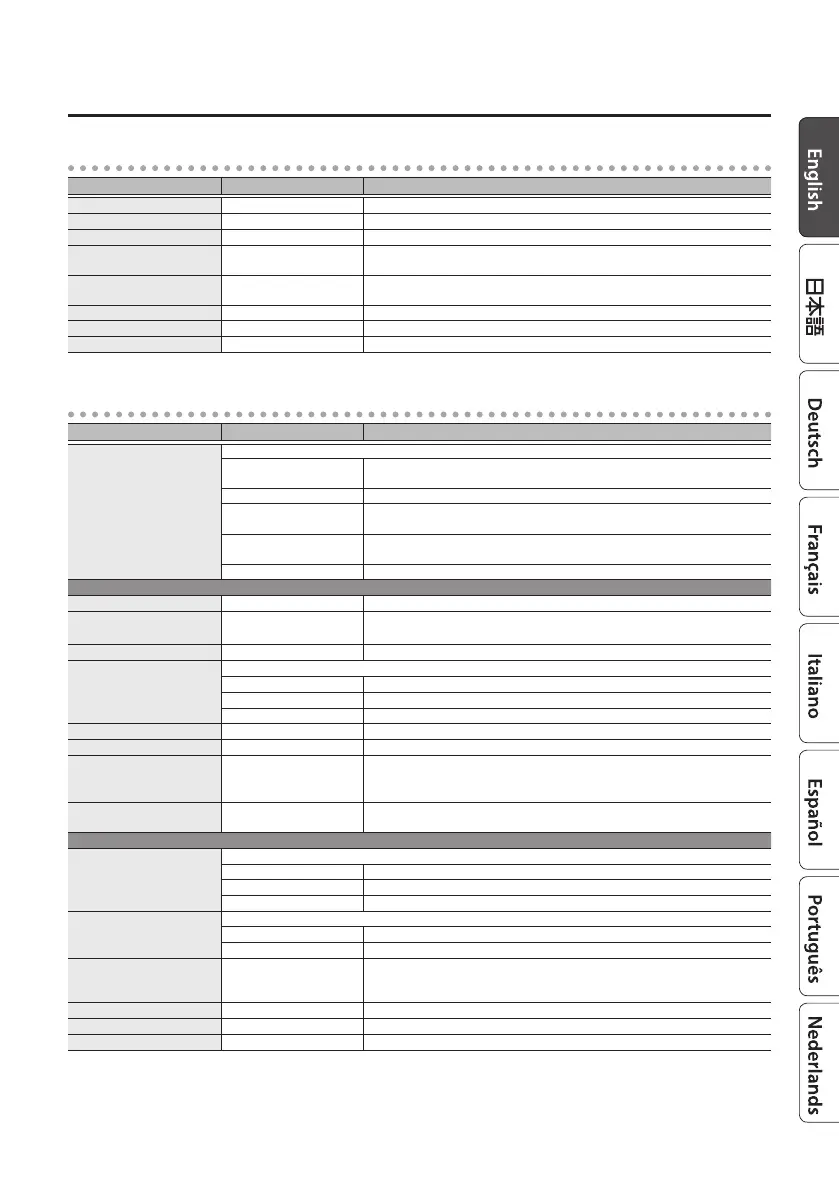
ROTARY
Parameter Value Explanation
SPEED SELECT SLOW, FAST Switches the speaker rotation speed between SLOW (slow) and FAST (fast).
SLOW RATE 0.01–20.00 Hz Adjusts the speed of rotation when SPEED SELECT is set to SLOW.
FAST RATE 0.01–20.00 Hz Adjusts the speed of rotation when SPEED SELECT is set to FAST.
RISE TIME 1–100
Adjusts the transition time over which the rotation speed changes when SPEED
SELECT is switched from SLOW to FAST.
FALL TIME 1–100
Adjusts the transition time over which the rotation speed changes when SPEED
SELECT is switched from FAST to SLOW.
MIC DISTANCE 0–100 Adjusts the distance between the horn/rotor and the mic.
ROTOR/HORN 100:0–0:100 Adjusts the volume balance between the horn and rotor.
DRIVE 0–100 Adjusts the amount of distortion in the preamp.
FILTER
Parameter Value Explanation
TYPE
Selects the type of wah eect and lter.
A-WAH G
Automatically produces a wah eect by cyclically modulating the lter
(for guitar).
A-WAH B Automatically produces a wah eect by cyclically modulating the lter (for bass).
T-WAH G
Produces a wah eect by modulating the lter according to the volume of the
input signal (for guitar).
T-WAH B
Produces a wah eect by modulating the lter according to the volume of the
input signal (for bass).
PATTERN Lets you freely program how the lter changes.
A-WAH G, A-WAH B
RATE 0.01–20.00 Hz Adjusts the rate of the wah.
BPM 6.0–600.0
Species the tempo.
The range of this setting depends on the RATE or NOTE value.
NOTE
`
–
Œ
Adjusts the rate of the wah, specied as a note value relative to the BPM.
FILTER MODE
Selects the wah mode.
LPF Low pass lter. Passes only the low-frequency region.
HPF High pass lter. Passes only the high-frequency region.
BPF Band pass lter. Passes only the specied frequency region.
DEPTH 0–100 Adjusts the wah depth.
FREQUENCY 0–100 Adjusts the center frequency of the wah eect.
RESONANCE 0–100
Adjusts how the wah eect is applied in the region of the center frequency.
Higher values boost the lter eect, producing a strongly distinctive character. A
value of “50” produces the typical wah sound.
WAVEFORM
SIN, TRI, SQR, SAW-UP,
SAW-DOWN, RAMP
Selects the type of wave.
T-WAH G, T-WAH B
FILTER MODE
Selects the lter mode.
LPF Low pass lter. Passes only the low-frequency region.
HPF High pass lter. Passes only the high-frequency region.
BPF Band pass lter. Passes only the specied frequency region.
POLARITY
Selects the direction in which the lter changes according to the input.
DOWN The lter moves toward a lower frequency.
UP The lter moves toward a higher frequency.
SENS 0–100
Species the sensitivity with which the lter moves in the direction specied by
the POLARITY setting. Higher values increase the response; with a setting of “0,”
the wah eect does not respond to your picking.
FREQUENCY 0–100 Adjusts the center frequency of the wah eect.
RESONANCE 0–100 Adjusts how the wah eect is applied in the region of the center frequency.
DECAY 0–100 Adjusts the rate at which the lter is moved.



 To Next Page