16
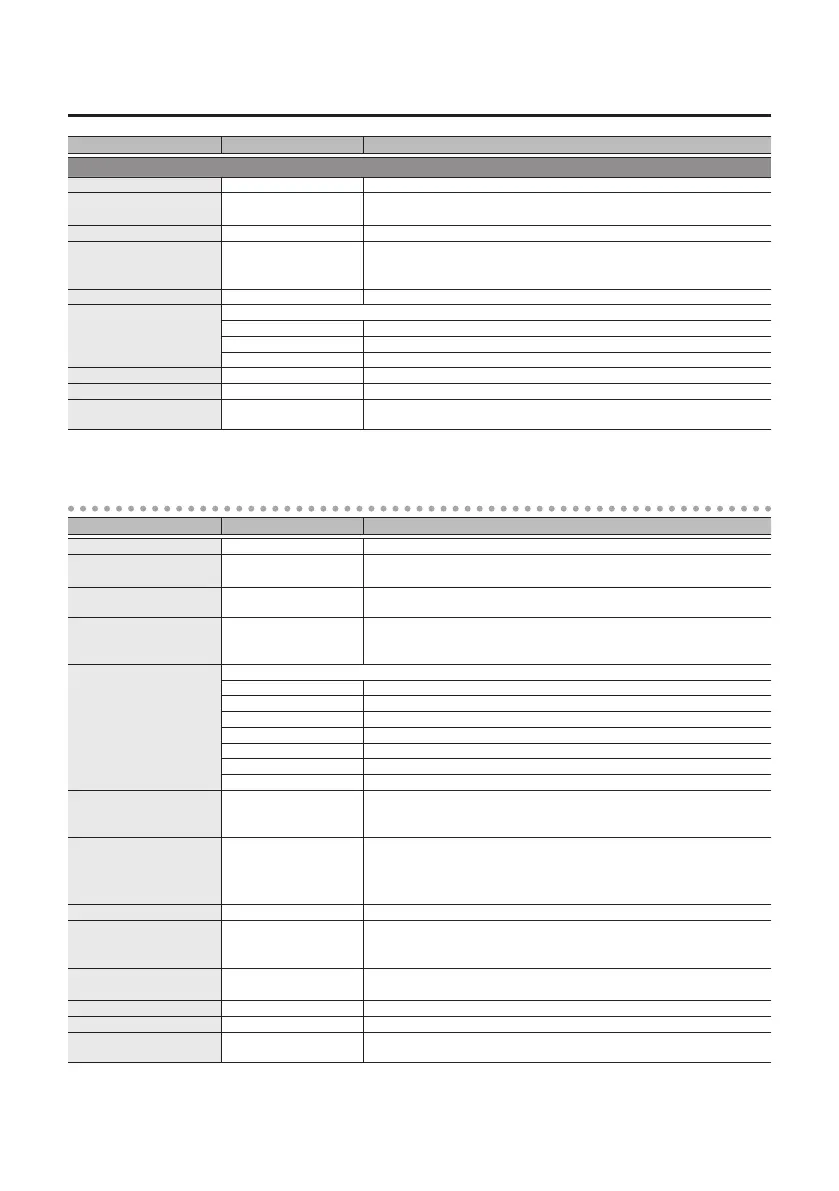
Parameter List
Parameter Value Explanation
PATTERN FILTER
RATE 0.01–20.00 Hz Adjusts the rate of the lter.
BPM 6.0–600.0
Species the tempo.
The range of this setting depends on the RATE or NOTE value.
NOTE
`
–
Œ
Adjusts the rate of the lter, specied as a note value relative to the BPM.
PATTERN PAT1–PAT10, USER
Selects the pattern.
PAT1–10: Selects a preset pattern.
USER: Lets you create an original pattern.
STEP NUMBER 8, 12, 16, 24 Selects the number of steps into which the sound is divided.
FILTER MODE
Selects the lter mode.
LPF Low pass lter. Passes only the low-frequency region.
HPF High pass lter. Passes only the high-frequency region.
BPF Band pass lter. Passes only the specied frequency region.
RESONANCE 0–100 Adjusts the resonance.
TRANSITION 0–100 Adjusts the time (smoothness) of the transition between steps.
STEP1–STEP24 FREQ (*1) 0–100 Adjusts the frequency of each step.
*1: Shown if PATTERN is “USER”
SLICER
Parameter Value Explanation
RATE 0.01–20.00 Hz Adjusts the rate at which the sound is sliced.
BPM 6.0–600.0
Species the tempo.
The range of this setting depends on the RATE or NOTE value.
NOTE
`
–
Œ
Adjusts the rate at which the sound is sliced, specied as a note value relative
to the BPM.
PATTERN P1–30, H1–H20, USER
Selects the slice pattern at which the sound is sliced.
P1–30, H1–H20: Selects a preset pattern.
USER: Lets you create an original pattern.
FX TYPE (*1)
Selects the eect type.
OFF Eect o
PITCH Pitch change
FLANGER Flanger
PHASER Phaser
SWEEP Sweep lter
FILTER Filter
RING Ring modulator
STEP NUMBER (*1) 8, 12, 16, 24
Selects the number of steps that play back as a pattern.
For example, if this is “8,” one measure is equally divided into eight steps for
playback.
STEP1–STEP24 LENGTH (*1) 0–100
Adjusts the length (duration) of each step.
0: No sound is heard.
1–99: The sound is heard for the duration specied here.
100: The sound is connected with the next step.
STEP1–STEP24 LEVEL (*1) 0–100 Adjusts the volume of each step.
STEP1–STEP24 BAND (*1) THRU, BAND1–BAND6
Species how the bandwidth of each step is limited.
THRU: The bandwidth is not limited.
BAND1–BAND6: Smaller values allow a higher bandwidth to pass.
STEP1–STEP24 EFFECT (*1) 0–100
Adjusts the volume of the eect sound for each step.
If FX TYPE is set to "PITCH," this adjusts the pitch (-12–+12).
ATTACK 0–100 Adjusts the volume of the attacks for the slice pattern.
DUTY (*2) 1–99 Adjusts the duration of the sound for the slice pattern.
OUTPUT MODE
MONO, FIXED, RANDOM,
PngPong, AUTO
Selects how output occurs.
*1: Shown if PATTERN is “USER”
*2: Unavailable if PATTERN is set to “USER.”



 To Next Page