31
PLANET CARRIER SERVICE
OUTPUT PLANET CARRIER
DISASSEMBLY
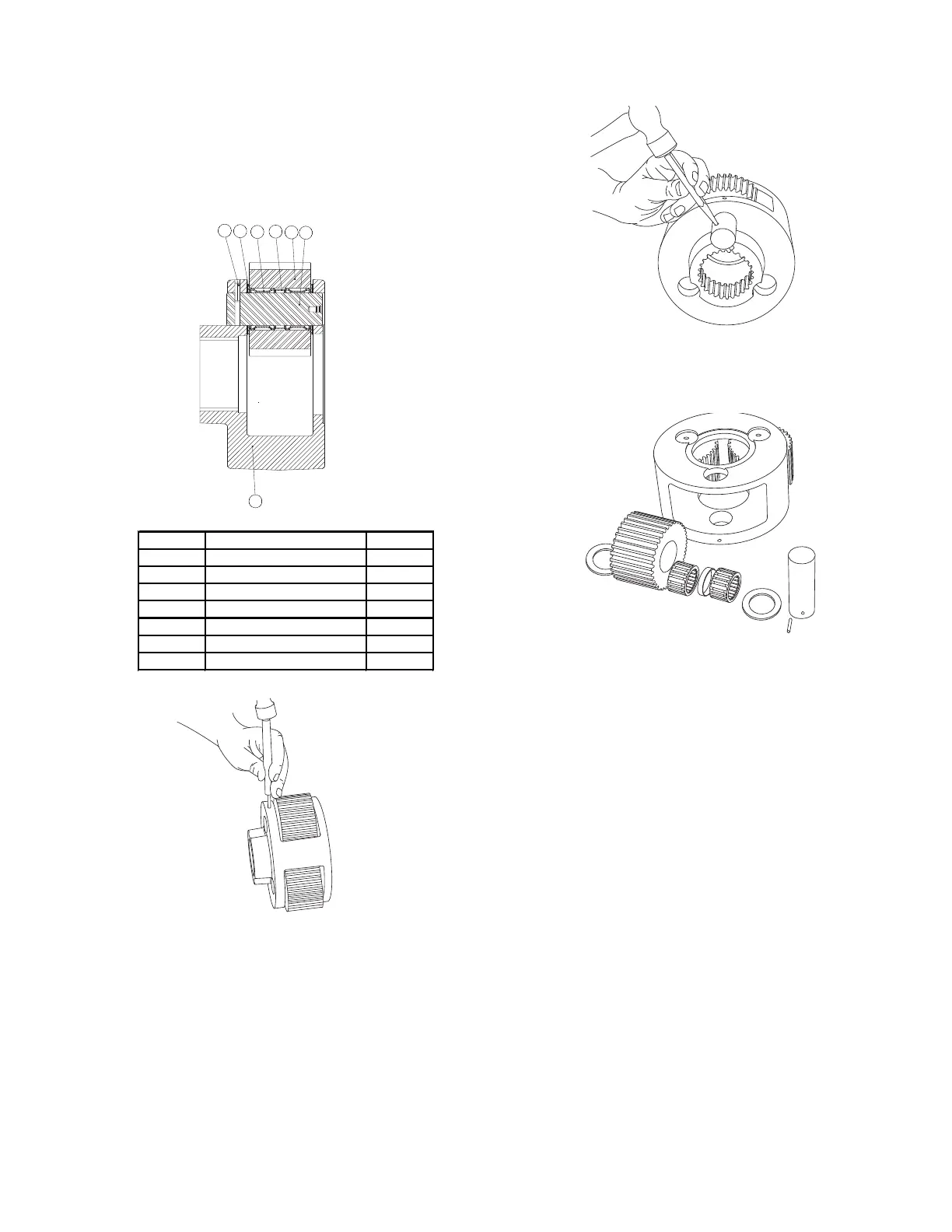
1. Remove the planet gears (17) by driving the spirol pins
(15) into the center of the planet shafts (18).
2. Use a punch to drive the spirol pins from the planet
shafts. Do not reuse the spirol pins.
3. Remove the planet shafts 18), bearings (19), spacer
(20), thrust washers (21) and gears (17). Thoroughly
clean all parts and inspect for damage and wear. The
bearing rollers should not exhibit any irregularities. If
the rollers show any sign of spalling, corrosion, discol-
oration, material displacement or abnormal wear, the
bearing should be replaced. Likewise, the cage should
be inspected for unusual wear or deformation, particu-
larly the cage bars. If there is any damage that will
impair the cage’s ability to separate, retain and guide
the rollers properly, the bearing should be replaced.
The thrust washer contact areas should be free from
any surface irregularities that may cause abrasions or
friction. The gears and shafts should be inspected for
abnormal wear or pitting. Replace if necessary.
15
21
19
20
17
18
16


 To Next Page