DataComm & T-Block Menu Basics
This section provides basic instructions on using the DataComm & T-Block Menu as well as an
overview of the menu selections. Use the menu and related softkeys to perform many of the label
formatting commands.
Note: See Chapter 6—
Creating Labels Using the DataComm & T-Block Menu for more
information. Also see Appendix B—DataComm & T-Block Menu Tree.
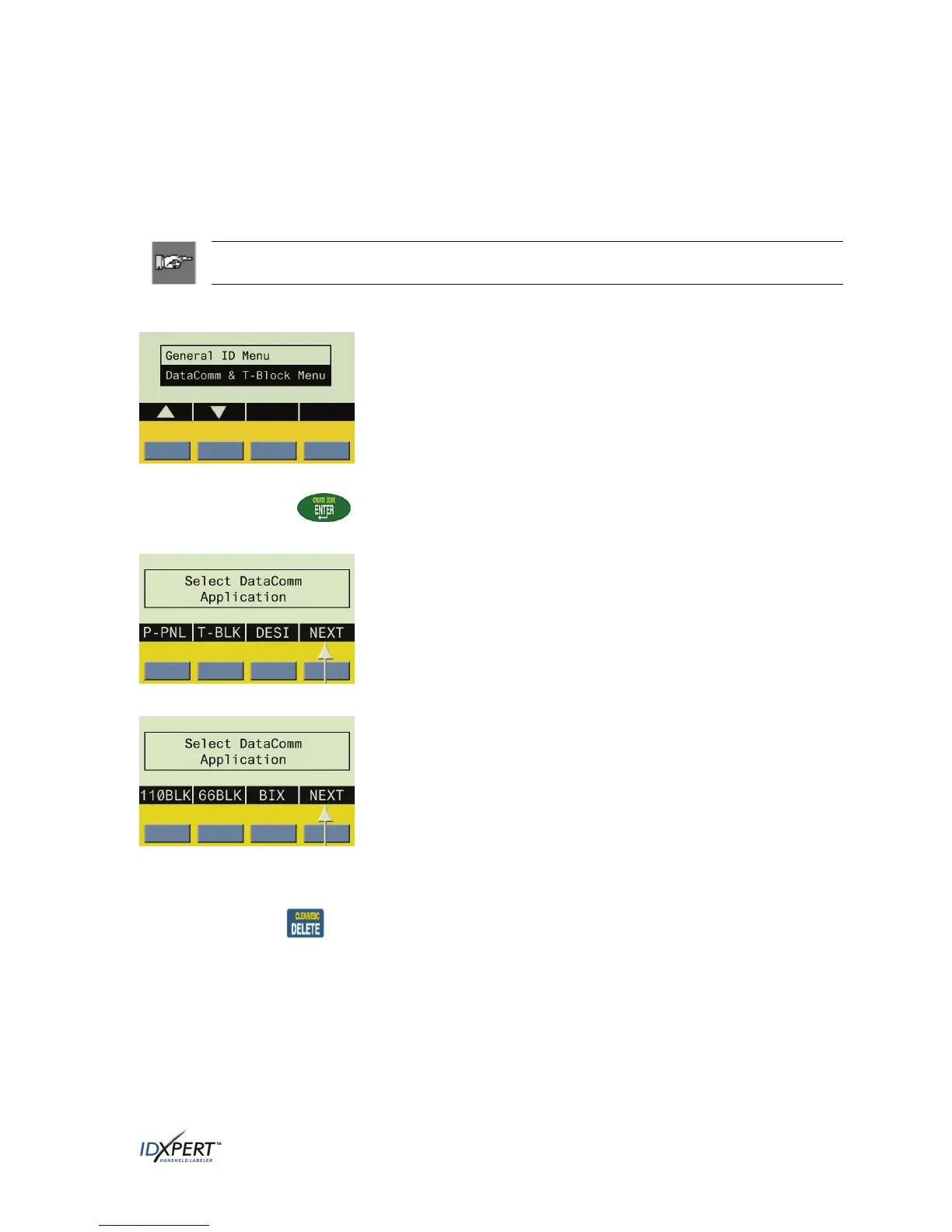
To access the DataComm & T-Block Menu:
Start-Up Display Screen
Upon returning to the start-up display (or by turning the power off
and on), the General ID Menu is highlighted by default. Use the
blue softkeys beneath the up/down arrows to toggle to the
DataComm & T-Block Menu.
Step 1. Press
ENTER to select the DataComm & T-Block Menu.
The Select DataComm Application display screen appears:
Step 2. Press
NEXT to advance to the next set of menu options:
At this point, pressing
NEXT again cycles back to the first set of menu options when the last set
of menu options is reached.
Pressing
CLEAR/ESC exits the DataComm & T-Block menu mode and returns you to the
General ID display screen.
After returning to the General ID display screen, pressing
FUNCTION + MENU returns you to
the start-up display screen.
User Manual 11



 To Next Page