B Series Degreaser Installation
Rev G Page 45
3.9.1 Calibration Mode
Open the control panel.
Warning: Live line voltage electrical circuits are exposed when the control panel is open. Only
qualified personnel should recalibrate the controller.
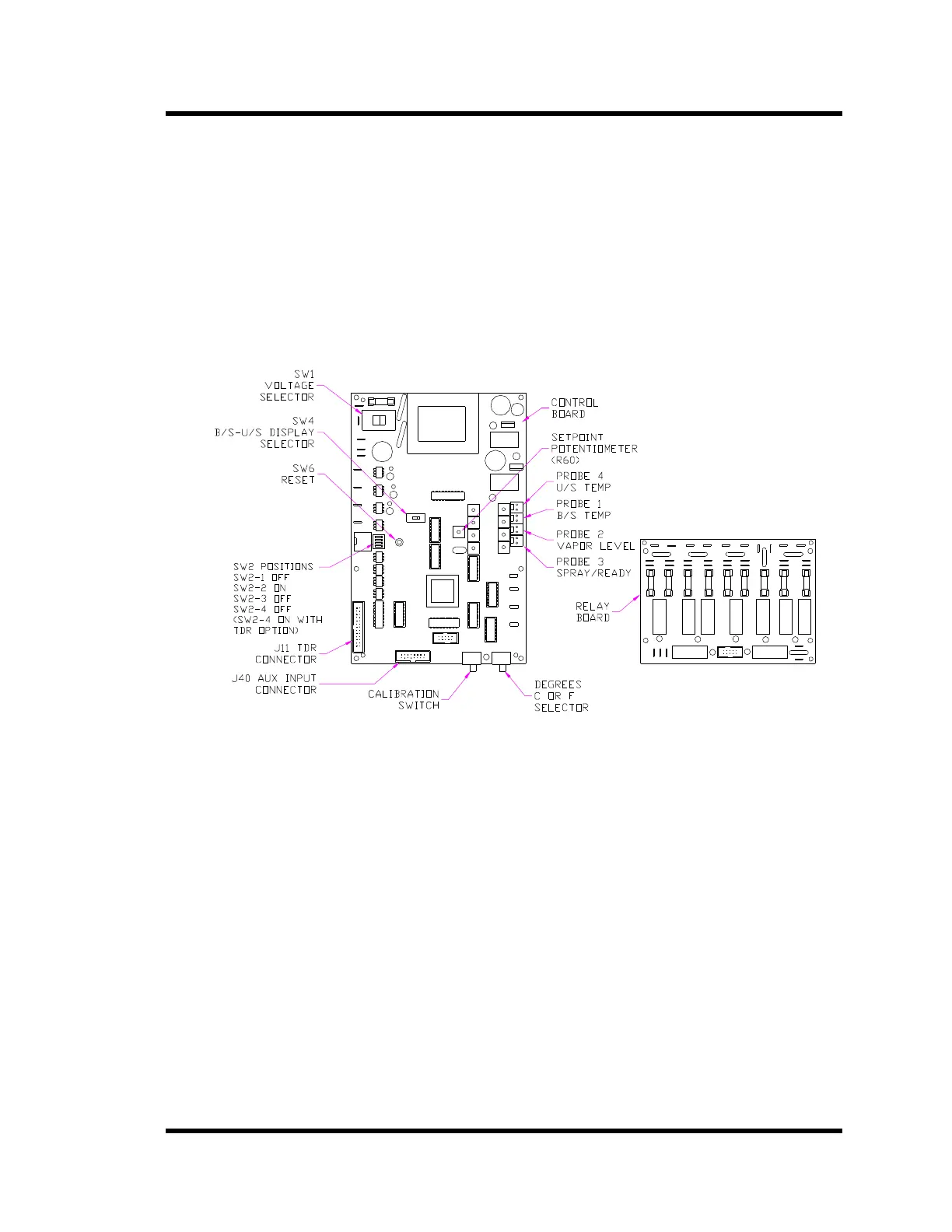
Place the Calibration switch in the Calibrate Position.
Press the RESET button (SW6). Three dots will be displayed between the numbers on the
front panel display. The Heat pilot light will be on.
Figure 3-7 Controller Back View
3.9.2 Setting the Solvent Boiling Temperature
Note: The condensing and sub-zero coils must be at room temperature when calibrating the
controller. The Ready Sensor and the Ultrasonic Sump Sensor will not be recognized if they
are below 30°
°°
°F (-1.1°
°°
°C) during calibration.
Note: Contact the solvent manufacturer to determine the solvent boiling temperature. The sea
level boiling temperature may be found on the solvent MSDS. Correct for altitude for
elevations above 3000 feet.
Note: Use degrees Centigrade setpoints if °
°°
°C units are displayed.
Note: Setting the solvent boiling temperature automatically sets the following parameters: B/S
over-temperature, Contamination Warning, Vapor Level and Ready indicators.



 To Next Page