32
Option 1 – Setup BeerDroid's
Wi-Fi via the BrewArt App
Note
Setting up your BeerDroid’s
Wi-Fi using this option will
also automatically link your
BeerDroid’s Serial Number to
your BrewArt Account.
Part 1 – On your Device
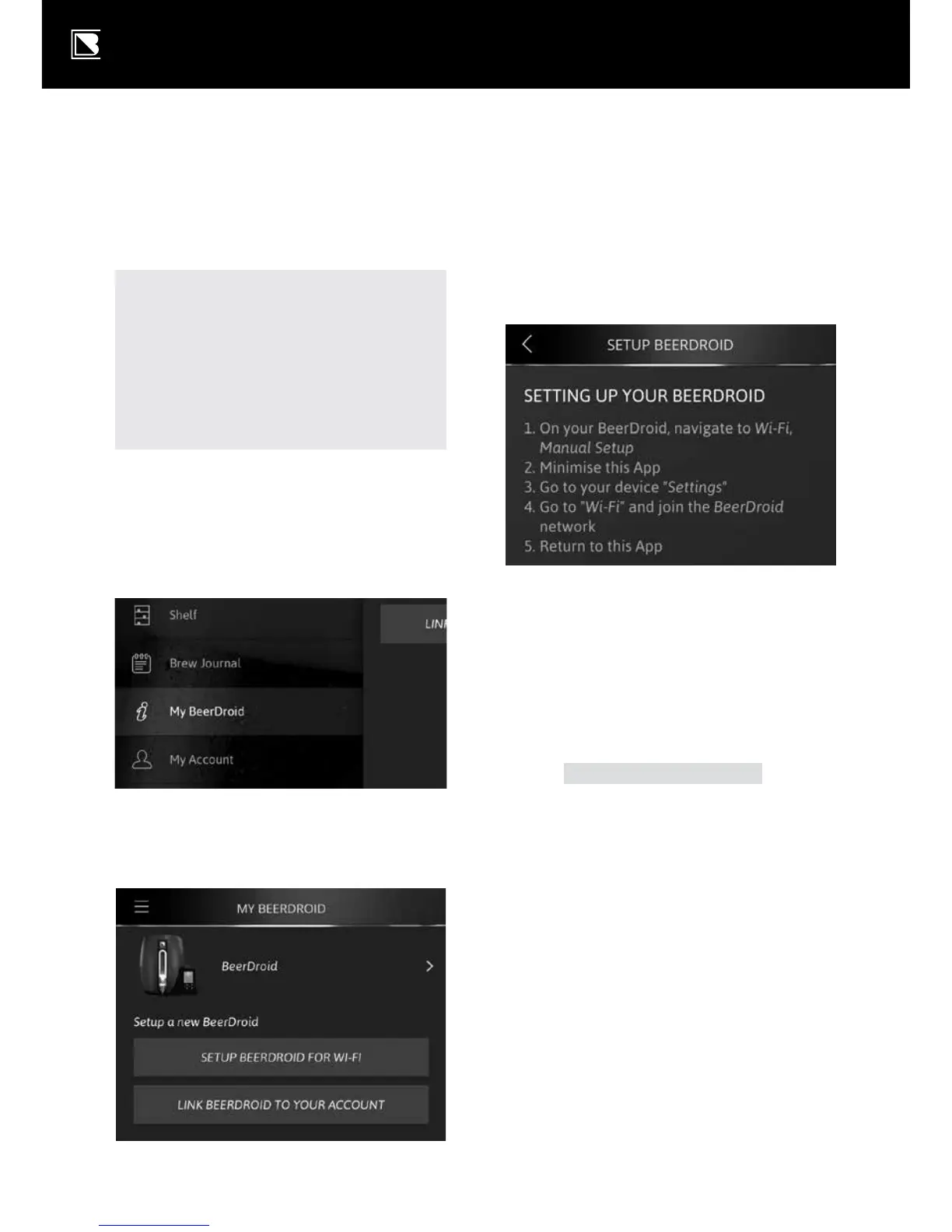
a. Using the App’s menu,
navigate to "My BeerDroid".
b. Select button – "SETUP
BEERDROID FOR WI-FI".
c. Following instructions to
"Setting up your BeerDroid".
Part 2 – On your BeerDroid
d. On your BeerDroid, navigate
to Wi-Fi, Manual Setup.
k Use the
and
arrows on
the control panel to scroll to
Wi-Fi in the main menu.
k
will appear on the user
prompt panel.
k Press
on the control
panel to enter the Wi-Fi
configuration menu.
k Use the
and
arrows scroll
through to manual setup.
k Press
on the control
panel to start setup.
k Wait for the
icon to
start flashing (this could
take 10 or more seconds),
then proceed to Part 3.


 To Next Page