Brooks Automation
148 278580 Revision A
8 Service and Troubleshooting LF80C ZeniD RFID Reader
8.6 Reader Does Not Respond Product Manual
8.6 Reader Does Not Respond
8.7 Reset
8.8 Power Cut
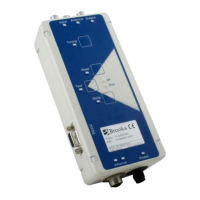
After a power cut, the reader performs a reset with self-test. The self-test
can take up to five seconds. In the first step of these self-tests, all LEDs of
the membrane keyboard light up. In the second step, the reader displays
the key statuses of the membrane keyboard.
If a LED is on, the specified button is active. The input LED signalizes the
ASCII protocol and the output LED signalizes the SECS protocol. If the test
was successful, all LEDs - except for the power LED - go off.
 Check if the interface connection cable is undamaged and
correctly connected to both reader and host!
 Check the status as indicated by the LED!
 Download the test software from the Internet
www.brooks.com
Service
Download. Follow the
instructions!
 If these measures do not solve the problem, contact the
manufacturer!
 In the case of a malfunction, a hardware reset can be
performed by switching the power supply off and on!
 After the reset, the reader performs a self-test. The self-test
can take up to five seconds. As the first step in these self-
tests, all LEDs of the membrane keyboard light up. At the
second step, the reader displays the key statuses of the
membrane keyboard. If a LED is on, the specified button is
active. The input LED signalizes the ASCII protocol and the
output LED signalizes the SECS protocol. If the test was
successful, all LEDs - except for the power LED - go off.


 To Next Page