Brooks Automation
38 278580 Revision A
6 Installation LF80C ZeniD RFID Reader
6.8 Ethernet Connection Product Manual
6.8 Ethernet Connection
The 10/100 BaseT Ethernet interface has the following default settings:
DHCP mode OFF
IP address 10.73.254.211
Gateway address 10.73.254.254
Subnet mask 255.255.254.0
If DHCP is enabled and the DHCP Server is not available, the device
initializes the Ethernet connection with the following values:
IP address 169.254.MAC5.MAC6
Gateway 169.254.MAC5.254
Subnet mask 255.255.255.0
Primary DNS Server IP 0.0.0.0
Secondary DNS Server I 0.0.0.0
(MAC address MAC1:MAC2:MAC3:MAC4:MAC5:MAC6)
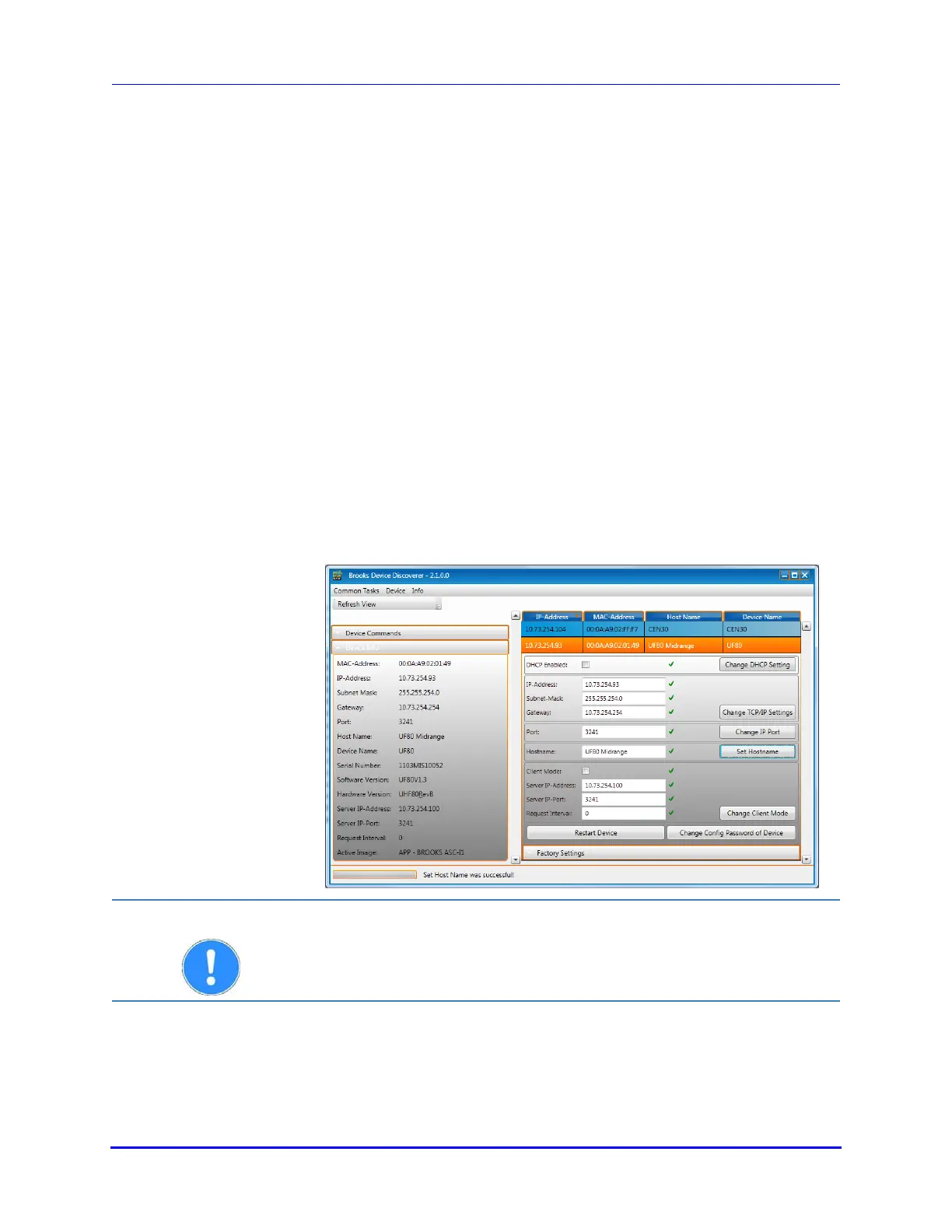
The Brooks Device Discoverer Tool can be used to find a device in the
network and to change the network settings easily. After sending a
configuration message, the tool requests the device configuration
password. Please enter the default password for Brooks RFID devices:
BROOKS.
The tool can also be used to perform a firmware update!
ATTENTION
For more information our extensive download area is available to you at
www.brooks.com -> Service -> Download.


 To Next Page